English
  Polski
  Čeština
  Deutsch
  Español
  Français
  Ελληνικά
  Hrvatski
  Italiano
  Lietuviškai
  Magyar
  Nederlands
  Português
  Română
  Slovenčina
  Svenska
  Türkçe
  Русский
Appointment Scheduling Programs: Why Your Optical Practice Needs Modern Booking Software
It’s 8:47 AM. Your phone has rung six times already, three patients are waiting at the counter, and you’re still trying to find last Tuesday’s appointment book because someone moved it. Sound familiar?
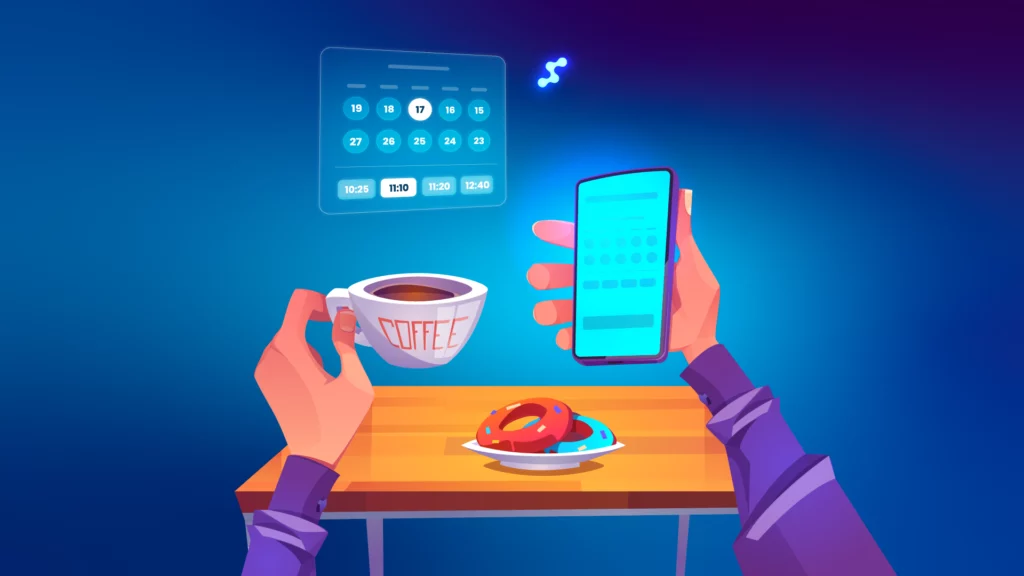
Here’s what’s actually happening: while you’re playing phone tag and flipping through paper calendars, your competitor down the street just filled their entire Thursday schedule with online booking that happened between midnight and 6 AM—while everyone was sleeping.
Appointment scheduling programs aren’t just digital calendars. They’re the difference between spending half your morning on the phone and actually serving the patients standing in front of you.
Key Insights
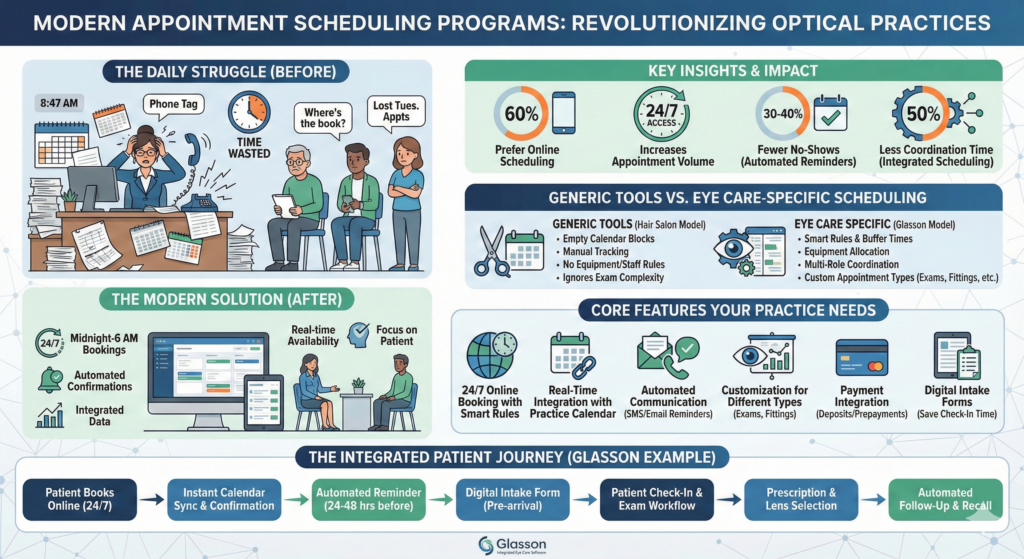
- 60% of American consumers prefer online appointment scheduling over phone calls for health appointments—your patients already expect this feature
- 24/7 booking access increases appointment volume by capturing patients who browse your services outside business hours
- Automated reminders cut no-shows by 30-40%, directly improving chair-time revenue and schedule stability
- Integrated scheduling saves 50% of coordination time by connecting appointments directly to exams, prescriptions, and billing
- Eye care scheduling has unique requirements: different appointment types (comprehensive exams, contact lens fittings, adjustments), equipment allocation, and multi-role coordination
- Most patients book appointments from their phones during commutes or lunch breaks
- Real-time availability prevents double-booking errors that damage patient trust and create staff stress
What Appointment Scheduling Programs Actually Are?
Appointment scheduling programs are cloud-based software tools that manage calendars, time slots, provider availability, and patient booking in one centralized system. Think of them as your receptionist’s brain—but one that never forgets, never takes lunch breaks, and works at 3 AM when patients suddenly remember they need new glasses.
Modern scheduling tools include online booking portals where patients can self-serve, automated confirmations and reminders, real-time availability displays, and integration with your practice management system. The best ones let clients book, reschedule, or cancel without ever calling your front desk.
Unlike the appointment book that lives under yesterday’s coffee cup, these programs sync across devices, update instantly when changes happen, and can send automated messages to fill last-minute cancellations.
Why Eye Care Practices Can’t Use Generic Scheduling Tools?
Your practice isn’t a hair salon. You can’t treat a comprehensive eye exam the same way you’d schedule a 15-minute haircut.
Eye care appointments come in wildly different flavors: comprehensive exams take 45-60 minutes and need specific equipment, contact lens fittings require different booking windows than frame adjustments, pediatric slots need longer buffer times, emergency visits disrupt carefully planned schedules, and frame styling consultations involve different staff than clinical exams.
Generic scheduling tools don’t understand this. They give you empty calendar blocks and expect you to manually track which room has the autorefractor, which staff member is certified for contact lens fittings, and whether you’ve already booked three comprehensive exams in the same hour.
Eye care-specific appointment scheduling understands that different appointment types need different durations, equipment, and staff combinations. It knows that when someone books a contact lens fitting, they’ll probably need a follow-up in two weeks. It recognizes that community screening events at the local school need to connect back to your main schedule for follow-up exams.
7-day free trial
Got Any Questions? Let us know in the Contact Us form below.
What Patients Actually Expect From Modern Booking App?
Remember when people thought online shopping would never catch on because they needed to “see things in person”? That’s where appointment booking was five years ago. Now, clients can book their eye exams the same way they book travel—online, instantly, on their phones, at 11 PM on a Sunday.
Here’s what your patients expect (whether they’re saying it out loud or not):
| Feature | Why It Matters to Patients | Why It Matters to You |
| 24/7 online booking system | They browse your services at midnight when they can’t sleep | Captures appointments outside business hours, increases number of bookings |
| Real-time availability | They see actual open slots, not “call for availability” | Prevents frustrating phone tag and reduces front-desk volume |
| Mobile-friendly booking page | They’re on their phone 96 times per day | Most booking happens during commutes, lunch breaks, or waiting in other appointments |
| Self-service rescheduling | Life happens—they need to move appointments without guilt | Reduces no-shows because patients can reschedule instead of just not showing up |
| Automated confirmations | They forget things; immediate confirmation texts feel professional | Reduces “did I book that?” callback volume |
| Service selection on booking page | They want to choose “eye exam” vs “contact lens fitting” vs “frame adjustment” | Ensures correct time allocation and staff assignment |
The uncomfortable truth: if booking an appointment with you requires a phone call during business hours, you’re losing patients to competitors who offer online booking. Younger patients especially will choose convenience over loyalty.
The Real Operational Impact: Numbers That Matter
Let’s talk about what modern booking software actually delivers in measurable terms.
Reduced phone volume: Front-desk staff spend roughly 30-40% less time on booking calls when patients can self-serve online. That time gets redirected to greeting walk-ins, processing insurance, or helping patients choose frames.
Higher show rates: Automated reminder messages via SMS reduce no-shows by 30-40%. When you send automated reminders 24 hours before appointments, patients actually show up—and your carefully planned schedule doesn’t collapse into wasted chair time.
Better schedule density: Real-time availability means you can offer patients the exact slot that works for both of you, rather than the guesswork of “I have something Thursday morning… let me check… no wait…” Online booking fills gaps faster because patients see all available times instantly.
Revenue protection: Every unfilled appointment slot is lost revenue you can’t recover. Scheduling programs with automated waitlists can fill cancellations within hours by texting patients who wanted earlier appointments.
Staff burnout reduction: When your team isn’t constantly interrupted by booking calls, they can focus on the patient standing in front of them. This matters more than you think—front-desk burnout is real, and phone overload is a major contributor.
Expert’s Voice
“The practices that resist modern booking systems always give me the same reason: ‘Our patients prefer calling.’ But when we dig into the data, what we find is different. Their current patients have adapted to calling because that’s the only option. Meanwhile, potential new patients—especially under 40—are browsing competitor websites, seeing online booking, and never bothering to call you. You’re not serving patient preference; you’re just filtering for the patients willing to tolerate your friction.”
Adam Smith, Product Manager @ Glasson
Want to see Glasson's full potential?
Book a presentation
Which Core Features Your Appointment Scheduling Software Actually Needs?
Not all appointment scheduling programs are built the same. Here’s what separates professional-grade eye care booking from basic calendar apps:
24/7 Online Booking With Smart Rules
Your booking page should let clients choose services, select providers, and see real availability—all without requiring staff intervention. But “open access” doesn’t mean chaos.
Smart scheduling tools let you control:
- How far in advance patients can book (prevents appointment hoarding)
- Minimum advance notice (so someone doesn’t book a comprehensive exam starting in 20 minutes)
- Maximum active bookings per patient (stops slot blocking)
- Time intervals between appointments (15, 30, or 60 minutes depending on service type)
- Buffer time before/after certain appointment types
Real-Time Integration With Your Practice Calendar
The worst booking systems are the ones that exist in isolation—patients book online, then someone has to manually copy everything into your “real” schedule, probably using a different system.
Professional integrated scheduling connects directly to your practice management calendar. When a patient books online at 2 AM, it appears on your staff’s schedule instantly. When your receptionist books someone by phone at 10 AM, that slot disappears from the online booking page immediately.
This prevents double-booking nightmares and eliminates duplicate data entry. One schedule, accessible through multiple channels.
Automated Communication That Actually Reduces No-Shows
Here’s what happens when booking systems include built-in messaging:
- Patient books appointment → Immediate SMS confirmation with date, time, and location
- 24-48 hours before appointment → Automated reminder text with option to confirm or reschedule
- Patient confirms → System logs confirmation, staff sees “confirmed” status
- Patient doesn’t respond → Staff can prioritize follow-up calls for unconfirmed appointments
- After appointment → Automated thank-you message with link to book next annual exam
This entire sequence runs automatically. No one on your team needs to send texts manually or check who confirmed.
Customization for Different Appointment Types
Eye care practices need booking systems that understand complexity:
- Comprehensive exams: 45-60 minutes, requires exam room and optometrist
- Contact lens fittings: 30-45 minutes, requires specific inventory and fitting expertise
- Frame selection consultations: 30 minutes, optician only, no exam room needed
- Adjustments and repairs: 15 minutes, walk-in friendly
- Follow-ups: 20 minutes, often same provider as original exam
- Pediatric exams: 60+ minutes, requires patience and special equipment
Your booking page should display these options clearly, allocate the correct time automatically, and assign appropriate staff and resources.
Glasson’s appointment system handles this through service templates that define duration, required roles, and equipment needs. When a patient selects “contact lens fitting,” the system automatically allocates 45 minutes, ensures an optometrist is assigned, and checks that trial lens inventory is available.
Payment Integration for Deposits and Prepayment
Some practices—especially those with high no-show rates or expensive equipment reserved for specific appointment types—benefit from requiring deposits or full prepayment through their booking page.
Stripe and PayPal integration lets you collect payment at booking time:
- Deposits for specialized appointments (scleral lens fittings, orthokeratology consultations)
- Full prepayment for workshops or group events
- Gift cards purchased online that patients can apply toward future appointments
This adds friction to booking, so use it strategically. For routine eye exams, requiring prepayment usually hurts conversion more than it helps. For specialized services with historically high cancellation rates, deposits protect your practice.
Digital Intake Forms That Save Check-In Time
Why should patients arrive 15 minutes early to fill out the same health history forms they completed last year?
Modern booking systems include intake forms that patients complete during online booking or receive via email after booking. By appointment time, you already have updated medical history, current medications, insurance information, and chief complaints entered into your system.
Benefits of digital intake:
- Patients complete forms at home, when they have their medication list and insurance card handy
- Forms integrate directly with patient records—no manual transcription
- You can customize forms for different appointment types (comprehensive exam vs. contact lens check)
- Forms are legible (no more decoding handwriting)
- Easy to update and version-control
Client management systems with integrated booking store these intake responses directly in patient records, so your optometrist sees completed history before walking into the exam room.
How Glasson Handles Appointment Scheduling for Optical Practices?
Let’s get specific about how professional eye care booking works in practice.
The Integrated Calendar: One Schedule for Everything
Glasson’s Office module provides a visual schedule where staff can click any time slot to create an appointment, assign a staff member, select the patient, and choose the service type—all from one screen.
The calendar is color-coded by appointment type, shows provider availability at a glance, and displays patient status (checked in, in progress, completed). When you have multiple providers, multiple rooms, and mobile clinics running simultaneously, this visual clarity prevents chaos.
This isn’t just a booking tool—it’s the hub that connects to everything else:
- When a patient checks in, the system automatically transitions to the 8-step diagnostic workflow
- When the exam completes, prescription data flows directly into lens selection
- When lenses are chosen, the order goes to your lab without re-entering data
- All communication (confirmations, reminders, follow-ups) logs in the patient record
Test Glasson for 7 days free of charge
Any questions? Leave your contact details and we'll call you back.
The Public Booking Page: Patient Self-Service 24/7
Glasson’s online reservation module gives practices a dedicated booking page with a shareable link you can post on your website, Google My Business profile, Facebook page, or email signature.
What patients see:
- Service selection (eye exam, contact lens fitting, frame consultation, adjustment)
- Provider selection (or “first available”)
- Calendar of available dates
- Time slots in 15/30/60-minute intervals (you configure this)
- Instant booking confirmation
What you control behind the scenes:
- How far in advance booking is allowed (e.g., max 30 days)
- Minimum advance notice (e.g., at least 4 hours)
- Working hours per provider
- Maximum concurrent active bookings per patient
- Which services appear on the booking page
Security features:
- SMS verification at account creation (reduces fake bookings)
- GDPR-compliant data handling
- Secure authentication for patient accounts
- Rate limiting to prevent booking spam
Recurring Appointments and Follow-Up Scheduling
Eye care often involves predictable recurring appointments: annual comprehensive exams, quarterly contact lens checks, monthly dry eye treatments.
Professional scheduling systems let you book recurring appointments at set intervals (every 3 months, every 6 months, annually) with one action, rather than manually entering six separate bookings.
Even better: at checkout after a comprehensive exam, your staff can immediately book next year’s annual exam while the patient is standing there. The system can even send automated reminders 30 days before that appointment to confirm it’s still convenient.
Communication and Reminder Automation
Glasson’s communication module connects directly to the schedule:
Automated workflows:
- Appointment confirmation sent immediately after booking
- Reminder messages 24-48 hours before appointment (customizable timing)
- Follow-up messages after completed appointments
- Recall campaigns for patients overdue for annual exams
- Targeted booking invitations to fill last-minute cancellations
All messages include:
- Patient name (personalization)
- Appointment date, time, and location
- Service type
- Provider name
- One-click links to reschedule or cancel
- Practice contact information
Because communication is logged in the patient record, your team can see at a glance who confirmed, who rescheduled, and who ignored three reminder texts (probably needs a phone call).
Statistics and Schedule Optimization
How do you know if your booking system is actually working?
Glasson’s statistics module tracks metrics that matter:
- Number of bookings by source (online booking vs phone vs walk-in)
- Booking conversion rate (how many people start but don’t finish online booking)
- No-show rates by appointment type
- Average time between booking and appointment
- Provider utilization (how full each provider’s schedule is)
- Revenue per appointment slot
- Cancellation patterns (are Mondays worse than Thursdays?)
This data helps you optimize booking rules, adjust time allocations, and identify which reminder strategies work best.
What to Look for When Choosing Appointment Scheduling Programs?
If you’re evaluating scheduling tools for your eye care practice, here’s your practical checklist:
Eye Care Workflow Understanding
Does the system know eye care?
- Multiple appointment types with different durations
- Provider specialization (optometrist vs optician vs technician)
- Equipment and room allocation
- Multi-location support for practices with multiple offices
- Community event booking for mobile clinics
Generic scheduling tools built for restaurants or salons force you to hack around their limitations. Eye care-specific software like Glasson starts with your workflow and builds from there.
Patient Experience Quality
Is the booking page actually usable?
- Mobile-responsive design (most booking happens on phones)
- Fast load times (every second of delay kills conversion)
- Clear service descriptions (patients shouldn’t guess what “comprehensive” means)
- Instant availability display (no “submit request and wait for callback”)
- Simple account creation (don’t require 15 fields to book an eye exam)
Test your booking page on your phone. If you find it frustrating, your patients definitely do.
Integration Depth
Does scheduling connect to everything else?
- Patient records and clinical data
- Prescription management
- Lens inventory and ordering
- Billing and insurance processing
- Communication and reminder systems
Standalone booking calendars create more work because staff manually copy data between systems. Integrated platforms let one appointment trigger your entire workflow.
Automation Capabilities
Can the system reduce manual work?
- Automated reminders via SMS and email
- Waitlist management for filling cancellations
- Recurring appointments for annual exams
- Intake forms sent automatically after booking
- Follow-up campaign triggers based on appointment type
The best booking systems don’t just schedule appointments—they customize communication around each appointment to reduce no-shows and improve patient engagement.
Security and Compliance
Is patient data protected?
- GDPR compliance for international patients
- HIPAA-grade security for US practices
- Role-based access control (staff see only what they need)
- Audit logs (who changed what and when)
- Data backup and recovery systems
Eye care practices handle sensitive health information. Your booking system needs to protect it properly and demonstrate compliance when auditors ask questions.
Scalability and Support
Will the system grow with you?
- Multi-provider support (can you add staff without breaking the system?)
- Multi-location capabilities (if you open a second office)
- API access for custom integration with other tools
- Training and onboarding support for staff
- Responsive customer service when problems arise
You’re not just buying appointment scheduling software—you’re choosing a long-term partner for practice growth.
The Glasson Advantage: Eye Care Scheduling Done Right
Here’s why optical practices choose Glasson’s integrated platform over standalone booking tools:
One system, complete workflow: Patient books online → Appointment appears on staff calendar → Check-in triggers exam workflow → Prescription flows to lens search → Order goes to lab → Follow-up reminders send automatically
No duplicate data entry, no disconnected systems, no manual copying between platforms.
Eye care built-in from day one:
- Appointment templates for every visit type
- Provider credentialing (which staff can perform which services)
- Equipment scheduling (prevent double-booking the autorefractor)
- Lens database with 3.5 million combinations connected directly to appointments
- Insurance verification integrated with booking
Professional patient experience:
- Mobile-optimized booking page you can share anywhere
- SMS verification to prevent fake bookings
- Automated reminders with one-click confirm/cancel
- Secure patient portal for managing appointments
- Google Calendar sync for patients who want appointments in their personal calendars
Practice-friendly administration:
- Visual calendar with color-coded appointment types
- Drag-and-drop rescheduling
- Bulk actions for staff schedule changes
- Notification system for urgent bookings or changes
- Detailed booking analytics for optimization
Proven results:
- Practices report 40-60% of new bookings happen outside business hours
- No-show rates drop 30-40% with automated reminders
- Front-desk call volume decreases by 35-50%
- Staff satisfaction improves when they’re not constantly interrupted
Making the Switch: What Actually Happens?
Worried about transitioning from paper books or your current system to modern appointment scheduling programs?
Week 1: Setup and customization
- Import existing patient records
- Configure appointment types, durations, and staff assignments
- Set booking rules (advance notice, maximum bookings, time intervals)
- Customize reminder messages and confirmation templates
- Set up your public booking page
Week 2: Staff training
- Learn to create, edit, and cancel appointments
- Practice checking patients in and moving through workflows
- Test online booking from patient perspective
- Set up mobile access for on-the-go schedule checks
Week 3: Soft launch
- Start using the system internally while keeping old system as backup
- Share booking link with a few trusted patients for feedback
- Monitor booking patterns and adjust rules as needed
- Build confidence with the interface
Week 4+: Full deployment
- Add booking link to website, social media, email signatures
- Train all staff on advanced features
- Retire old booking system
- Monitor metrics and optimize
Glasson’s support team guides practices through this transition with dedicated onboarding, staff training sessions, and ongoing technical support.
FAQ
1. How much do appointment scheduling programs cost?
Pricing varies widely. Standalone booking tools start around $30-50/month but lack eye care features. Comprehensive practice management platforms like Glasson include booking as part of an integrated system, typically $100-300/month depending on features and practice size. Consider total cost vs. value: time saved, no-shows prevented, and additional bookings captured.
2. Can patients book appointments through Google or Facebook?
Yes, modern booking systems provide links you can share anywhere. Your booking page URL can go on your Google My Business profile, Facebook page, Instagram bio, website, and email signature. Some systems offer direct Google Calendar integration for practice staff.
3. What if a patient books the wrong appointment type?
Quality booking pages provide clear service descriptions and duration estimates. If a patient books incorrectly, staff can easily change the appointment type in the system, which automatically adjusts time allocation and sends an updated confirmation with correct details.
4. How do automated reminders actually reduce no-shows?
Patients forget appointments or life gets busy. Automated reminder texts 24-48 hours before appointments give patients time to reschedule rather than simply not showing up. Systems that include one-click confirm/cancel options see the highest success rates—30-40% reduction in no-shows.
5. Can I limit which services appear on the online booking page?
Absolutely. Most practices keep complex or specialized appointments (scleral lens fittings, pediatric evaluations) as phone-only booking while offering routine exams, contact lens checks, and consultations for online booking. You control exactly which services patients can self-book.
6. What happens if two people try to book the same time slot simultaneously?
Real-time availability systems prevent this. When someone starts booking a slot, it’s temporarily held. If they complete booking within a few minutes, the slot disappears from availability. If they abandon the process, the slot releases automatically. Double-booking becomes virtually impossible.
7. Do appointment scheduling programs work with multiple locations?
Professional systems handle multi-location practices with separate calendars, staff assignments, and booking pages per location. Glasson supports multiple locations within one account, letting patients choose which office to visit during booking.
8. How does payment integration work for booking deposits?
Systems with Stripe or PayPal integration let you require deposits or full prepayment during online booking. You configure which appointment types require payment, and the booking page collects payment securely before confirming the appointment. Useful for specialized services with historically high cancellation rates.
9. Can patients reschedule appointments themselves?
Yes, patient portals in modern booking systems allow self-service rescheduling within rules you set (e.g., must reschedule at least 24 hours in advance). This reduces phone volume and prevents no-shows by making it easy to change plans.
10. What about walk-in appointments and emergencies?
Booking systems work alongside walk-in capacity. Staff can instantly add walk-ins to the schedule, mark slots as “emergency held,” or create same-day bookings from the office. The system adapts to real-world optical practice flow, not the other way around.