English
  Polski
  Čeština
  Deutsch
  Español
  Français
  Ελληνικά
  Hrvatski
  Italiano
  Lietuviškai
  Magyar
  Nederlands
  Português
  Română
  Slovenčina
  Svenska
  Türkçe
  Русский
Lens Finder Tool Optician: What It Is and Why Every Practice Needs One

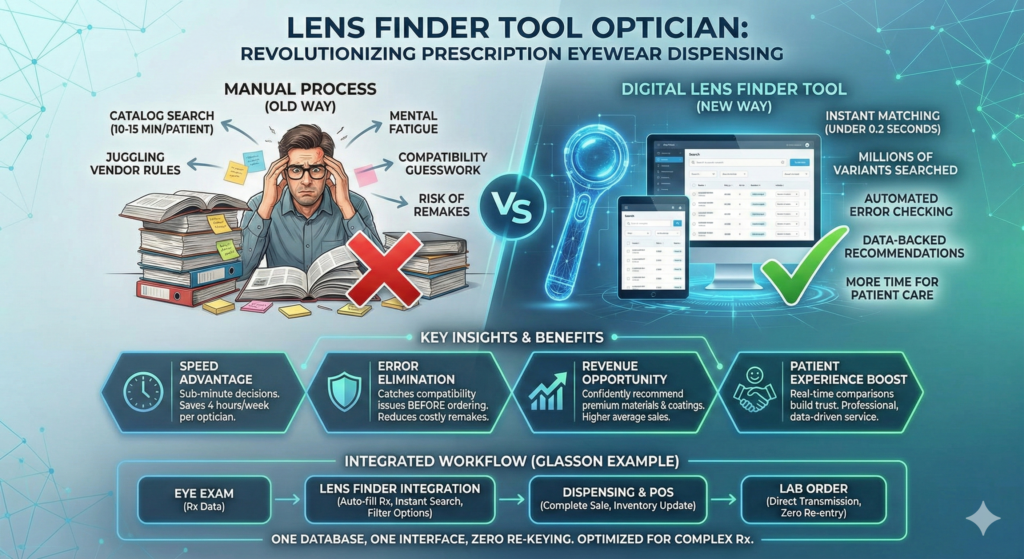
A lens finder tool is specialized software that instantly matches prescriptions with compatible lenses from multiple manufacturers, replacing the tedious manual catalog searches that waste 10-15 minutes per patient. For opticians juggling hundreds of lens variants across dozens of brands, this calculator transforms what used to be a cognitive puzzle into a 30-second decision—freeing you to focus on what actually matters: helping patients see clearly and leave happy.
Key Insights
- Speed advantage: Modern lens finder tools search millions of lens variants in under 0.2 seconds, turning 10-15 minute catalog searches into sub-minute decisions
- Error elimination: Digital lens selection reduces remake rates by catching compatibility issues before orders go to the lab
- Revenue opportunity: Instant comparison tools help opticians confidently recommend premium materials, coatings, and designs that truly fit patient needs
- Database depth matters: The best lens calculators access 3-3.5 million lens variants versus limited catalog subsets that force you into familiar defaults
- Integration is critical: Standalone lens selectors create data re-entry problems; integrated tools flow prescription data directly from exams into orders
- Patient experience boost: When you can compare lens options in real-time at the dispensing table, recommendations feel data-backed rather than improvised
Why Does Manual Lens Selection Waste So Much Time?
Manual lens selection forces opticians to juggle multiple vendor catalogs, product updates, and compatibility rules simultaneously—a process that drains mental energy and eats precious chair time. Think about your last progressive lens fitting: you probably checked base curves, verified cylinder limits, cross-referenced index options, confirmed coating compatibility, and compared pricing across three manufacturers. That’s 10-15 minutes minimum, and longer if the prescription has any complexity.
The hidden cost isn’t just the minutes per patient. It’s the cognitive load that builds through the day. By your eighth progressive fitting, you’re tired of flipping through PDFs and second-guessing yourself. You start defaulting to the same familiar lenses even when better options exist. Patients sense the hesitation.
Industry research on electronic lens ordering confirms what you already know: manual processes significantly slow order processing and increase staff time spent on paperwork instead of patient care. When your team spends more time hunting through catalogs than explaining lens benefits to patients, something’s broken.
The Remake Problem Nobody Talks About
Here’s what really hurts: compatibility errors that surface after the lab starts cutting. You missed that a specific progressive design doesn’t work below -6.00 in that index. The base curve you specified isn’t available for that diameter. The coating package doesn’t bond to that material.
Each remake costs you twice—the material expense and the patient goodwill when you have to call them back. Most practices absorb 2-3 remakes monthly, minimum. At $150-200 per remake in lost profit, that’s $3,600-7,200 annually in avoidable costs. A reliable lens finder eliminates most of these errors by enforcing manufacturer constraints automatically.
What Exactly Is a Lens Finder Tool for Opticians?
A lens finder (also called a lens search engine or lens advisor) is specialized optical software that matches patient prescriptions and frame parameters with available lenses from multiple suppliers. You enter the SPH, CYL, AXIS, and ADD values just like you would on a standard prescription form, specify basic requirements like lens type and index, and the tool returns every lens that technically fits—usually with pricing and availability.
This isn’t a generic product search. The calculation engine understands optical constraints: progressive corridor lengths, astigmatism limits, minimum edge thickness, base curve requirements, material compatibility. It knows that certain designs only work within specific power ranges or that some coatings require particular surface preparations.
Other fields use similar calculator tools—machine vision engineers have lens calculators for focal length and field of view, photographers use lens selectors for camera equipment—but those focus on imaging geometry, not prescription eyewear. An optician-focused lens finder is purpose-built for the unique challenge of matching human vision correction needs with manufactured lens products.
How It Differs From Lab Catalogs
Lab catalogs show you what’s available. A lens finder shows you what works for this specific patient. The difference is critical: a catalog might list 200 progressive designs, but only 12 work for a -4.50 -1.75 × 180 prescription in a 56mm frame with 1.67 index. The tool does that filtering instantly.
Generic online search functions can’t handle this complexity. They don’t understand that ADD power affects corridor design or that certain base curves create unacceptable edge thickness at higher minus powers. They’re built for e-commerce browsing, not clinical dispensing.
Why Do Opticians Actually Need a Dedicated Lens Selection Tool?
Because your brain isn’t a database, and patients don’t want to wait while you think. Every minute spent flipping through catalogs is a minute you’re not explaining why they should upgrade to anti-reflective coating or why a second pair for computer work makes sense.
The practices that consistently hit high average sales don’t have better sales skills—they have better tools that free their opticians to actually use those skills. When lens selection takes 30 seconds instead of 15 minutes, you have time for the conversations that drive revenue.
The Cognitive Load Problem
On a busy day, you might fit 8-12 patients for eyewear. That’s 8-12 separate mental calculations about lens compatibility, each requiring you to remember which manufacturers offer what indices for which designs at which power ranges. Your working memory gets full. Mistakes creep in.
A lens calculator handles the remembering for you. It knows every constraint for every lens from every supplier in its database. It never forgets that Brand X’s progressive won’t work above +4.00 or that Brand Y requires a special coating process for polycarbonate. You just use the tool and trust the results.
How Does a Modern Lens Finder Actually Work?
Most lens finder tools follow three steps: input, computation, and filtering. The optician enters prescription data and frame details into a form that usually mirrors the standard Rx layout you already know. The engine compares these parameters against a digital catalog—sometimes millions of lens variants—and returns compatible matches. Then you narrow results using filters for material, design, coatings, brand, or price until you find the best fit.
Here’s what happens behind the scenes during that 0.2-second search: the software validates the prescription values, checks them against minimum and maximum power limits for each lens design in the database, calculates required center and edge thickness based on frame size and patient PD, eliminates options that exceed cosmetic thickness limits, verifies base curve compatibility, confirms coating availability for the chosen material, and ranks remaining options by your preferred criteria.
That’s computational work no human can do in real-time. You’d need to check hundreds or thousands of individual specifications manually. The tool does it faster than you can blink.
7-day free trial
Got Any Questions? Let us know in the Contact Us form below.
The Four-Step Workflow in Practice
Take Glasson’s approach as an example of how this works in daily practice. First, you start simple: enter the prescription using a form that looks exactly like a paper Rx, with dropdowns and presets that reduce typing errors. The interface feels familiar because it’s modeled on what you already do.
Second, search and compare: the advanced engine analyzes millions of combinations instantly and presents results in less than 0.2 seconds. You see every option that works, not just what you remember exists.
Third, filter and refine: you narrow results by index, diameter, thickness, material, and coatings—including ranges and multiple values to hit specific targets. Need a 1.67 index progressive with anti-reflective coating under $200? Three clicks.
Fourth, complete the sale: once you’ve chosen the lens, the system moves directly into order and POS flow. No re-entering product codes or pricing in another system. The selection flows straight through to the lab order.
What Makes Glasson’s Lens Finder Different From Generic Search Tools?
Glasson’s Lens Finder searches over 3.5 million lens variants from multiple manufacturers in a unified database—dramatically more comprehensive than any single lab catalog or generic product search. The system analyzes more than 22,000 combinations of visual defects and prescription patterns, ensuring that even complex or unusual Rxs get accurate matches.
The real differentiator isn’t just database size; it’s search intelligence. Generic tools require you to know exact product names or codes. Glasson’s calculator understands optical constraints: it knows which progressive designs work for which power ranges, which indices are available for which base curves, which coatings bond to which materials. You search by clinical needs, and it handles the technical compatibility.
Speed matters too. When you can run multiple comparison scenarios in seconds—comparing indices, trying different designs, checking coating options—you engage patients differently. They see you exploring solutions rather than guessing. That builds confidence and opens conversations about premium options.
Integration With the Full Workflow
Here’s where standalone lens advisor tools break down: they’re disconnected from your practice management software. You search for a lens in one system, then manually enter the details into your POS, then re-type them into your lab order form. Each transfer creates opportunity for errors and wastes time.
Glasson integrates the lens finder into the complete workflow. After an eye exam, the prescription lives in the patient’s profile. At dispensing, you open that profile, launch the lens search with one click (prescription data auto-fills), choose the lens, and move directly to checkout. The selection updates inventory, generates pricing, and feeds into lab ordering automatically. One database, one interface, zero re-keying.
This matters more than you might think. Industry sources on integrated lens ordering emphasize that eliminating double-entry significantly reduces errors and speeds up processing. When information flows automatically from refraction to selection to order, nothing gets lost in translation.
How Much Time Does a Lens Finder Actually Save?
Practices using integrated lens search and ordering report saving 10-15 minutes per patient on complex prescriptions—primarily progressives and high-index lenses where compatibility checking takes longest. Even for simple single-vision jobs, digital selection cuts 2-3 minutes by eliminating catalog hunting.
Over a typical week, that compounds fast. If you fit 30 patients for eyewear weekly and save an average of 8 minutes per fitting, that’s 240 minutes—four hours—reclaimed. For a practice with multiple opticians, multiply accordingly. That’s not just efficiency; it’s capacity. You can either serve more patients or spend more quality time with each one.
The technology also changes how you use that time. Instead of disappearing to check binders or calling suppliers to verify specifications, you stay at the dispensing table with the patient. You run comparisons together: “Here’s what this lens looks like in 1.60 versus 1.67 index—see how the thickness changes?” That collaborative approach feels professional and builds trust.
Expert’s Voice
“The opticians who consistently drive higher average sales aren’t necessarily better salespeople—they’re the ones whose tools let them focus on patient needs instead of administrative friction. When lens selection takes 30 seconds instead of 15 minutes, you have the mental bandwidth to explain why anti-reflective coating matters, why computer lenses improve posture, why a second pair for sports makes sense. The calculator handles the detail work; you handle the relationship.”
Adam Smith, Product Manager @ Glasson
Want to see Glasson's full potential?
Book a presentation
What Should You Look for in a Lens Selection Tool?
Not all lens finders deliver equal value. The difference between a basic product search and a professional tool comes down to five factors: database depth, search intelligence, filtering power, integration capability, and usability.
Database Depth and Freshness
How many lens variants can the system search? A database with 50,000 options forces you into compromises; one with 3.5 million variants ensures you find the optimal lens, not just an acceptable one. Just as important: how often does the catalog sync with lab data? Prices change, products get discontinued, new options launch. The best tools update continuously so you’re never recommending something that’s out of stock or incorrectly priced.
Search Intelligence
Can the tool understand complex prescriptions and edge cases? A basic calculator might handle simple sphere power but choke on high astigmatism or unusual prism requirements. Professional-grade systems know the optical design constraints: which progressive corridors work for which frame sizes, which base curves minimize distortion for which powers, which manufacturing processes affect surface quality.
This intelligence extends to automatic compatibility checking. The system should prevent impossible combinations—like progressive designs that don’t exist in the requested index, or coating packages that don’t adhere to the chosen material—rather than letting you place orders that will fail.
Filtering and Comparison Power
Once you have compatible lenses, you need to narrow them efficiently. Look for fine-grained filters covering design type, index, material, coating options, brand preferences, price ranges, and frame constraints. Bonus points if you can save filter presets for common scenarios: “progressive, 1.67, AR coating, under $250” as a one-click starting point.
The best lens selector tools also support side-by-side comparison: place two or three lens options next to each other with specs and pricing clearly displayed. This makes patient education effortless—you can show why the upgrade costs more and what they get for that investment.
Integration With Practice Management
Standalone tools create data silos. You search for lenses in one system, manage patient records in another, process sales in a third, and submit lab orders through a fourth. Every handoff requires manual data entry and creates opportunity for errors.
Integrated platforms connect everything: patient profiles include prescription history, the lens finder auto-fills from exam data, chosen lenses flow into inventory and billing, orders transmit electronically to labs. The ideal setup feels like one continuous workflow, not a patchwork of disconnected apps.
Usability and Learning Curve
Even the most powerful tool fails if your staff won’t use it. The interface should be based on dispensing logic—prescription parameters, patient needs, optical performance—not on raw product codes or manufacturer part numbers. New hires should be productive within hours, not weeks.
Look for systems that minimize typing through intelligent dropdowns and presets. The form should feel familiar, ideally matching the paper prescription layout you already use. Error messages should be helpful (“This cylinder value exceeds the maximum for this design”) rather than cryptic (“Invalid entry: CYL_LIMIT_ERROR_23”).
How Does a Lens Finder Improve the Patient Experience?
Patients can’t tell the difference between good optical software and bad optical software—but they definitely notice the results. When lens selection is fast and confident, the entire dispensing experience feels more professional. When you fumble through catalogs and say “let me check on that,” trust erodes.
The modern lens calculator keeps you engaged with the patient. You run searches together in real-time, explaining trade-offs between index options or design features as results appear. The patient sees you exploring solutions rather than guessing. That visible competence matters.
Real-Time Recommendations Build Confidence
Picture this: a patient asks about progressive lenses for the first time. With traditional methods, you explain the concept, excuse yourself to check catalogs, return five minutes later with a recommendation, and hope they trust your expertise. With a lens finder, you explain the concept while simultaneously pulling up options filtered to their exact prescription, frame choice, and budget. You show them three designs side-by-side with pricing. You demonstrate how corridor width affects field of view.
The conversation shifts from “trust me” to “let me show you.” That’s powerful. External commentary on Glasson specifically notes that instant, data-backed recommendations contribute directly to perceived professionalism and patient trust.
Where Does the Lens Finder Fit in Your Complete Workflow?
A lens finder sits between prescription confirmation and order placement in a modern optical practice. After the eye exam, the optometrist or optician enters refraction results into the practice management system. At dispensing, you open the patient’s profile (which now contains the prescription), launch the lens search tool, and translate that clinical data plus frame selection into a specific lens product.
Once you’ve chosen the lens, the integrated system should update inventory automatically, generate accurate pricing including insurance adjustments, and create the lab order with all necessary specifications. Nothing gets re-keyed; the prescription data flows through each step.
In Glasson’s platform specifically, this integration runs deeper: diagnostics, lens search, inventory management, POS, and communication all live in one interface. There’s no “jump” to a separate app for lens selection—you stay in the same system from patient check-in through final pickup reminder.
The ROI of Saving Time
Let’s quantify this. Suppose your practice fits 120 patients monthly for eyewear. Manual lens selection averages 12 minutes per patient; a lens finder reduces that to 2 minutes. You’ve saved 10 minutes × 120 patients = 1,200 minutes monthly, or 20 hours.
At an average optician wage of $25/hour, that’s $500 in monthly labor savings, or $6,000 annually. Most comprehensive optical software subscriptions cost less than that per year. The tool pays for itself through time savings alone—before you factor in fewer remakes, better product mix, or higher average sales from confident recommendations.
Test Glasson for 7 days free of charge
Any questions? Leave your contact details and we'll call you back.
Can a Lens Calculator Really Handle Complex Prescriptions?
Modern lens finder tools excel at exactly the cases that frustrate manual selection: high powers, significant astigmatism, unusual axis orientations, prism requirements, or occupational lenses with specific distance and near zones. These prescriptions have the most constraints—and therefore the most opportunities to order something incompatible.
Glasson’s engine, for example, supports over 22,000 combinations of visual defects and prescription patterns. That means it has been programmed to handle not just common myopia and hyperopia, but also complex astigmatism, high-add progressives, asymmetric prescriptions, and custom requirements that fall outside normal ranges.
The system validates every parameter: if you enter a cylinder value that exceeds what’s available for that design and power, it tells you immediately rather than letting you place an impossible order. If the frame size creates edge thickness problems for the chosen index, it flags the issue before the lab starts cutting.
Beyond Standard Parameters
Some patients need more than standard lenses. An industrial worker might require safety-rated polycarbonate with specific impact resistance. A pilot might need lenses that meet FAA vision standards. A computer programmer might benefit from occupational progressives optimized for intermediate distances.
The right lens selection software accommodates these special cases through detailed filtering and notes fields. You can specify material requirements, add manufacturing instructions, flag special handling needs, and ensure the lab receives complete information for one-off jobs that don’t fit standard workflows.
What Happens If You Keep Using Manual Catalog Search?
Nothing catastrophic—your practice won’t collapse overnight. But you’ll continue bleeding time, money, and patient confidence through a thousand small inefficiencies that compound daily.
Every 15 minutes spent hunting through catalogs is 15 minutes not spent explaining lens benefits, addressing concerns, or suggesting second pairs. Every remake from a compatibility error is $150-200 in lost profit plus a frustrated patient. Every time you default to familiar lenses because checking alternatives takes too long, you miss revenue from premium options that would genuinely serve patients better.
The strategic risk runs deeper: as online retailers and automated kiosks improve, the personal expertise of independent opticians becomes your competitive moat. But expertise requires time and mental bandwidth. If your tools eat both, you can’t compete on service quality.
The Competitive Disadvantage
Your competitors who adopt efficient lens selection technology can serve more patients daily, recommend products more confidently, and operate with lower overhead. They can afford to invest in better frame collections and marketing because they’re not wasting money on remakes and administrative friction.
Eventually, the gap shows in business results: their growth accelerates while yours stagnates. The irony is that you’re probably working harder—you just lack the tools that multiply effort into outcomes.
How Do You Evaluate Lens Finder Options for Your Practice?
Start with a clear-eyed assessment of your current process. How long does lens selection actually take per patient? How many remakes occur monthly? How often do staff express frustration with catalog searches or compatibility questions? Honest answers establish your baseline for improvement.
Then demo available tools with those specific pain points in mind. Don’t just watch vendor presentations; actually use the software for your real prescriptions. Enter a complex progressive case and see how long it takes to find suitable options. Try a high-index aspheric lens with AR coating and verify that results match what you’d expect. Test the filtering: can you quickly find lenses within a specific price range or from preferred manufacturers?
Pay attention to integration requirements. If the lens finder is standalone software, how will data flow between it and your existing practice management system? Manual re-entry defeats the purpose. The ideal solution embeds lens search within your complete workflow, or at minimum offers seamless data export/import.
The Trial Period Matters
Most modern optical software platforms offer free trials—use them fully. Have your entire dispensing team test the lens calculator during actual patient appointments, not just in demo scenarios. Collect feedback: does it actually save time? Does it surface lens options they wouldn’t have considered? Does it catch errors before they become remakes?
Track tangible metrics during the trial: average time per dispensing appointment, number of lenses recommended outside your “usual” set, staff confidence levels when discussing lens options. If the tool doesn’t demonstrate clear value within two weeks, it probably won’t deliver long-term.
[banner_blog_4]
FAQ: Your Lens Finder Questions Answered

What is a lens finder tool and how does it help opticians?
A lens finder tool is specialized software that instantly matches patient prescriptions with compatible lenses from multiple manufacturers, eliminating manual catalog searches that waste 10-15 minutes per patient and reducing costly remakes from compatibility errors.
How does a lens calculator differ from a lab catalog?
Lab catalogs list available products; a lens calculator filters those products based on your specific prescription parameters, frame measurements, and patient needs, showing only options that will actually work rather than everything that exists.
Can a lens finder tool handle complex or unusual prescriptions?
Yes, professional-grade lens selection tools are specifically designed to excel at complex cases—high powers, significant astigmatism, prism requirements, or unusual parameters—where manual catalog checking is most difficult and error-prone.
How much time does a lens finder actually save per patient?
Most practices report saving 10-15 minutes on complex progressive or high-index prescriptions and 2-3 minutes on simple single-vision jobs, averaging 8-10 minutes per patient across all dispensing appointments.
What database size should I look for in a lens advisor tool?
Larger databases provide more options and better matches; professional tools should access at least hundreds of thousands of lens variants, with top platforms like Glasson searching over 3.5 million variants for comprehensive coverage.
Does a lens selector tool require special training for staff?
No, the best lens finder tools use interfaces modeled on standard prescription forms that opticians already understand, enabling new staff to become productive within hours rather than weeks of training.
Can a lens finder suggest premium lens options I might otherwise miss?
Absolutely—by searching the complete database rather than relying on what you remember, lens calculators surface premium materials, coatings, and designs that genuinely fit patient needs and drive higher average sales.
How does integrated lens selection reduce errors and remakes?
Integrated tools automatically validate compatibility between prescription parameters, lens designs, materials, and coatings, preventing impossible combinations from reaching the lab where they’d fail and require remakes.
What’s the ROI timeline for investing in a lens finder tool?
Most practices achieve positive ROI within 2-3 months through time savings alone (before factoring in fewer remakes and higher average sales), with annual returns typically exceeding software subscription costs by 3-5x.
Can a lens calculation tool work with my existing practice management software?
Integration varies by platform; some lens finders operate standalone and require manual data transfer, while comprehensive systems like Glasson embed lens search within complete practice management for seamless workflows without re-entering data.