English
  Polski
  Čeština
  Deutsch
  Español
  Français
  Ελληνικά
  Hrvatski
  Italiano
  Lietuviškai
  Magyar
  Nederlands
  Português
  Română
  Slovenčina
  Svenska
  Türkçe
  Русский
Why Your Eye Care Practice Needs Better Software (And How to Actually Get It)
Your front desk just put someone on hold—again. Meanwhile, you’re squinting at a patient record that looks like it was designed in 1997, trying to remember which of your three different systems has the inventory count you need. Sound familiar?
Here’s what most eye care professionals won’t admit: the software you’re using is probably costing you money, frustrating your staff, and making patient care harder than it needs to be. Not because you chose poorly, but because most eye care software wasn’t built for how you actually work.
Let’s talk about what modern eyecare software should actually do—and why settling for “good enough” is expensive.

Key Insights
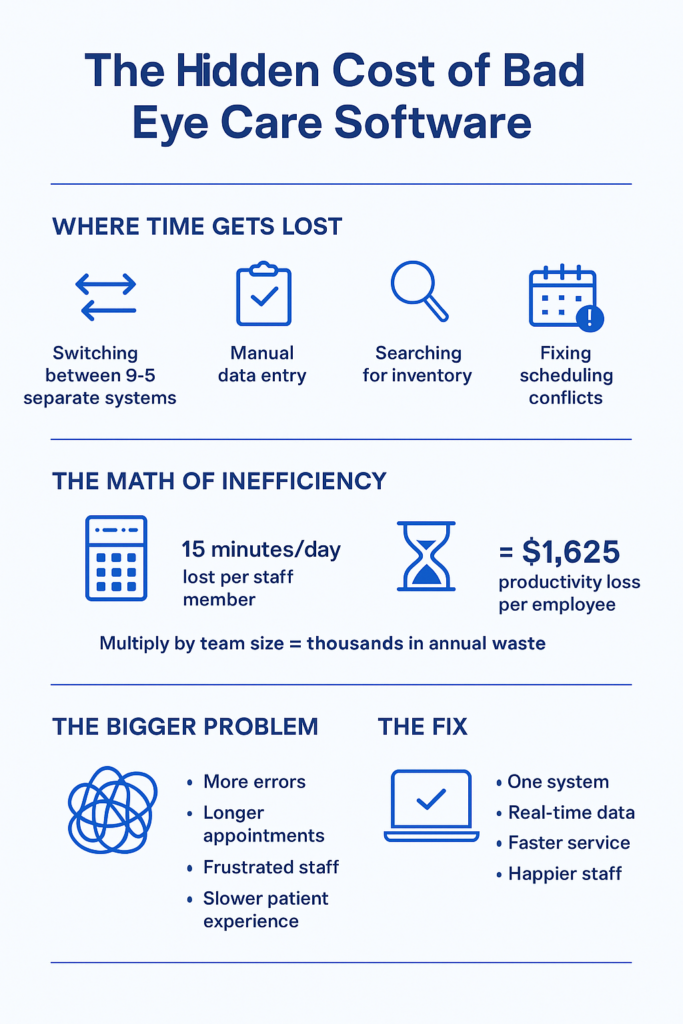
The eye care software market is broken in predictable ways. Most systems either excel at clinical workflows OR practice management, rarely both. This creates data silos where your exam records live separately from your inventory, which lives separately from your scheduling, forcing your team to manually bridge these gaps dozens of times per day.
Digital eye strain is creating unprecedented demand for eye care services. About 69% of North American adults experience computer vision syndrome symptoms, with prevalence jumping to 73% among workers in their 20s. This surge in demand makes practice efficiency critical—you can’t afford software that slows you down.
Cloud-based eyecare practice management systems now dominate new installations because they solve real problems: no server maintenance, automatic updates, work from anywhere, and predictable monthly costs. Yet many practices still cling to legacy systems they hate because switching seems daunting.
The hidden cost of “cheap” software is staff time. If your team spends 15 minutes per day working around software limitations—manually transferring data, looking up information in multiple places, fixing scheduling conflicts—that’s 65 hours per year, per employee. At $25/hour, that’s $1,625 annually in lost productivity, per person.
Modern eyecare software should reduce no-shows, optimize inventory, streamline exams, and provide actionable business insights—all from one integrated platform. If yours doesn’t do all four, you’re paying for multiple partial solutions when one complete system would cost less and work better.
What Most Eye Care Professionals Actually Need (But Aren’t Getting)
Walk into most optometry practices and you’ll see the same dysfunctional setup: one system for appointments, another for exams, a third for inventory, maybe a separate platform for billing. Staff members have developed elaborate workarounds—sticky notes, Excel spreadsheets, memory—to bridge the gaps.
This isn’t because practice owners make poor decisions. It’s because the eye care software market evolved this way, with different vendors focusing on different pieces of the puzzle.
The problem compounds over time. Your diagnostic equipment vendor offers their “integrated” solution. Your frame suppliers have their own inventory system they’d love you to use. Your EHR provider promises seamless documentation. Before long, you’re managing a Frankenstein’s monster of disconnected tools, each one technically functional but collectively inefficient.
The Real Cost of Disconnected Systems
Consider what happens when a patient calls to schedule an exam and ask about frame availability:
With disconnected systems, your front desk checks your appointment software, asks the patient to hold, walks to your frame area to check inventory or logs into a separate system, comes back to confirm, then manually notes the frame request in the appointment notes. Total time: 3-4 minutes.
With integrated eyecare practice management software, your front desk sees availability, inventory, and patient history on one screen. Total time: 45 seconds.
Multiply that time difference across 30 calls per day, 250 working days per year. You’re losing about 310 hours annually to system inefficiency on this one task alone. That’s nearly two months of full-time work.
Most practices don’t notice these losses because they’ve adapted. Your team works around the limitations so consistently that the workarounds feel normal. But normal doesn’t mean efficient.
Why Legacy Eye Care Software Keeps Failing You
Ever wonder why your practice management system feels like it was designed by someone who’s never actually worked in an optical practice? That’s because it probably was.
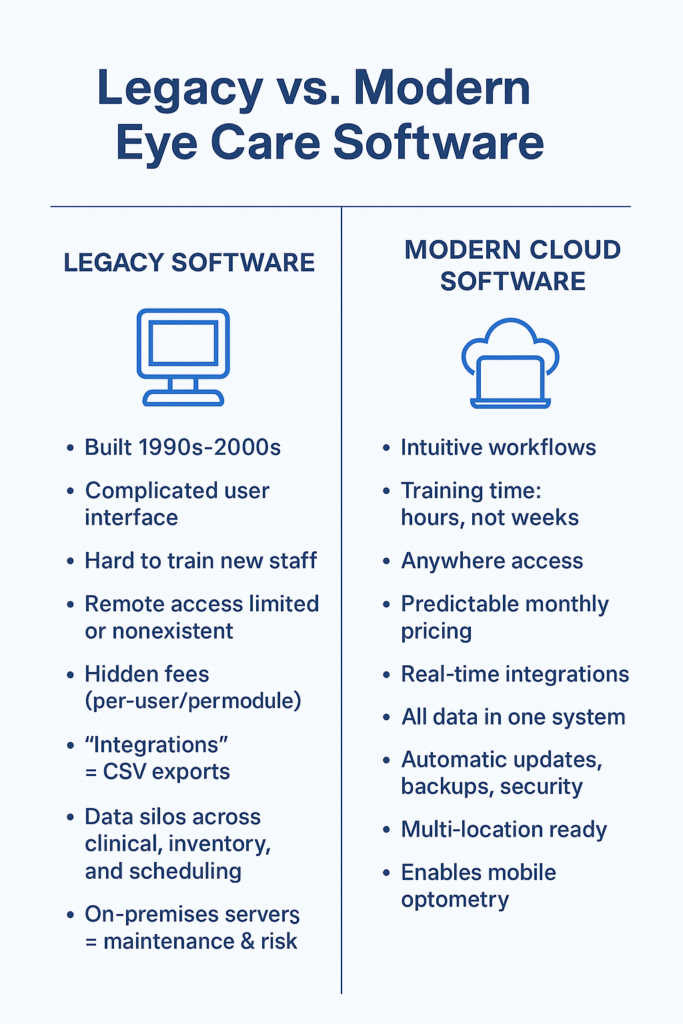
Most legacy eyecare software was built in the 1990s or early 2000s, then repeatedly patched with new features bolted onto aging architecture. The core design predates smartphones, cloud computing, and modern user experience standards.
The Tell-Tale Signs You’re Using Outdated Software
Training new staff takes days or weeks. Modern software should be intuitive enough that someone familiar with basic computer use can navigate core functions within hours. If your training process includes phrases like “it’s confusing at first, but you’ll get used to it,” your software is working against you.
You can’t easily access your system remotely. Cloud-based architecture isn’t just convenient—it’s essential for modern practice management. Mobile optometry visits? Home consultations? Checking tomorrow’s schedule from your phone? These should be standard features, not expensive add-ons.
Your pricing model is opaque. Legacy vendors often charge by user, by location, by module, with separate fees for updates, support, and features you thought were included. You end up paying more than expected and never quite sure what additional costs are coming.
Data lives in silos. Your exam records, frame inventory, contact lens orders, and patient communications exist in separate systems. Every day, your team manually transfers information between these islands of data, creating opportunities for errors and wasting valuable time.
“Integration” means export/import files. True integration means systems talk to each other in real-time, automatically. If your current solution requires downloading CSV files, uploading them elsewhere, and hoping the data maps correctly, that’s not integration—that’s digital duct tape.
7-day free trial
Got Any Questions? Let us know in the Contact Us form below.
The Migration Trap
Here’s why practices stay with failing systems: switching appears complicated and risky. Your current vendor has effectively held your data hostage—not through malice necessarily, but through proprietary formats and complex export processes.
You worry about: Will patient records transfer correctly? What happens during the transition period? How long will staff training take? Will we lose historical data? These concerns are valid, but they shouldn’t paralyze you into accepting inefficiency indefinitely.
Modern eyecare practice management platforms anticipate these concerns. Data migration tools, transition support, running old and new systems in parallel—these aren’t optional features for vendors who understand the switching barrier.
What Actually Matters in Eye Care Software (Ignore the Marketing Fluff)
Software vendors love listing features. Most feature lists are useless for decision-making because they don’t tell you what matters: how the software handles your actual daily workflows.
Let’s cut through the noise. Here’s what genuinely matters:
Clinical Workflow Integration
Can your optometrist complete an exam without switching between multiple screens or programs? The Eye Care Module in Glasson provides an 8-step diagnostic workflow that mirrors how optometrists actually conduct exams—from patient interview through refraction testing to final recommendations. No jumping between systems, no duplicate data entry, no wondering which screen has the information you need.
The test isn’t “does it have exam documentation features?” The test is “can your optometrist complete a comprehensive exam faster and more accurately than with your current system?” If the answer isn’t an obvious yes, keep looking.
Real Inventory Management (Not Just a Product List)
Your frames, lenses, and contact lenses aren’t static inventory items—they have sizes, powers, coatings, manufacturers, suppliers, and constantly changing stock levels. Generic inventory systems treat everything like widgets in a warehouse.
Eye care-specific inventory management understands that when a patient selects a frame, you need to know: Do we have their prescription in stock? What lens options work with this frame? What’s the typical lead time from our supplier? Can we order online directly from this system?
Glasson’s Inventory module handles the complexity of optical retail: FIFO tracking for expiring products, real-time stock visibility, automated delivery management, and direct integration with suppliers for seamless ordering. It’s built for how optical practices actually manage inventory, not adapted from warehouse management software.
Patient Communication That Actually Reduces No-Shows
Automated appointment reminders sound simple. They’re not. Your system needs to: send reminders at optimal times (not too early, not too late), handle multiple communication channels (SMS, email), allow easy rescheduling without phone calls, track confirmation status, and identify patients who chronically don’t show up.
Generic reminder systems send a text message. That’s table stakes. Effective patient communication systems reduce no-shows, improve satisfaction, and free your staff from playing phone tag.
Glasson’s Communication features include customizable message templates, automated reminders, birthday promotions, and follow-up sequences—all managed from the same platform handling your appointments and patient records.
Want to see Glasson's full potential?
Book a presentation
Business Intelligence (Not Just Reports)
Running reports is administrative work. Getting actionable insights is business intelligence.
Your software should answer questions like: Which frame brands sell best? Which insurance plans are most profitable? Who are your highest-value patients? What’s your average revenue per patient visit? Which days/times have the most cancellations? Where are your inventory dollars tied up?
These aren’t luxury questions—they’re essential for running a profitable practice. Yet many systems make you export data to Excel and build your own analysis. Glasson’s Statistics module provides built-in analytics that turn your operational data into strategic decisions.
The Mobile Optometry Revolution (And Why Your Software Probably Can’t Handle It)
Something interesting happened during the pandemic: eye care went mobile. Optometrists and opticians started offering home visits, corporate screenings, and mobile clinic services. Patients discovered they preferred the convenience.
This isn’t a temporary trend. Mobile optometry is growing because it solves real problems: serving elderly patients who can’t easily travel, providing workplace vision screenings, reaching underserved communities, and offering premium concierge service.
But most practice management software was built for a static location. It assumes you’re always at your practice, with access to all your equipment and files, seeing patients in your exam rooms.
What Mobile Practice Actually Requires
Mobile optometry demands software that works seamlessly across devices and locations. When you’re conducting a home visit, you need:
- Complete patient history on your tablet
- Ability to document the exam in real-time
- Access to your inventory (so you know what’s available)
- Scheduling tools to coordinate travel and appointments
- Communication capabilities to confirm visits and follow up
- All data automatically syncing back to your central system
Most software fails this test. Legacy systems might have a “mobile app,” but it’s usually a stripped-down version that requires you to re-enter information when you get back to the office. That’s not mobile functionality—that’s mobile data entry.
Glasson was built cloud-first, meaning every feature works on any device, anywhere. Your team can manage appointments, access patient records, and check inventory from the practice, from home, or from a patient’s living room conducting a mobile visit. The experience is identical because the software lives in the cloud, not on specific computers.
The Economics of Mobile Services
Mobile visits command premium pricing—$50-150 more than in-office exams, depending on your market. But they also have unique operational costs: travel time, transportation, portable equipment.
To determine if mobile services are profitable for your practice, you need software that tracks: time spent per mobile visit, revenue per visit type, geographic distribution of mobile patients, scheduling efficiency for route planning.
Generic scheduling systems treat all appointments the same. Eye care software designed for mobile practice understands these nuances. The question isn’t “should I offer mobile services?”—it’s “do I have the operational infrastructure to make mobile services profitable?”
Why “Industry-Leading” Eye Care Software Often Isn’t
The optometry software market has a few dominant players. They’re “industry-leading” primarily because they’ve been around longest and have large customer bases, not necessarily because they’re the best solutions available today.
This matters because market dominance creates complacency. These vendors can coast on name recognition, existing customer inertia, and long-established relationships with equipment manufacturers.
The Innovation Problem
Large, established software vendors move slowly. They have legacy code to maintain, enterprise customers with complex custom integrations, and institutional resistance to change. When new technologies emerge—cloud architecture, mobile-first design, AI-assisted workflows—these vendors are often the last to adopt them.
Meanwhile, newer entrants can build from scratch using modern technology stacks, contemporary user experience design, and flexible architecture. They’re not constrained by decades-old code or customers still running Windows XP.
This isn’t theoretical. Compare the user interfaces of leading “enterprise” optometry software with consumer apps you use daily. The consumer apps feel intuitive and responsive. The enterprise software feels like… enterprise software. Clunky, dated, designed by engineers for engineers.
The Feature Trap
Established vendors compete on feature counts. Their marketing materials proudly list hundreds of capabilities, most of which you’ll never use. This feature bloat isn’t customer-focused—it’s competitive positioning disguised as value.
What you actually need is software that does the essential things brilliantly, not software that does 500 things adequately. Comprehensive doesn’t mean comprehensive feature list—it means comprehensive support for your actual workflows.
Ask yourself: would you rather have 200 mediocre features or 20 excellent ones that match exactly how your practice operates?
“Most practice owners think they need different software for clinical, inventory, and communications. We built Glasson specifically to prove they don’t. When everything lives in one system, the whole practice runs smoother—fewer errors, faster service, happier staff. It’s not complicated technology. It’s just designed correctly.” — Adam Smith, Product Manager @ Glasson
Test Glasson for 7 days free of charge
Any questions? Leave your contact details and we'll call you back.
The Cloud vs. On-Premises Debate (It’s Not Really a Debate Anymore)
Ten years ago, practices had legitimate concerns about cloud-based software: security, reliability, internet dependency, data control. Today, those concerns have largely been addressed, while the advantages of cloud architecture have only grown more compelling.
Why Cloud-Based Wins for Most Practices
Deployment time: On-premises software requires server setup, software installation, configuration, testing, and training. Timeline: weeks or months. Cloud software? You log in. Timeline: hours.
Maintenance burden: Server-based systems require: hardware maintenance, software updates, backup management, security patches, disaster recovery planning. Unless you employ dedicated IT staff, this burden falls on… someone in your practice who isn’t qualified for it. Cloud systems handle all of this automatically.
Multi-location scalability: Running multiple practices with on-premises software means: replicating your entire server infrastructure at each location or complex networking to connect locations or accepting that each location operates independently. Cloud systems work identically everywhere because they don’t live on your local hardware.
Accessibility: Your optometrist is traveling and needs to review a patient’s history. Your manager wants to check tomorrow’s schedule from home. You’re considering expanding and want to preview your inventory costs. On-premises software: these scenarios range from difficult to impossible. Cloud software: log in from anywhere.
Predictable costs: Server-based systems have unpredictable expenses: hardware replacement, emergency repairs, upgrade cycles. Cloud systems have fixed monthly fees. You know exactly what you’ll pay, making budgeting straightforward.
Automatic updates: Software improves continuously. Bug fixes, security patches, new features—these improvements should arrive automatically overnight, not through painful “upgrade projects” that disrupt your practice for days.
The Security Red Herring
Some vendors still warn that cloud software is “less secure” than on-premises systems. This is misleading at best, deliberately deceptive at worst.
Cloud providers invest millions in security infrastructure that would be impossible for individual practices to match: redundant data centers, 24/7 security monitoring, automatic backups, encryption, compliance certifications, disaster recovery systems.
Your on-premises server? It’s probably sitting in a closet, backed up irregularly if at all, protected by whatever firewall your internet provider installed, and vulnerable to physical theft, fire, flooding, or simple hardware failure.
The question isn’t “is cloud secure?” It’s “is your current setup more secure than professional cloud infrastructure?” For 99% of practices, the honest answer is no.
What “Integration” Really Means (And Why Yours Probably Isn’t)
Software vendors love claiming their product “integrates” with other systems. What they usually mean is: you can export data from System A and import it into System B, assuming the formats match and you don’t mind manually moving files around.
Real integration means systems communicate automatically, in real-time, without manual intervention.
True Integration Scenarios
When a patient books an appointment online through your website, that appointment automatically appears in your schedule, triggers a confirmation email, and updates your daily capacity planning. You don’t review a queue of online requests and manually enter them—it just happens.
When you complete an exam, the prescription data flows immediately to the lens recommendation engine, which suggests appropriate products from your current inventory, checks supplier availability for special orders, and generates a cost estimate including your standard markup. Your optician doesn’t re-enter the prescription—they simply select from intelligent suggestions.
When a frame arrives from your supplier, scanning the package barcode automatically updates your inventory count, records the receipt date, matches it against outstanding orders, and notifies staff if it’s for a waiting patient. Nobody manually checks off items on a spreadsheet.
These workflows exist in well-designed eyecare practice management software. They’re not “advanced features”—they’re basic operational efficiency that good software should provide.
The Hidden Cost of Non-Integration
Practices accept disconnected systems because “that’s how it’s always been.” But consider the cumulative impact:
Each time your staff manually transfers information between systems, there’s an opportunity for error. Wrong number, missed detail, forgotten step. These errors cascade: incorrect orders, billing mistakes, patient dissatisfaction.
Each system transition represents cognitive load—staff must remember which information lives where, how to move it, what format each system requires. This mental overhead is exhausting and reduces capacity for actual patient care.
Each separate login, each different interface, each unique workflow creates friction. Your team isn’t stupid for finding this difficult—the systems are poorly designed for integrated practice management.
The solution isn’t “better training” or “more diligent staff.” The solution is software built as an integrated whole, not assembled from incompatible pieces.
How Glasson Actually Works (Without the Sales Pitch)
Let’s walk through what integrated eyecare practice management actually looks like in daily operation. No marketing fluff—just realistic scenarios showing how well-designed software eliminates common friction points.
Morning: Opening the Practice
Traditional Setup: Log into your scheduling system. Check your email for any patient communications. Log into your inventory system to see what arrived yesterday. Open your billing software to review yesterday’s outstanding balances. Check the answering service for after-hours messages. Total time: 15-20 minutes, multiple systems, information scattered.
Integrated Setup with Glasson: One login. Dashboard shows today’s appointments, recent messages, inventory notifications, outstanding balances, and overnight online bookings. Everything you need to start the day in one place. Total time: 2-3 minutes.
The efficiency gain isn’t just time—it’s cognitive simplicity. Your team starts the day with complete situational awareness, not fragmented information gathering.
Mid-Morning: Patient Exam
Traditional Setup: Pull up patient record in your EHR. Conduct exam, document findings. Patient asks about specific frame styles they saw online. You’re not sure what’s in stock, so you tell them you’ll check after the exam. Patient leaves exam room, you search your separate inventory system, return to tell them what’s available. Patient decides they want different lenses than standard. You manually look up options in supplier catalog, calculate costs. Total time for appointment and follow-up: 45-60 minutes, multiple systems, interrupted workflow.
Integrated Setup with Glasson: Patient record shows complete history and preferences. Exam documentation flows naturally through standardized workflow. When discussing frames, you instantly see current inventory with images. When adjusting lens selection, the Lens Finder searches 3.5 million combinations and shows available options with pricing in under 0.2 seconds. Patient makes decisions in real-time, everything documented in one continuous session. Total time: 30-35 minutes, one system, seamless workflow.
The efficiency gain here is exponential—faster appointments, better patient experience, higher conversion rates, and less staff frustration.
Afternoon: Inventory Management
Traditional Setup: Frame delivery arrives. Staff manually checks packing list against order. Updates inventory spreadsheet or separate system. Realizes one frame was for a waiting patient. Searches scheduling system to find patient. Calls patient to notify them. Updates patient record with communication notes. Total time: 15-20 minutes per delivery, multiple system entries.
Integrated Setup with Glasson: Scan delivery barcode. System automatically matches to orders, updates inventory counts, identifies the waiting patient, and offers to send notification (SMS or email) directly. Staff reviews and confirms message. Patient record automatically notes the communication. Total time: 3-4 minutes, one workflow.
Over a month with 20 deliveries, you’ve saved 4-5 hours of staff time. That’s meaningful operational efficiency.
[banner_blog_4]
Late Afternoon: Business Planning
Traditional Setup: Owner wants to know: Which frame brands are most profitable? Export sales data from POS system. Export cost data from inventory system. Export customer data from practice management system. Build Excel analysis. Cross-reference across systems. Spend 2-3 hours building report. Get answers, which are already days old by the time analysis completes.
Integrated Setup with Glasson: Open Statistics module. Select date range and analysis type (profitability by brand). System generates report instantly, showing revenue, costs, margins, sell-through rates. Drill down to specific products or time periods. Export to PDF or CSV if needed. Total time: 5-10 minutes, current data, actionable insights.
This isn’t a luxury for large practices—it’s essential for practices of any size that want to make informed business decisions rather than guessing.
The Real Question: Why Hasn’t Your Current Vendor Fixed These Problems?
If disconnected systems, clunky interfaces, and operational inefficiency are common problems, why haven’t established eyecare software vendors solved them?
The answer is uncomfortable but important: they don’t have to. Market dominance creates complacency.
The Switching Barrier Strategy
Legacy vendors understand that switching practice management software is perceived as difficult and risky. They don’t need to be the best solution—they just need to be “good enough” that the pain of switching seems worse than the pain of staying.
This is intentional strategy. Complex data formats that are difficult to export. Expensive “implementation fees” for new customers. Contracts with auto-renewal clauses and difficult cancellation terms. These aren’t accidents—they’re moats designed to protect market share.
The Innovation Economics
Large software companies have different incentives than practices. Your priority is operational efficiency and patient care. Their priority is recurring revenue and margin expansion.
Building genuinely better software requires investment in research, modern technology, user experience design, and continuous improvement. Maintaining existing software and extracting maximum revenue from current customers requires much less investment and generates higher margins.
When companies reach a certain size, the financial incentive shifts from “be the best solution” to “retain maximum customers with minimum investment.” This is basic corporate economics, not a character judgment—but it explains why innovation often comes from newer entrants rather than established players.
The Consolidation Effect
The eye care software market has consolidated significantly over the past decade. Large vendors acquire smaller competitors, absorb their customer base, and gradually migrate everyone to a unified (usually less innovative) platform.
This reduces choice, increases pricing power, and slows innovation. It’s great for vendor profitability, less great for practice owners seeking optimal solutions.
What to Look for When Evaluating New Eye Care Software
Choosing practice management software isn’t like buying a frame line—you can’t easily switch if it doesn’t work out. The decision deserves careful evaluation, but not paralysis.
Questions That Matter More Than Features
Can I try it risk-free? Any vendor confident in their product offers a genuine trial period—not a “demo” where a sales person clicks through screens, but actual hands-on use with your team in your practice. Glasson offers 7-day free trials because confident software doesn’t need long-term commitments before you experience the value.
What does it actually cost? Not “starting at” pricing, not feature comparison grids—what will you pay monthly for your specific practice configuration? Glasson uses transparent, fixed pricing per location with unlimited users—one price, no surprises, predictable budgeting.
How long does implementation take? Real-world timeline, not “can be done in…” marketing speak. Days? Weeks? Months? What’s required from your team? Cloud-based systems should be operational within hours or days, not months.
What happens to my data if I leave? Can you export everything in standard formats? Do you maintain access during a transition period? Vendors who make data extraction difficult are signaling they don’t expect you to stay based on product quality alone.
Who provides support, and when? Is it outsourced tier-1 help desk or people who actually know eye care? Business hours only or 24/7? Additional cost or included? Response time commitments?
How do updates work? Automatic overnight or disruptive “upgrade projects”? New features added regularly or annual major releases? Bug fixes deployed quickly or batched into quarterly updates?
Red Flags to Watch For
“Implementation fees” that exceed monthly costs. This is vendor code for “we need to recoup development costs upfront because our ongoing value is questionable.”
“That’s a feature we’re planning to add.” Great, when? Next month? Next year? “On the roadmap” isn’t a feature—it’s a promise that may or may not materialize.
“You’ll need to contact our sales team for pricing.” Translation: “We charge different amounts based on negotiation rather than consistent value.”
“Most practices customize it extensively.” Translation: “Our out-of-box experience is inadequate, so everyone has to pay us to make it actually work.”
“You can integrate it with…” If basic functions require third-party integration, the software isn’t comprehensive—it’s incomplete and expecting you to assemble a solution from pieces.
The Migration Path (It’s Less Scary Than You Think)
Switching practice management software feels daunting. You’re not wrong to be cautious—but you might be overestimating the difficulty and underestimating the cost of not switching.
What Actually Happens During Migration
Phase 1: Setup and Configuration
The new system is configured to match your practice operations: staff accounts, service types, product catalogs, standard workflows, communication templates. This happens in parallel with your existing system—nothing changes in your daily operations yet.
Phase 2: Data Migration
Patient records, appointment history, inventory data, and financial information export from your old system and import into the new one. Modern migration tools handle most of this automatically, with validation checks to ensure accuracy.
Phase 3: Parallel Operation
Both systems run simultaneously for a transition period (typically 1-2 weeks). New appointments can be scheduled in either system, patient records update in both. Your team gradually shifts to the new system while old system remains available as backup.
Phase 4: Full Cutover
Once your team is comfortable and data integrity is verified, the old system becomes read-only archive (for historical reference) and all operations move to the new platform.
Phase 5: Optimization
After cutover, you refine workflows, customize features, and fully leverage new capabilities that weren’t possible in your old system.
Total timeline: 2-4 weeks from decision to full operation, with minimal disruption to patient care.
Why It’s Worth the Short-Term Effort
Calculate the annual cost of your current system—not just subscription fees, but also: staff time lost to inefficiency, no-shows from inadequate reminders, inventory waste from poor management, missed revenue from slow patient processing, and errors from disconnected systems.
Now compare that to: one month of mild inconvenience during migration followed by permanent efficiency gains.
For most practices, the payback period is 6-12 months. After that, improved efficiency generates ongoing returns every single day.
Frequently Asked Questions
How do I know if my current practice management software is actually holding me back?
Ask your staff honestly: “If you could change one thing about our software, what would it be?” If they immediately have answers (or worse, if they laugh and say “just one?”), that’s your signal. Also watch for these patterns: staff creating workarounds using sticky notes or Excel, regularly apologizing to patients for “slow systems,” hiring additional administrative staff because existing staff can’t handle volume, or declining to offer services (like mobile visits) because your software can’t support them.
What’s the real difference between “eye care-specific” software and generic practice management systems adapted for optometry?
Eye care-specific software understands that prescriptions aren’t just numbers—they’re complex specifications requiring specific lens products. It knows that inventory isn’t just “items in stock”—frames have sizes and styles, lenses have powers and coatings, contact lenses have base curves and diameters. Generic systems adapted for optometry require constant workarounds because they weren’t built with optical workflows in mind. Purpose-built software like Glasson handles these complexities naturally because that’s what it was designed to do.
How much disruption should I expect when switching to new eyecare software?
With cloud-based systems and modern migration tools, far less than you fear. Expect 1-2 weeks of parallel operation where both systems run simultaneously. During this time, some tasks take slightly longer because staff is learning new workflows. After full cutover, expect 2-3 weeks of “getting comfortable” where the new system is faster but staff is still discovering features. By week 6-8, most practices report they can’t imagine going back to their old system. The key is choosing vendors who provide hands-on migration support, not just documentation.
Can I actually trust cloud-based software with sensitive patient data?
Professional cloud infrastructure is significantly more secure than the average practice’s on-premises setup. Cloud providers invest millions in security measures that individual practices cannot match: redundant data centers, 24/7 monitoring, automatic encrypted backups, physical security, and compliance certifications. Your biggest security risk isn’t the cloud—it’s using outdated software with known vulnerabilities, inadequate backups, or staff with weak passwords. Reputable eye care software vendors meet HIPAA requirements and regional healthcare data protection standards.
What happens to my data if the software company goes out of business or I decide to switch again?
This is exactly the right question to ask before committing. Reputable vendors guarantee data portability—your information exports in standard formats (CSV, PDF, industry-standard medical records) that other systems can import. Before signing any contract, verify: that you can export all data types (patients, appointments, exams, inventory, financial), that exports use standard formats not proprietary ones, that you maintain access during any transition period, and that there’s no “exit fee” for data extraction. If a vendor makes data export difficult, that’s a red flag signaling they expect to retain customers through lock-in rather than value.
How does integrated software handle specialized equipment from different manufacturers?
Modern eyecare practice management systems use standard integration protocols (like DICOM for imaging) to connect with diagnostic equipment regardless of manufacturer. Your autorefractor, OCT, or other devices transmit results directly to the patient record automatically. The key is choosing software that supports open standards rather than requiring proprietary equipment from specific vendors. Glasson’s clinical module integrates with major diagnostic equipment brands, so your investment in existing equipment isn’t wasted.
Is it realistic for small practices (1-2 optometrists) to benefit from comprehensive practice management software?
Absolutely—arguably more than large practices because small practices can’t afford operational inefficiency. If you’re doing everything manually now, the efficiency gains from automation are proportionally larger. With modern cloud-based pricing, the cost is accessible ($99-159 per month for Glasson’s comprehensive plans), and implementation doesn’t require IT staff. Small practices benefit most from: automated appointment reminders reducing no-shows, inventory management preventing stockouts and overstock, patient communication building loyalty, and business analytics revealing which services/products are most profitable.
Can practice management software actually help with mobile optometry and home visits?
Yes, if it’s built with mobile functionality from the start rather than as an afterthought. Mobile optometry requires complete patient records accessible on tablets, real-time exam documentation that syncs automatically, inventory visibility so you know what’s available, route planning for efficient scheduling, and communication tools for confirming appointments. Legacy systems struggle with this because they were designed assuming you’re always at your practice. Cloud-based systems like Glasson work identically on any device anywhere, making mobile visits operationally feasible.
What’s the typical ROI timeline for switching to better practice management software?
Most practices see positive ROI within 6-12 months through reduced no-shows (automated reminders), faster patient throughput (integrated workflows), reduced inventory waste (better management), decreased administrative staffing needs, and improved patient retention (better communication). The exact timeline depends on practice size and current inefficiency level. Calculate conservatively: if new software saves your staff just 30 minutes per day at $25/hour, that’s $3,250 annually in labor savings alone. Add reduced no-shows, better inventory management, and improved patient experience, and the business case becomes compelling quickly.
Do I really need an entire practice management system, or can I just improve specific pain points with point solutions?
This is the classic “integrate or optimize individual pieces” question. Point solutions (separate appointment scheduling, standalone inventory, independent billing) seem appealing because you can address one problem at a time. But you end up with the same disconnection problem—just with slightly better individual tools. Every time data needs to move between systems, you create manual work, error opportunities, and efficiency losses. Integrated systems cost less than assembling multiple point solutions and eliminate the integration overhead entirely. Unless you have genuinely unique requirements that no integrated system addresses, comprehensive platforms deliver better long-term value.
Your Next Step (The Obvious One You’re Avoiding)
You’ve read this far, which means you recognize your current software situation isn’t optimal. Maybe you’re frustrated daily, or maybe it’s a low-grade annoyance you’ve learned to tolerate.
Either way, the question isn’t “should I eventually look at better software?”—it’s “what’s the actual cost of waiting another year?”
Calculate it honestly. Hours lost to inefficiency, multiplied by staff hourly cost, multiplied by 250 working days. No-shows that could have been prevented with better communication. Inventory sitting unsold because you didn’t know you had it. Patients who don’t book follow-up appointments because your reminder system is manual.
That annual cost probably exceeds the cost of better software several times over.
The barrier isn’t the decision—it’s starting the evaluation process. Try Glasson free for 7 days. Not a demo. Not a sales pitch. Actual hands-on use with your team, your workflows, your patients. See if integrated eye care software actually delivers the efficiency gains promised, or if it’s just marketing hype.
If it doesn’t work for your practice, you’ve lost nothing except a few hours of exploration. If it does work, you’ve found a solution to problems that cost you thousands annually.
The software choice matters less than making any choice at all. Staying with demonstrably inadequate systems because switching seems inconvenient is expensive comfort.