English
  Polski
  Čeština
  Deutsch
  Español
  Français
  Ελληνικά
  Hrvatski
  Italiano
  Lietuviškai
  Magyar
  Nederlands
  Português
  Română
  Slovenčina
  Svenska
  Türkçe
  Русский
Optometry Practice Management Software: Why Your Current System Is Probably Costing You More Than You Think
You know that moment when you’re hunting through lens catalogs while your patient zones out on their phone, probably Googling “buy glasses online cheaper”?

Or that Friday when you stayed two hours late trying to reconcile your billing, and you still couldn’t figure out why the numbers don’t match?
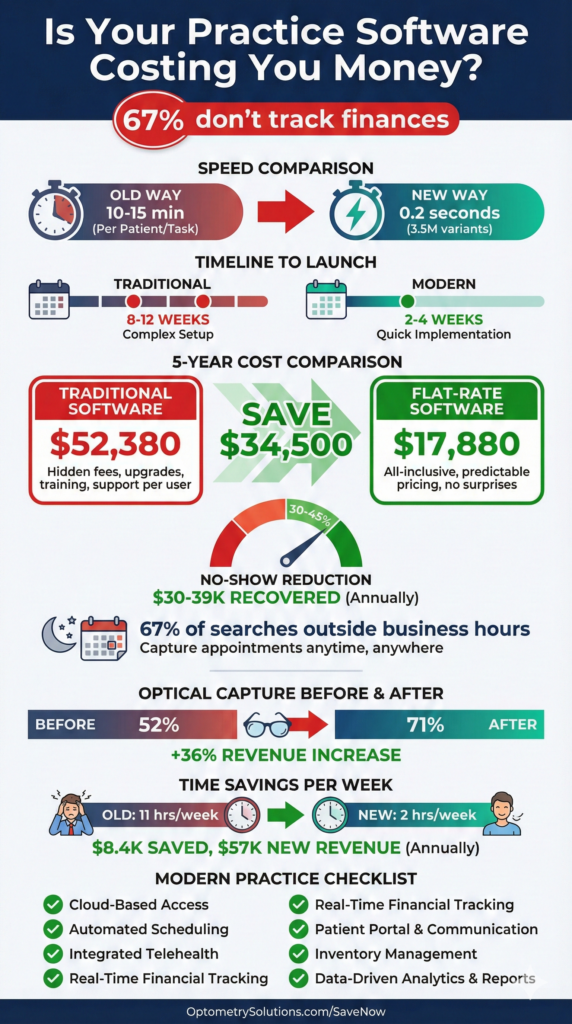
Here’s the reality: 67% of optometry practices don’t systematically track their financial performance because their software makes it too complicated. Their staff spends hours on administrative tasks that modern software handles in minutes.
If you’re nodding along, it’s time to have an honest conversation about your practice management system—and whether it’s actually managing your practice or just managing to slow everyone down.
Key Insights
- Speed matters: Modern systems search 3.5 million lens variants in under 0.2 seconds—no more catalog hunting
- Learning curve reality: Staff should master essentials in under one hour, not weeks of training
- Hidden costs add up: Per-user licensing and add-ons can double your actual software costs
- Implementation timeline: Expect 2-4 weeks for complete migration, not 8-12 weeks of disruption
- No-show prevention: Automated reminders reduce no-shows by 30-45%, recovering thousands monthly
- Integration is everything: Fragmented systems waste 10-15 hours weekly per staff member
- Patient expectations changed: 67% of appointment searches happen outside business hours—24/7 booking captures these
- True cost comparison: Calculate total including per-user fees, add-ons, implementation, and support—not just base price
What Actually Matters in Practice Management Software
When you’re evaluating optometry practice management software, three things determine whether your staff will love it or hate it:
Does it save time or waste it? If your front desk spends 20 minutes per patient on insurance verification because the system requires seven different screens, that’s a problem. If finding the right progressive lens takes fifteen minutes of catalog hunting, that’s a problem.
Does it connect your workflows or fragment them? An exam leads to a prescription. A prescription leads to lens selection. Lens selection leads to ordering. That’s one workflow, not four separate tasks in four different systems. Yet many practices cobble together an EHR, separate optical POS, third-party billing, and maybe a fourth system for patient communication. Every handoff creates friction, errors, and wasted time.
Does the pricing make sense when you actually calculate it? A system advertised at “$199/month” sounds great until you realize that’s per provider, per location, and doesn’t include the modules you actually need. Add two optometrists, three locations, and the optical retail module, and suddenly you’re at $1,400 monthly—before per-user fees for staff.
7-day free trial
Got Any Questions? Let us know in the Contact Us form below.
The Lens Database Problem (And How Modern Software Solves It)
Picture this: A patient needs progressive lenses with anti-reflective coating, blue light filtering, and they’re highly myopic with significant astigmatism. Your optician opens a catalog. Then another. Then Googles the specific lens series. Ten minutes later, they’re still not confident they’ve found the best option.
Your patient pulls out their phone. You know what they’re doing—comparing your prices to online retailers.
Here’s what modern lens finder software does differently:
A comprehensive database accesses over 3.5 million lens variants and searches them in less than 0.2 seconds. The system supports over 22,000 combinations of vision defects—meaning virtually any prescription has scientifically optimal lens recommendations instantly available.
The workflow becomes:
- Enter prescription parameters (sphere, cylinder, axis, PD)
- Apply filters (progressive design, coating preferences, material)
- Review top matches with pricing and specifications
- Select and move directly to ordering
Total time: Under 60 seconds.
One practice owner tracked this: Their average dispensing time dropped from 23 minutes to 11 minutes after implementing intelligent lens search. That’s an extra 48 patients weekly they could serve in the same hours. At an average $400 optical sale, that’s $19,200 additional monthly revenue just from eliminating the catalog hunt.
Client Management: Why Everything Should Connect
How many clicks does it take to see a patient’s complete history in your current system? Their last exam? Their prescription history? What frames they bought? Whether they owe a balance?
If the answer is “I need to check three different places,” your system is fragmenting your workflow.
What comprehensive client management actually looks like:
Every piece of information lives in one unified patient record: complete medical and vision history, exam results across all visits, purchase history with specific frame and lens details, communication logs, appointment history, insurance coverage, outstanding balances, and patient preferences.
You click the patient’s name. Everything appears. Two clicks maximum to any information you need.
Real-world example:
A patient calls: “My glasses are uncomfortable. I think something’s wrong with the prescription.”
Old way (8-12 minutes):
- Pull up patient file (one system)
- Switch to optical POS to find which glasses they bought (second system)
- Check if prescription was made correctly (third system)
- Look up if they’ve called before (check phone notes?)
Integrated way (45 seconds):
- Open patient record (one system with complete history)
- See they bought progressives three weeks ago
- See this is their first progressive lens
- See prescription was filled correctly
- See they called once before about adjustment
- See notes suggesting adaptation period counseling
Your patient isn’t on hold for ten minutes. Your staff isn’t frustrated toggling between systems. And you make better clinical decisions with complete information instantly.
Expert voice
“The practices struggling most with efficiency aren’t using bad software—they’re using five different ‘good’ software systems that don’t talk to each other. Every time you make someone copy data from one system to another, you’re creating work, introducing errors, and burning money. Integration isn’t a luxury feature anymore. It’s the entire point of practice management software.”
— Adam Smith, Product Manager @ Glasson
Appointment Scheduling: The Missed Opportunity
When do most people search for “optometrist near me”? Between 8 PM and 11 PM on weeknights, or Saturday and Sunday afternoons. Know when your phones are off? Exactly those times.
67% of healthcare appointment searches happen outside business hours. If your only booking option is “call us during business hours,” you’re losing two-thirds of potential patients to competitors with online booking.
Automated appointment reminders via text or email reduce no-shows by 30-45%. For a practice doing 100 appointments weekly with a 12% no-show rate, that’s 4-5 additional completed appointments weekly, or 200-260 annually. At $150 average per appointment, that’s $30,000-$39,000 in recovered revenue just from reminder texts.
One solo practitioner calculated that appointment scheduling consumed 8 hours weekly before automation—400 hours annually, essentially a part-time person just answering phones and confirming appointments. After implementing online booking and automated confirmations, that dropped to 2 hours weekly. Those 6 hours were reallocated to patient experience improvements and optical consultations that directly generate revenue.
The Point-of-Sale Integration Nobody Talks About
What happens after the exam? This is where practices either maximize optical revenue or watch it walk out the door to online retailers.
Common problems:
The handoff problem: Optician asks about the prescription. Patient says, “I think it’s for distance? The doctor mentioned astigmatism?” Your optician walks back to get details. Patient waits. Momentum dies.
The catalog hunt: Optician opens catalogues. “Let me see what progressive options we have.” Patient watches them flip pages. Patient pulls out phone and Googles “progressive lenses price comparison.”
The inventory surprise: Perfect frames selected. Goes to create the order—frame is out of stock. “Should be here in about two weeks.” Patient’s enthusiasm fades. Some don’t come back.
What integrated optical retail and inventory management prevents:
The prescription flows automatically from exam to optical. Your optician sees: complete prescription details with measurements, doctor’s recommendations, patient’s previous purchases, instant lens recommendations, real-time inventory status, and insurance coverage.
Frame selection happens with real-time inventory visibility. Lens selection happens with intelligent recommendations in under a second. Order creation happens in one integrated transaction.
One practice tracked their optical capture rate before and after implementing integrated optical POS:
- Before: 52% optical capture rate
- After: 71% optical capture rate
- Revenue impact: 36% increase in optical revenue with same exam volume
Why? Momentum preservation (optical feels like the natural next step) and confidence demonstration (fast, precise recommendations prove expertise).
Communication: The Automated Assistant You Didn’t Know You Needed
Your front desk spends how many hours weekly confirming appointments, calling patients overdue for annual exams, texting that glasses are ready, emailing invoices, and reminding contact lens wearers about reorders?
Modern patient communication systems automate the routine:
- Appointment reminders send automatically 24 hours before via patient’s preferred channel
- Annual exam recalls trigger at 12-month mark with direct booking link
- Ready-for-pickup notifications send when orders arrive
- Contact lens reorder reminders trigger based on previous supply
- Post-appointment follow-ups catch issues before they become negative reviews
Real impact:
One practice calculated their front desk spent 11 hours weekly on routine communications. At $18/hour, that’s $10,296 annually just on task time.
After implementing automated workflows:
- Time spent on routine communications: 2 hours weekly
- Annual savings: $8,424 in direct labor
- No-show rate improvement: 12% → 7%
- Annual exam recall rate: 28% → 47%
The recall rate improvement alone: If you have 2,000 active patients and improve recall from 28% to 47%, that’s 380 additional annual exams at $150 each = $57,000 additional revenue annually.
Want to see Glasson's full potential?
Book a presentation
Statistics and Reporting: The Data You Should Be Using
67% of practices don’t systematically track financial performance. Not because they don’t care about numbers—because extracting useful data requires either paying an accountant to manually compile reports, spending hours in spreadsheets, or just giving up.
Modern practice statistics should answer:
Financial performance:
- What’s our actual profitability this month vs. last?
- Which services generate the highest margins?
- What’s our average transaction value trend?
Operational efficiency:
- Average appointment duration vs. scheduled time?
- Patients per doctor hour?
- Optical capture rate by doctor and optician?
Patient metrics:
- Retention rate (patients returning for annual exams)?
- New patients monthly and trend?
- No-show rate improvement?
Inventory analysis:
- Which frame styles sell fastest?
- What’s dead stock costing holding costs?
- When to reorder to avoid stockouts?
You shouldn’t need an MBA to answer these questions. Your practice management software should make this data visible, actionable, and automatic.
One practice owner described the shift: “Before, our accountant gave us a P&L 30 days after month-end. By then, if we had a problem, we’d already had it for six weeks. Now I see daily revenue, weekly trends, monthly patterns in real-time. When optical sales dipped 18% one week, we saw it immediately—our top-selling frame line was out of stock. We expedited reordering and recovered the next week.”
The Real Cost of Practice Management Software
Let’s do honest math. The advertised price is usually meaningless. Here’s what you need to calculate:
| Cost Category | Traditional System | Flat-Rate System |
| Base Subscription | $199/mo × 2 providers = $398 Multi-location = $150 Total: $548/mo | $149/mo × 2 locations Unlimited users Total: $298/mo |
| Modules & Add-Ons | Optical POS: $100/mo Patient portal: $75/mo Advanced reporting: $50/mo Total: $225/mo | All features included Total: $0 |
| Implementation | Implementation: $3,000 Training: $2,000 Support plan: $1,200/year | All included Total: $0 |
| YEAR 1 TOTAL | $15,476 | $3,576 |
| YEAR 5 TOTAL | $52,380 | $17,880 |
| DIFFERENCE | — | $34,500 savings (293% less) |
And that’s before considering:
- Staff time wasted on inefficient workflows
- Lost revenue from poor optical integration
- Opportunity cost of complicated systems requiring extensive training
- Hidden costs when you need that “optional” module later
Multi-Location Management: Scaling Without Chaos
If you’re running multiple locations (or thinking about expanding), your practice management software makes or breaks the operation.
The nightmare: Each location uses software independently. Patient comes to location A for exam, location B for pickup. Location B has no idea what was ordered. Patient waits 20 minutes while someone calls location A.
What proper multi-location management does:
- Unified patient records accessible at any location regardless of where previous visits occurred
- Cross-location inventory visibility with transfers to meet demand where it exists
- Centralized pricing ensuring consistency across locations
- Location-specific analytics with roll-up reporting for corporate overview
- Role-based access controls for location managers and corporate oversight
One practice owner with three locations calculated they wasted 15 hours weekly coordinating between locations before implementing integrated multi-location management. That’s 780 hours annually—essentially another half-time position just managing logistics.
What to Actually Look For When Evaluating Systems
Forget the sales pitch. Here are questions that reveal whether a system will actually work:
Implementation timeline:
- Red flag: 8-12 weeks (too long, indicates overcomplicated system)
- Good answer: “2-4 weeks including data migration and training”
Learning curve:
- Red flag: “We recommend a full week of training” or “Most users comfortable after 2-3 weeks”
- Good answer: “Most users master essentials in under an hour, productive same day”
True cost:
- Red flag: Can’t provide all-in cost for year 1 and year 5, or significant cost increases
- Good answer: “Here’s your exact monthly cost, includes everything, same price year 1 through year 5”
Data ownership:
- Red flag: Export fees, 30-60 days notice required, proprietary formats only
- Good answer: “You own your data completely, export anytime in standard formats, no fees”
Integration:
- Red flag: “Your optician will need to pull up the prescription” or “It’s available in a separate module”
- Good answer: “Prescription flows automatically to optical with one click”
References:
- Red flag: Can’t or won’t provide current user references
- Good answer: “Here are three practices you can contact directly”
The Migration Question: It’s Not As Scary As You Think
You’re thinking: “We’ve been using [current system] for 7 years. All our data is there. Switching sounds overwhelming.”
What migration actually involves:
- Data extraction from current system (usually straightforward with modern systems)
- Data formatting (handled by new vendor’s implementation team, not you)
- Data import with validation to ensure nothing lost
- Staff training on new interface
- Parallel operation for 1-2 weeks (run both systems)
- Full cutover once confident
Timeline reality:
- Traditional complex systems: 8-12 weeks
- Modern streamlined systems: 2-4 weeks
What one practice experienced:
Week 1: Kickoff call, data export, import into new system
Week 2: Staff training (2 hours), parallel operation
Week 3: Full cutover, implementation team available for questions
Week 4: Follow-up training on advanced features
Their assessment: “We were nervous about switching, but the actual process was way less painful than expected. The training was easier than learning our first system because this one just makes sense. Wish we’d done it two years ago.”
Cost of NOT switching:
If your current system:
- Wastes 10 hours weekly of staff time
- Costs $4,000 more annually than alternatives
- Causes 5% higher no-show rate
- Results in 10% lower optical capture rate
What’s that costing? For most practices: $20,000-$50,000+ annually in direct and opportunity costs.
Compare that to temporary disruption of a 2-4 week migration. The ROI is obvious.
Why “Built for Optometry” Actually Matters
Systems adapted from medical EHR were designed for medical diagnosis, complex insurance coding, prescription medication management, and hospital integration. None of which is the primary workflow in optometry.
They bolt on optical retail features as an afterthought. It’s like buying a pickup truck when what you really need is a sports car—both have four wheels, but that doesn’t make them interchangeable.
Systems built specifically for optometry start with optical retail as core workflow, lens selection as primary function, frame inventory as integrated feature, and visual workflow mirroring actual patient journey.
The difference shows:
Medical-adapted system: Products → Inventory → Medical Supplies → DME → Optical → Frames → Search (7 clicks)
Optometry-specific system: Inventory → Frames → [Search box] (2 clicks)
It’s not just about fewer clicks. It’s about whether the software thinks like an optical practice or thinks like a medical practice trying to do optical.
Test Glasson for 7 days free of charge
Any questions? Leave your contact details and we'll call you back.
Frequently Asked Questions

Q: How long does implementation really take?
A: Modern cloud-based systems designed for optometry typically complete in 2-4 weeks including data migration and staff training. Traditional systems adapted from medical EHR often require 8-12 weeks. Ask for specific timelines and talk to references who recently implemented.
Q: Will we lose patient data during migration?
A: No—if you choose a competent vendor with established migration processes. Data migration should include validation ensuring every patient record, prescription, purchase history, and financial transaction transfers correctly. Expect parallel operation (both systems) for 1-2 weeks before fully cutting over.
Q: What if our staff can’t learn the new system?
A: Modern practice management software designed specifically for optometry should have minimal learning curve—most users productive within an hour, fully comfortable within a day. If training requirements exceed this, the system is probably too complicated. During demos, watch whether the interface makes immediate sense.
Q: How much will this actually cost us?
A: Calculate total cost including: base subscription (watch for per-user multipliers), required modules, implementation and onboarding fees, ongoing support costs, training expenses, and integration fees. Systems advertised at “$199/month” often cost $800-1,500/month once you add everything. Demand an all-in cost estimate for years 1-5.
Q: What happens to our data if we want to switch systems later?
A: You should own your data completely and export it in standard formats (CSV, HL7, etc.) anytime with no fees. If a vendor makes data export difficult, charges fees, requires advance notice, or provides only proprietary formats, run away—they’re using your data as lock-in. Ask explicitly: “If I need to export tomorrow, what’s the process and cost?”
Q: How does the system handle multiple locations?
A: Look for centralized patient records accessible across all locations, unified inventory visibility, consistent pricing and policies, location-specific analytics with consolidated reporting, and role-based access controls. Multi-location support should be included in base pricing, not an expensive add-on.
Q: Will this integrate with our current equipment?
A: Most modern systems integrate with major diagnostic equipment (autorefractors, OCT, visual field analyzers), but specific models vary. Provide your equipment list during evaluation and confirm each device’s integration capability. Some integrations are bidirectional (data flows both ways), others are import-only.
Q: Is cloud-based software really secure?
A: Modern cloud infrastructure typically exceeds on-premises security for small practices. Look for SOC 2 Type II compliance, encryption at rest and in transit, regular security audits, HIPAA-specific safeguards, and automatic security updates. Cloud providers have dedicated security teams and resources small practices can’t match.