English
  Polski
  Čeština
  Deutsch
  Español
  Français
  Ελληνικά
  Hrvatski
  Italiano
  Lietuviškai
  Magyar
  Nederlands
  Português
  Română
  Slovenčina
  Svenska
  Türkçe
  Русский
The Lens Finder Tool Every Optician Needs: How Glasson Replaces the Catalog Nightmare

Picture this. A client is in the chair. You have the prescription in front of you. Now comes the part nobody enjoys: flipping through catalogs, cross-referencing parameters, trying to remember which binder has the high-index options. Ten minutes later you’re still searching, your client is checking their phone, and the next appointment is already waiting. A dedicated lens finder tool for opticians exists precisely to eliminate that moment — and Glasson’s implementation is worth looking at closely.
Key insights
- 74% of opticians say searching for lenses in catalogs is time-consuming and often very difficult — according to Glasson’s own focus group research.
- More than 45% of opticians say they lose money because they can’t compare lens prices easily.
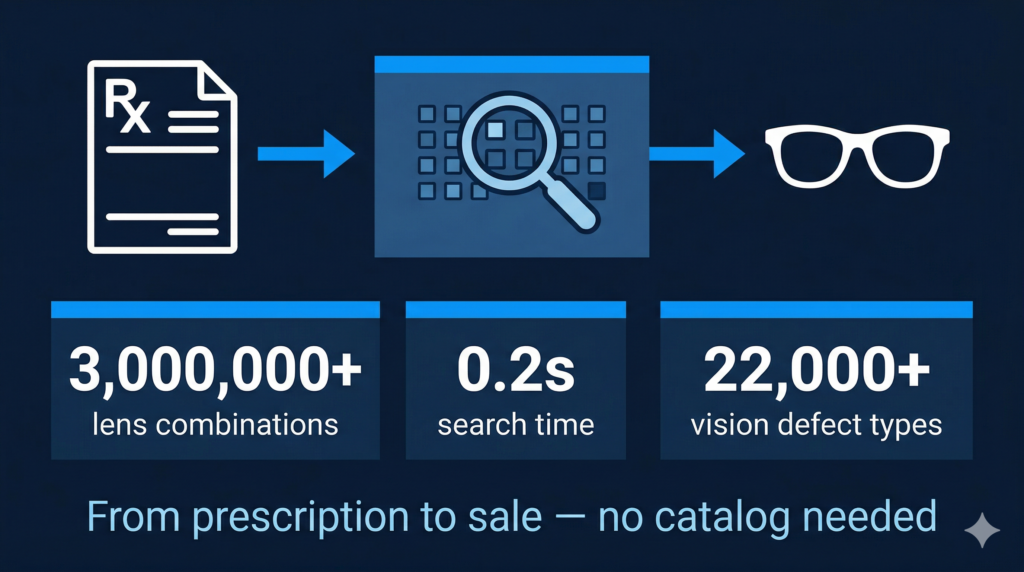
- Glasson’s Lens Finder analyzes over 3 million lens combinations in under 0.2 seconds, covering over 22,000 combinations of vision defects.
- The search form mirrors a standard prescription sheet — so there’s no learning curve for staff already familiar with prescriptions.
- Results are filtered in two stages: optical power first, then physical parameters — keeping large result sets manageable.
- One click from search results takes you directly into the sale, with no re-entering of data.
Why do opticians still waste time on lens searches?
The honest answer: because most software wasn’t built with the dispensing workflow in mind. A lot of optical practice tools handle billing, scheduling, and basic records well enough — but when it comes to the actual moment of matching a prescription to available lenses, they leave opticians to do the heavy lifting manually.
That means printed catalogs, supplier binders, separate web lookups, and a lot of mental cross-referencing — all while a client is waiting. Glasson interviewed a focus group of opticians, optometrists, and doctors specifically to understand this problem, and the numbers they found are striking: 74% of opticians say looking for lenses in catalogs is time-consuming and often very difficult. More than 45% say they lose money because they can’t compare lens prices effectively.
That’s not a minor inconvenience — it’s a structural inefficiency that affects every single client visit. If a practice sees 20 patients a day and wastes even five minutes per visit on lens searching, that’s nearly two hours of avoidable dead time every day.
What is a lens finder tool for opticians, and what should it actually do?
A lens finder tool is software that takes prescription data and returns a list of matching lenses from a database — automatically, in seconds, without any manual catalog work. That’s the baseline. A good one does a bit more:
- Covers a large enough database that virtually any prescription has viable matches
- Returns results fast enough that it doesn’t slow down a live client interaction
- Handles complex prescriptions — progressive lenses, high cylinder, unusual combinations — not just simple single-vision cases
- Lets you filter by physical parameters (index, diameter, material, coating) so results are actually useful, not just a raw list
- Connects to the rest of the workflow — so you can go from search result to completed sale without leaving the system or copying data between screens
That last point is often where dedicated lens search tools fall short. You get a good match, but then what? You still have to manually enter the lens details into your POS, check your stock separately, and build the order from scratch. Glasson’s Lens Finder is designed to skip all of that.
7-day free trial Got Any Questions? Let us know in the Contact Us form below.
How does Glasson’s Lens Finder actually work?
The workflow is built to be as close as possible to how opticians already think about prescriptions. Here’s what the process looks like in practice.
Step 1: Does the search form feel familiar?
Yes — and that’s intentional. The input form in Glasson’s Lens Finder is modeled on the standard prescription layout opticians already use every day: lens type, sphere, cylinder, axis, and pupil distance (PD) for right and left eyes. There’s no translation required between the prescription on your desk and what you type into the search.
That familiarity matters more than it might sound. A tool that requires staff to re-learn how to enter data introduces hesitation and errors. A form that looks like what you already know gets adopted without friction.
Step 2: How fast are the results, and how comprehensive is the database?
Results come back in under 0.2 seconds. Glasson’s search engine analyzes over 3 million lens combinations and supports over 22,000 combinations of vision defects. That coverage means the tool is useful for routine single-vision cases and for the more complex prescriptions — high cylinders, progressive lens requirements, unusual parameter combinations — that would previously require the longest catalog searches.
The results aren’t just a raw list either. Glasson divides the output into two stages: first you select the optical power match, then you refine by physical parameters. That two-step approach keeps the results actionable even when there are many matches — rather than presenting an overwhelming list all at once.
Step 3: What filtering options are available?
Once you have the optical power match, you can filter further by the physical characteristics of the lens. This is where the tool handles the more technical aspects of lens selection:
- Index and PHI (diameter) — specify the physical dimensions you need, including ranges of values if the situation is flexible
- Material — mineral, polycarbonate, and other available materials in your database
- Coating — UV, oleophobic, anti-reflective, and other coating specifications
The ability to enter ranges for diameter and index — rather than just a single fixed value — is particularly useful for complex prescriptions where there’s some flexibility in the physical specs. It means the search returns more usable results rather than excluding valid options because of rigid exact-match requirements.
Step 4: What happens after you find the right lens?
One click takes you from the search result to full lens details and the start of the sale process. There’s no copying of parameters from one screen to another, no switching systems, and no re-entering data that the search already captured.
From that point, the sale flows through Glasson’s integrated workflow: you add frames, select services, adjust pricing, apply discounts, and complete the order — all within the same system. The lens you found is already in the order. Your inventory reflects the change. The client record gets updated automatically.
This connects directly to Glasson’s Inventory module, which tracks real-time stock levels for lenses, frames, contact lenses, and accessories — so what you find in the Lens Finder is what you actually have available.
Here’s a summary of the Lens Finder’s key capabilities and what they mean for day-to-day dispensing:
| Capability | What it does in practice |
| 3M+ lens combinations | Covers virtually any prescription — routine single-vision through complex progressive cases |
| Under 0.2s search speed | Fast enough to use mid-conversation, without making the client wait |
| 22,000+ vision defect combinations | Handles unusual and complex prescription combinations, not just standard cases |
| Two-stage results (power, then filters) | Keeps large result sets manageable — no overwhelming list to scroll through |
| Index, PHI, material, coating filters | Precise physical matching, with range inputs for flexibility |
| One-click to sale | Goes straight from search result to order — no copying, no switching screens |
Want to see Glasson's full potential? Book a presentation
How does the Lens Finder connect to the rest of Glasson?
A standalone lens search tool solves one problem. An integrated one solves the whole workflow. Glasson’s Lens Finder is part of a broader practice management platform, which means the lens you find connects directly to several other parts of the system.
Does it connect to client records and purchase history?
Yes. When a client comes in for a follow-up or a repeat order, their previous lenses, prescriptions, and purchase history are already in Glasson’s Clients module. Staff can see what they bought last time, what they paid, and what their preferences were — before the search even starts. That context helps narrow the lens selection and makes for a more informed conversation with the client.
The Clients module stores frame and lens history, prescription records, and purchase details — all accessible during the dispensing workflow.
How does the Eye Care module fit in?
If the client has had an eye examination in Glasson, the prescription data from that exam flows through to the lens search. That means the optician doesn’t have to manually transcribe numbers from the exam record into the Lens Finder — the data is already there.
That closed loop from examination to lens search to completed order is one of the more significant practical benefits of having everything in one platform. Every manual data transfer is an opportunity for a transcription error. Removing those transfers removes those errors.
The Eye Care Module handles refraction studies, vision tests, and eye exams — feeding prescription data directly into the dispensing workflow.
What about stock and ordering?
The Lens Finder pulls from Glasson’s product inventory, so the lenses shown in search results are the lenses you actually have — or can order. Real-time stock visibility during lens selection means you’re not recommending a lens to a client and then discovering it’s out of stock when you go to place the order.
After the sale, Glasson’s statistics section tracks which lenses sell best and in what volumes. That data feeds back into smarter inventory and reorder decisions — not just for one practice, but across multiple branches if you’re running a chain.
The Statistics feature covers revenue by product category and top-selling items — useful for identifying which lens types drive the most volume.
Expert’s voice
“When we designed the Lens Finder, we started from a simple question: what does an optician actually need at the moment they’re sitting with a client? The answer wasn’t ‘a better catalog’ — it was no catalog at all. The form needed to feel like a prescription, the results needed to come back in under a second, and the path from ‘right lens found’ to ‘order placed’ needed to be as short as possible. A tool that handles the lens search but leaves the sale to a different system is only solving half the problem. The value comes from the integration.”
Marcin Debski, Product Manager @ Glasson
What does the data say about time savings?
Concrete numbers matter here. Glasson’s own research and user data point to some specific outcomes from switching away from manual catalog-based lens searches.
The 74% figure — the share of opticians who say catalog searching is time-consuming and difficult — is a baseline measure of the problem. But the more instructive number is what happens to dispensing time when the search is automated.
One practice reported cutting their dispensing time roughly in half after switching to Glasson. The downstream effect: additional capacity for more client appointments, and a measurable increase in monthly revenue.
That kind of gain isn’t surprising when you think about what’s actually being removed. Each manual catalog search involves locating the right binder or reference, scanning the correct table, cross-checking parameters, comparing prices across options, and writing down or remembering the result before entering it into another system. Replace all of that with a sub-second search and a one-click path to sale, and the time savings compound across every appointment.
| Metric | Manual catalog approach | Glasson Lens Finder |
| Time to find matching lenses | 10–15 minutes per patient (manual cross-referencing) | Under 0.2 seconds for full database search |
| Vision defect combinations covered | Limited by catalog completeness and staff knowledge | 22,000+ combinations covered automatically |
| Lens combinations searchable | Depends on which catalogs are available | 3 million+ combinations in one search |
| Price comparison | Manual, slow, often skipped | Multiple options returned simultaneously for comparison |
| Path from result to order | Requires manual re-entry into POS or order form | One click from search result to sale workflow |
| Risk of transcription error | Present at every manual transfer point | Reduced — data flows through from search to order |
Test Glasson for 7 days free of charge Any questions? Leave your contact details and we'll call you back.
Is Glasson’s Lens Finder worth switching to?
If your current lens search process involves any combination of physical catalogs, supplier web portals, or separate lookup tools that don’t connect to your sales system — yes, it’s worth evaluating seriously.
The case isn’t complicated. Every minute spent on manual lens lookup is a minute not spent with the client. Every manual data transfer between systems is a potential transcription error. And every practice running on disconnected tools is carrying unnecessary operational friction that adds up across hundreds of appointments a month.
Glasson offers a 7-day free trial with no payment details required upfront. That’s enough time to set up your lens database, run a few test searches against real prescriptions, and see whether the speed and integration actually work the way they’re described — in your practice, with your workflow.
Try the Lens Finder at glasson.app/engine or start the full 7-day trial at glasson.app.
FAQ

What is a lens finder tool for opticians?
It’s software that takes prescription data and automatically searches a database of available lenses to return matching options — replacing manual catalog lookups. A good lens finder tool is fast, covers a wide range of prescription combinations, and connects directly to the sale and ordering workflow.
How many lens combinations does Glasson’s Lens Finder cover?
Glasson’s search engine analyzes over 3 million lens combinations and supports over 22,000 combinations of vision defects. Results are returned in under 0.2 seconds.
Does the Glasson Lens Finder handle complex prescriptions like progressives?
Yes. The tool supports over 22,000 vision defect combinations, which includes progressive lens prescriptions and other complex cases — not just standard single-vision searches.
What filtering options does the Lens Finder offer?
After matching on optical power (sphere, cylinder, axis, PD), you can filter by index, diameter/PHI, material (e.g., mineral, polycarbonate), and coating (UV, oleophobic, anti-reflective). The tool accepts ranges for diameter and index, not just single values.
How does the Lens Finder connect to the rest of Glasson?
The Lens Finder is integrated with Glasson’s inventory (real-time stock visibility), client records (purchase and prescription history), Eye Care module (exam data flows directly into the search), and the sales workflow — so one click from the search result starts the order process.
Does the Lens Finder work for multi-branch optical practices?
Yes. Glasson is cloud-based and supports chain store management from one account. Stock visibility and lens search work across locations, with the ability to check per-branch inventory and transfer products between stores.
How is Glasson’s Lens Finder different from a standalone lens calculator?
A standalone calculator gives you a match but leaves the rest of the work to you. Glasson’s Lens Finder is integrated — the matched lens connects directly to real-time inventory, the client record, and the sale workflow. You go from prescription to completed order without leaving the system or re-entering data.
Can I compare prices between lens options in the search results?
Yes. One of the key problems Glasson’s research identified was that more than 45% of opticians lose money because they can’t compare lens prices effectively. The Lens Finder returns multiple matching options simultaneously, making price comparison straightforward.
How quickly can staff learn to use the Lens Finder?
The input form is modeled on a standard prescription sheet, so it uses the same format opticians already work with. Most staff find the learning curve minimal because the data entry mirrors what they do with paper prescriptions.
How do I try Glasson’s Lens Finder?
Glasson offers a 7-day free trial with no upfront payment required. You can start at glasson.app and access the Lens Finder as part of the full platform — including inventory, client records, statistics, and the full sales workflow.