Optical Retail Store Software: The Complete Buyer’s Guide for 2026

Walk into any busy optical store on a Saturday morning. The optometrist is mid-exam in the back. Up front, a staff member is trying to match a frame a customer wants to reorder — but it’s in a different system to the prescription, which is in a different system to the inventory. By the time they’ve stitched it together, the customer is getting restless. This is the problem that optical retail store software exists to solve: not managing a shop, not managing a clinic, but managing both — simultaneously, without seams.
Key Insights
Here is what this guide covers and what you need to know before evaluating any platform:
- Optical retail sits at the intersection of clinical practice and fashion retail — and most software only understands one half of that equation
- The global optical retail market is worth USD 158.59 billion in 2025, growing steadily; physical stores still account for 61% of the market
- Bad software has a measurable cost: 15–20 hours of staff time lost weekly, 2–3 lens remakes per month at $150–200 each, and an industry-average optical capture rate of only ~50%
- Optical retail store software must cover seven pillars: POS, inventory, prescriptions/CRM, scheduling, lens selection, communication, and analytics
- Glasson is purpose-built for optical retail — with a 3.5M+ lens database returning results in under 0.2 seconds, a connected 8-step diagnostic workflow, and two-way SMS/email CRM — starting at $99/month with a 7-day free trial
What is optical retail store software — and why is it a category of its own?
Optical retail store software is the operational platform that runs every aspect of an optical store: patient records, scheduling, prescriptions, inventory, point of sale, lab ordering, and customer communication. The key word is ‘every’ — because the defining challenge of optical retail is that none of these things can work properly in isolation.
Here is what makes optical stores genuinely unusual. They run two completely different businesses under one roof. At the back, you have a clinical practice: eye exams, refraction data, optical parameters, diagnostic notes, prescription history. At the front, you have a fashion retail operation: frames by brand, style, size, and color; contact lenses tracked by power and base curve and expiration date; bundled transactions that combine multiple line items into one custom order. One staff member needs to move fluently between both worlds, often within the same conversation with the same customer.
Generic retail systems — Square, Lightspeed, and their equivalents — cannot handle prescription parameters, PD measurements, progressive fitting height, or vision insurance billing. Generic medical software can’t track a frame collection by color and temple length, or process a composite sale of frame plus two lenses plus a coating. The result, in most practices that cobble systems together, is workarounds: spreadsheets, paper files, separate apps, and staff who spend hours reconciling data between platforms instead of serving customers.
How big is the optical retail market — and why does software matter more than ever?
The optical retail industry is large, growing, and under competitive pressure from multiple directions. Understanding the market context matters when you’re choosing software — because the choice shapes whether your practice can compete effectively over the next five years, not just get through next month.
What do the market numbers tell you?
The global optical retail market was valued at USD 158.59 billion in 2025, projected to reach USD 185.95 billion by 2031. Physical stores still command 61% of that market — online channels are growing at 7.44% CAGR, but in-store remains the dominant sales channel. The pressure online is creating is not displacement — it is a higher bar for the in-store experience.
The optical software market itself is growing even faster: valued at USD 1.2 billion in 2024, forecast to reach USD 2.5 billion by 2033 at 9.5% CAGR. This is a category where investment is accelerating sharply, driven by practices recognizing that operational software is a competitive variable, not just back-office overhead.
Optical retail and software market at a glance
| Metric | Value | Source |
|---|---|---|
| Global optical retail market (2025) | USD 158.59 billion | Mordor Intelligence |
| Global optical retail market (2031) | USD 185.95 billion | Mordor Intelligence |
| Contact lens segment CAGR (2025–2031) | 8.01% | Mordor Intelligence |
| Online eyewear channel CAGR | 7.44% | Mordor Intelligence |
| Offline stores’ share of market | 61.12% | Mordor Intelligence |
| Optical software market (2024) | USD 1.2 billion | LinkedIn analysis |
| Optical software market (2033) | USD 2.5 billion | LinkedIn analysis |
| Optical software CAGR | 9.5% (2024–2033) | LinkedIn analysis |
Why is the aging population relevant to software decisions?
One of the steadier growth drivers in optical retail is demographic: an aging global population means more people needing vision correction, combined with rising screen time creating vision issues in younger cohorts too. A growing patient base puts more pressure on operational efficiency — which is exactly where the right software makes the most difference.
Contact lenses, the fastest-growing product segment at 8.01% CAGR, increasingly work on subscription and refill models. Managing those refill triggers, expiration dates, and automated recall communications manually — across hundreds or thousands of patients — is how practices leave revenue on the table.
7-day free trial
Got Any Questions? Let us know in the Contact Us form below.
What does optical retail store software actually need to do?
This is the practical question, and it has a clear answer. Optical retail software must cover seven interconnected pillars. Miss any one of them and you will either need a separate tool — which creates a gap — or a workaround, which creates waste.
Pillar 1: Point of sale built for optical transactions
Optical POS is not the same as general retail POS. A frame sale is not like selling a jacket. A typical optical transaction is a composite order: a frame, a right lens, a left lens, coatings, and potentially a warranty add-on, all priced together, with some portion covered by vision insurance and the rest paid by the patient. A POS system that cannot handle bundled transactions, split payments, and staged deposits — where the patient pays part on order and the balance on collection — will force your staff into manual calculations every single time.
Optical POS also needs real-time inventory integration (decrement stock the moment a sale is made), VAT invoice generation, and the ability to capture upsell moments — lens coating upgrades, second pair discounts — at the point of dispensing. These are not optional extras; they are the baseline of what optical transactions require.
Pillar 2: Inventory management for eyewear
Optical inventory has more dimensions than almost any other retail category. Frames need tracking by brand, style, size, and color. Contact lenses need tracking by power, base curve, diameter, and expiration date. A mid-sized optical store in Canada reduced its inventory costs by 25% after implementing dedicated optical retail software — the visibility into slow-moving stock alone changed its buying decisions.
The minimum requirements: real-time stock updates with every sale, barcode and QR scanning, automated reorder alerts so you never run out of bestsellers, and dead stock identification so you stop buying products that sit on the shelf for months. Without these, you are managing eyewear inventory the same way a general retailer manages clothing — and paying the price in stockouts and tied-up cash.
Pillar 3: Prescriptions and CRM — the patient-as-customer problem
Every optical customer is also a patient. That means their CRM record needs to hold clinical data — prescription history, eye health notes, refraction results — right alongside retail data: what frames they’ve bought, what they’ve tried and rejected, whether they prefer lightweight titanium or classic acetate. When a patient comes back two years later and your staff can pull up their full history in 10 seconds, that is the moment when personalization becomes a competitive advantage instead of a nice idea.
The CRM also needs family account linking — group appointments, shared preferences, offers that make sense for a household rather than a single individual — and recall triggers that automatically flag when someone is overdue for their annual exam or contact lens refill. Details on how client management works are in Glasson Clients.
Pillar 4: Appointment scheduling connected to the clinical workflow
An unfilled slot in an optical practice is double revenue lost: the exam fee and the eyewear sale that follows. Scheduling software that does not connect to the clinical workflow forces a manual handoff — someone has to walk the exam results from the diagnostic room to the dispensing desk, or re-enter the prescription data. That manual step is where transcription errors happen, where prescriptions get misread, and where lens remakes originate.
Online self-booking has become a real factor: in some documented practices, 60% of bookings happen outside business hours — meaning patients book in the evening or on weekends when no staff are available to answer a phone. Automated appointment reminders have been shown to reduce no-shows by 40%. These are operational gains that pay for themselves quickly. See Glasson Online Reservation for how self-booking works in practice.
Pillar 5: The lens selection engine
This is the feature that most clearly separates purpose-built optical retail software from everything else. Without a dedicated lens finder, matching a complex prescription — high power, significant astigmatism, progressive requirement — to the right lens takes 10 to 15 minutes of manual catalog searching. For a practice seeing 30 patients a week, that is 7.5 hours of staff time per week consumed by a problem software can eliminate in under 30 seconds.
The lens finder also prevents compatibility errors. Wrong material for a high Rx. Edge thickness problems the optician didn’t catch. Cylinder exceeding design limits. Each of those errors becomes a lens remake, and practices typically absorb 2–3 remakes monthly at $150–200 each — $3,600 to $7,200 per year in preventable costs. More on the Glasson lens engine at Glasson Lens Finder.
Pillar 6: Communication and marketing automation
Retention in optical retail is driven by consistency: consistent reminders, consistent follow-ups, consistent outreach to lapsed patients. Without automation, these things depend on staff memory and initiative — which means they happen sometimes, not always.
Communication tools should cover automated reminders before appointments, follow-up messages after completed exams, recall campaigns for annual exam overdue patients, targeted offers for specific segments (parents, contact lens wearers, patients interested in specific frame categories), and two-way messaging where patient replies are logged in their record. Full details at Glasson Communication.
Pillar 7: Analytics you can actually act on
What are your ten best-selling frames this quarter? Which staff member has the highest average transaction value? What time slots consistently go unfilled? Which products are tying up cash as dead stock? If your software cannot answer those questions within three clicks, you are running your practice on instinct instead of information.
Useful reporting covers sales by product, category, brand, and staff member; inventory turn rates; staff performance metrics; peak hour analysis; and financial dashboards covering inflows, outflows, and income. See how Glasson handles analytics at Glasson Statistics.
“When I talk to optical store owners who’ve switched from a stitched-together setup to a purpose-built platform, the first thing they mention isn’t a specific feature — it’s the feeling that the system understands their business. The lens finder connects to the Rx. The Rx connects to the exam. The exam connects to the appointment. That’s not a feature list. That’s how a practice actually runs.”
— Marcin Debski, Product Manager @ Glasson
What is the real cost of using the wrong software?
This is the question worth sitting with before any software evaluation. Bad optical retail software — or no dedicated software — has a measurable cost that shows up in staff hours, error rates, and revenue that never materializes. These numbers are not hypothetical: they reflect documented experiences from optical stores that have made the switch.
| Cost Category | Annual Impact | Driver |
|---|---|---|
| Staff time lost to manual workarounds | ~$6,500 per employee* | 15–20 hrs/week at $25/hr |
| Lens remakes from compatibility errors | $3,600–$7,200 | 2–3 remakes/month at $150–200 |
| Revenue lost to optical capture gap | Varies (industry avg ~50%) | Friction in clinical-to-retail handoff |
| Stockouts on bestsellers | Lost sales, unquantified | Reactive inventory management |
| Staff onboarding time (complex systems) | Lost productivity | Weeks to get new staff productive |
* Conservative estimate: 15 min/day per staff member × 260 working days × $25/hour
The 50% optical capture rate statistic is particularly striking. The industry average means that roughly half of patients who get an eye exam in your practice leave without buying eyewear from you. Disconnected systems that slow the clinical-to-retail handoff — or fail to surface the right lens options quickly — are a major contributor. Improving that capture rate from 50% to 60% on 500 annual exams, at an average frame sale of $300, is $15,000 in additional revenue per year.
The reverse is also true. A practice that switched to dedicated optical retail software and reduced inventory costs by 25% — that is not an edge case. That is what happens when you have real-time stock visibility, automated reorder alerts, and dead stock reporting instead of manual counts and gut feel.
Want to see Glasson's full potential?
Book a presentation
What should you look for when evaluating optical retail store software?
There are dozens of platforms in this category, from general retail POS with optical add-ons to dedicated clinical systems with limited retail logic. The evaluation checklist below focuses on the questions that separate genuinely useful platforms from software that looks good in a demo and creates friction in daily use.
Does the workflow actually connect end-to-end?
This is the most important question. It is not enough for a platform to have scheduling and inventory and a lens finder — they need to work as a single connected system. When a patient checks in, does the system transition to the diagnostic workflow automatically? When the exam finishes, does the prescription flow into the lens finder without manual re-entry? When a lens is selected, does the inventory update in real time and the lab order go out without a separate step? Every manual step between those stages is a risk point — and a source of errors.
Is it fast enough to use during a patient interaction?
Software that requires five screens to find insurance coverage, or three minutes to pull up a prescription, is not just slow — it is actively damaging. It breaks the flow of a consultation, makes the patient feel like an inconvenience, and reduces the likelihood of an upsell. The lens finder should return results in seconds, the patient record should be accessible immediately, and the booking calendar should be readable at a glance.
Can retail staff actually use it, or does it require an optometrist to operate?
Some platforms are built for optometrists and tolerated by retail staff. The diagnostic modules are rich, but the dispensing workflow is complex, the inventory screens assume clinical knowledge, and new employees need weeks to get productive. In a busy optical store, software training is not a luxury — it is time and money spent on something that should be intuitive from day one.
Does it handle the financial complexity of optical transactions?
Check the POS in detail. Can it handle split payments between insurance and patient? Does it support staged deposits — payment on order, balance on collection? Can it generate the detailed invoices your patients need for reimbursement? Does it track refunds and prepayments cleanly? These are not edge cases in an optical store — they are every other transaction.
What does the vendor’s support model look like?
Cloud-based optical retail software should come with real support: account managers, training on onboarding, response time guarantees. A 7-day free trial with full feature access — not a limited demo — tells you whether the vendor is confident in their product. No credit card required tells you something about how they think about risk for new customers.
Buyer checklist: questions to ask when evaluating optical retail store software
| Evaluation Criterion | Why It Matters | Red Flag |
|---|---|---|
| End-to-end workflow integration | No manual steps between stages = no error opportunities | Separate tools for scheduling, Rx, POS |
| Lens finder speed and database size | 30 seconds vs 15 minutes per prescription | Manual catalog search or limited database |
| POS handles bundled optical transactions | Frame + lenses + coatings as one composite order | Each item processed separately |
| Inventory tracks optical dimensions | Frame size/color, lens expiry dates, contact Rx | Generic SKU tracking only |
| Two-way SMS/email included | Replies logged in patient record | One-way broadcast only |
| GDPR / data compliance | Patient health data requires secure handling | No mention of compliance |
| Free trial with full access | Evaluate the real product, not a demo | Demo-only or credit card required upfront |
How does Glasson work as optical retail store software?
Glasson is a complete optical salon management platform built from the ground up for optical retail — not adapted from a general medical system or a generic POS. The design philosophy is that integration is the product: individual features matter less than how they connect, because gaps between tools are where errors, delays, and wasted time accumulate.
What does the full patient workflow look like in Glasson?
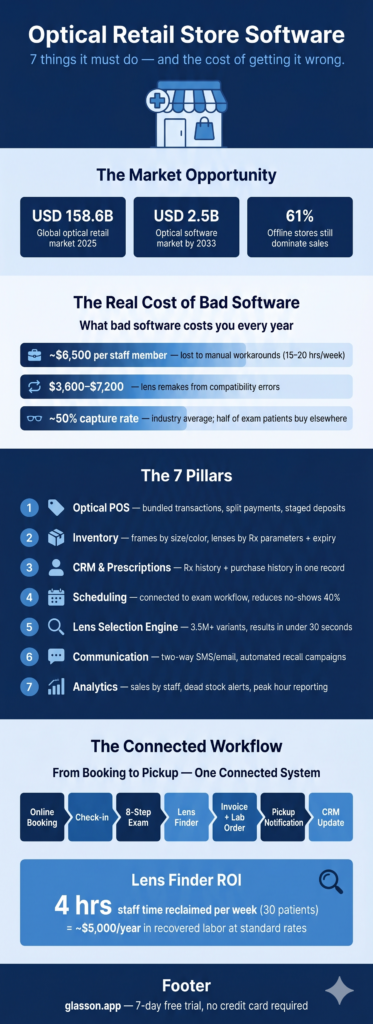
The connected workflow is the clearest way to show what purpose-built optical retail software actually means. Here is the full sequence:
- Patient books online through Glasson’s self-service page — shareable via your website, Google Business Profile, or email signature — and appears on the staff calendar immediately
- Check-in triggers the structured 8-step diagnostic examination: interview, illness history, refraction, optometry, anterior and inner eye examination, vision correction recommendations, appointment history
- Exam results flow directly into the Lens Finder — one click, no re-entry of prescription data
- Lens selected from 3.5M+ variants in under 30 seconds; inventory decrements in real time, pricing calculates automatically including any insurance portion, and the invoice generates
- Lab order submitted directly from Glasson — no separate system, no manual re-keying of parameters
- Patient receives automated follow-up reminders and collection notifications via SMS or email
- The complete interaction — from booking through exam, dispensing, payment, and communication — is logged in the patient’s CRM record
No duplicate data entry. No disconnected systems. No manual copying between platforms.
What makes the Glasson Lens Finder different?
The Lens Finder is Glasson’s most distinctive capability, and it illustrates the difference between optical-specific software and everything else. The database covers over 3.5 million lens variants from multiple manufacturers. It analyzes more than 22,000 combinations of visual defects and prescription patterns. Results return in under 0.2 seconds.
The interface is modeled on the standard paper Rx layout — familiar to any optician, fast to use without training. It auto-fills prescription data from the patient profile, filters by index, diameter, thickness, material, and coatings, and validates parameters automatically: it will flag if cylinder exceeds design limits, or if edge thickness is problematic for a given frame. For a practice seeing 30 patients weekly, this reclaims approximately 4 hours of staff time per week — around $5,000 per year in labor at standard rates.
How does inventory management work in Glasson?
Glasson’s inventory module tracks frames by brand, style, size, and color; contact lenses by power, base curve, diameter, and expiration date. Every sale decrements stock in real time — the inventory is always accurate, not accurate as of the last manual count. Barcode and QR scanning eliminate manual entry errors. Automated reorder alerts mean you find out a bestseller is running low before you run out. Dead stock reports tell you which products are tying up cash so you can make buying decisions based on data rather than habit.
Administration and inventory details are in Glasson Inventory and Glasson Administration.
What does Glasson’s cloud architecture mean in practice?
Glasson runs in the cloud — accessible from any device with an internet connection, whether that is a desktop at the practice, a tablet at the dispensing bench, or a phone for a manager checking stats from off-site. There are no servers to maintain, no VPNs to configure, and no IT staff required. Updates happen automatically — you are always on the current version without scheduling a system upgrade or paying for a maintenance contract.
For independent practices competing against chains with larger IT budgets, cloud-based optical retail software is the equalizer. The same real-time data access, the same security (bank-level encryption, automatic backups, full audit trails), the same multi-location capability when you’re ready to grow — without the infrastructure overhead.
Test Glasson for 7 days free of charge
Any questions? Leave your contact details and we'll call you back.
What does Glasson cost — and what does the trial include?
Glasson’s pricing is a single monthly fee per location with no module costs and no hidden add-ons for the features that make the platform actually work. Everything — the lens finder, the eye care module, two-way SMS, automated recall campaigns, inventory management, statistics, and GDPR compliance — is included in the base plan.
| Plan | Price | Best for | Staff accounts |
|---|---|---|---|
| Optometrist | $99/month | Solo practitioners | Single user |
| Optician | $149/month | Optical stores with staff | Unlimited |
| Optical Chains | Individual pricing | Multi-location operations | Unlimited |
Automated SMS messages are billed separately at $0.04–$0.10 per message. The 7-day free trial gives full access to every feature — including the lens database, scheduling, inventory, CRM, and analytics — with no credit card required. Based on documented practice experience, positive ROI typically arrives within 2–3 months. Full pricing details are at Glasson Price List.
FAQ — Optical Retail Store Software

What is optical retail store software?
It is a platform that manages the complete operation of an optical store: patient records and prescriptions, appointment scheduling, lens selection, point of sale, inventory, lab ordering, and customer communication. Purpose-built optical retail software handles both the clinical side (prescriptions, diagnostic exams) and the retail side (frames, transactions, inventory) in one connected system.
How is optical retail software different from a general retail POS?
General retail POS cannot handle prescription parameters, PD measurements, progressive fitting height, vision insurance billing, or composite optical transactions. Optical retail software is built to understand the specific data structures and workflows of eyewear retail — including lens parameters, frame dimensions, and the clinical-to-dispensing handoff.
What is an optical capture rate and how does software affect it?
Optical capture rate is the percentage of patients who get an eye exam and then buy eyewear from the same practice. The industry average is around 50% — meaning half of exam patients buy elsewhere. Friction in the clinical-to-retail handoff, slow lens selection, and inability to show the right products quickly all contribute to that loss. Better software reduces friction and improves capture.
How many lens variants does Glasson’s database include?
Glasson’s Lens Finder covers over 3.5 million lens variants from multiple manufacturers. It analyzes more than 22,000 combinations of visual defects and prescription patterns and returns results in under 0.2 seconds.
Does Glasson handle insurance billing?
Glasson supports split payments — where insurance covers part of the transaction and the patient covers the rest — and generates detailed invoices for reimbursement. For specific insurance billing integrations, check the current feature set at Glasson’s features overview.
Can Glasson be used for multiple locations?
Yes. The chain plan includes a shared client database accessible across all locations, inventory visibility across stores, and standardized workflows. Individual pricing applies to multi-location deployments.
What is the 8-step diagnostic examination module?
Glasson’s Eye Care Module structures the clinical exam across eight steps: patient interview, illness history, refraction, optometry, anterior eye segment, inner eye segment, vision correction recommendations, and appointment history. The exam results flow directly into the Lens Finder and the patient’s CRM record.
How does automated recall work?
Glasson flags patients who are overdue for their annual exam and sends them a reminder via SMS or email automatically, without staff needing to pull a list manually. Timing and message content are configurable. The same logic applies to contact lens refill reminders.
Is Glasson GDPR compliant?
Yes. Glasson is built for GDPR compliance and the Data Protection Act, with bank-level encryption, automatic backups, full audit trails for health and communication data, and secure storage of sensitive clinical information.
How long does it take to get started with Glasson?
Glasson is designed to be operational within a practice’s first day. There is no long implementation project or consultant requirement. The 7-day free trial with no credit card gives you enough time to import records, run a test recall campaign, and process a few transactions before committing.