Guide for Independent Opticians and Optical Chains
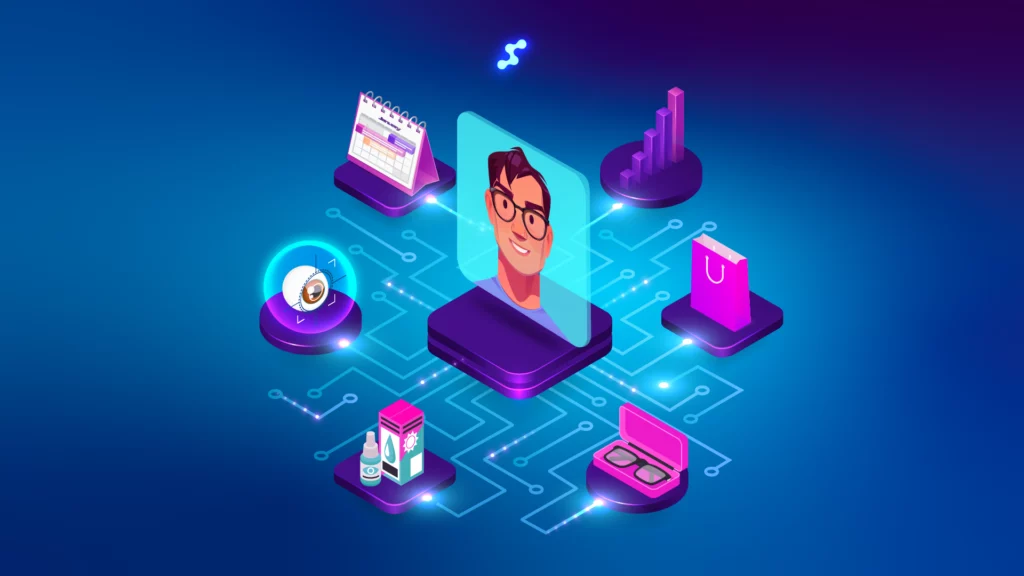
Your patient walks in for the third time this year. You greet them by name, mention they were looking at titanium frames last visit, and ask how the progressive lenses are settling in. They leave with a second pair and a referral card in their pocket. Now picture the opposite: “Sorry, which file are you in? Let me check three different systems.” The difference between those two experiences is optical CRM software — and it matters far more than most practice owners realize.
Key Insights
Before we dig in, here is what you need to know:
- Optical CRM is not a contact list — it unifies prescription data, purchase history, appointment scheduling, and communication in one place
- Generic CRM tools (HubSpot, Salesforce) cannot handle optical-specific data: prescriptions, lens variants, clinical exam workflows
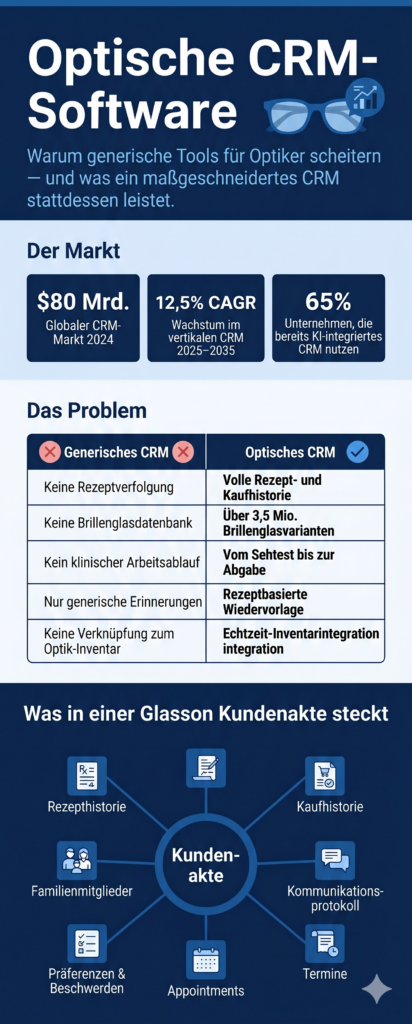
- The global CRM market hit $80 billion in 2024; vertical, industry-specific CRM is growing at 12.5% CAGR — the market is moving toward tools like Glasson
- The real cost of skipping CRM: missed annual recalls, lapsed patients, impersonal service, and staff wasting time on manual follow-ups
- Glasson is purpose-built for optical retail — with a 3.5M+ lens database, 8-step diagnostic module, two-way SMS/email, and automated recall campaigns — starting at $99/month
What is optical CRM software — and how is it different from regular CRM?
Optical CRM software is a system that tracks every interaction a patient or customer has with your practice: their prescriptions, purchase history, appointments, preferred contact method, and clinical notes. The goal is to help optical professionals deliver personalized, proactive service — at scale, consistently, every day. It is not a fancy contact list.
Here is where most people go wrong. They look at tools like HubSpot or Salesforce and think: “We can adapt this.” You can — technically. But optical retail has requirements that no generic platform was built for. Your customers are also patients. Their Rx data needs to sit right next to their frame purchase history. Your appointment booking needs to connect directly to the exam workflow. Your lens ordering needs to happen without re-keying the prescription from a PDF. Generic CRM tools see none of that.
Think of it this way: buying a pickup truck when you need a refrigerated delivery van. Both have wheels. One actually solves your problem.
Generic CRM vs. optical CRM: what each actually handles
| Capability | Generic CRM (e.g. HubSpot) | Optical CRM (e.g. Glasson) |
|---|---|---|
| Prescription tracking | No | Yes — integrated with exam workflow |
| Frame & lens purchase history | No | Yes — full purchase record per client |
| Lens database / finder | No | Yes — 3.5M+ variants in Glasson |
| Appointment scheduling integration | Via third-party add-on | Native, connected to diagnostics |
| Automated recall campaigns | Generic email only | SMS + email, clinically triggered |
| GDPR / health data compliance | Varies | Yes — full audit trails |
| Staff training time | Weeks | Often within first day (Glasson) |
7-day free trial
Got Any Questions? Let us know in the Contact Us form below.
What does it actually cost you not to have it?
This is the question most practice owners don’t ask until something goes wrong. Not having optical CRM is not a neutral choice — it is an active one, with compounding consequences. Every month without a CRM is a month where patients lapse silently, recalls go unsent, and staff rely on memory for follow-ups.
Let’s make this concrete. A patient gets new progressive lenses in January. Without CRM, what happens 14 months later? Nothing — unless someone on your team happens to remember. With CRM, they get an automated SMS: “Hi Sarah, it’s been over a year since your last exam. Ready to schedule your annual check-up?” That message costs you next to nothing to send. The cost of not sending it is a patient who booked at the practice down the street.
Here is what optical practices lose when they skip CRM:
- Lapsed patients: customers who haven’t visited in 18+ months and got no outreach — often the easiest revenue to recover
- Missed recalls: annual exam reminders not sent = appointments not booked = revenue not earned
- Impersonal service: staff have no context at the point of contact — every visit feels like the first visit
- Double data entry: prescriptions copied manually between systems, creating transcription errors and wasted time
- No visibility into performance: no way to know which campaigns worked, which staff drove the most sales, or which product lines are underperforming
None of this is dramatic. It is just slow, quiet, expensive erosion — of patient loyalty, of staff efficiency, and of revenue.
“The most underused feature in optical retail is the recall campaign. Practices that run automated annual exam reminders consistently see a 15–20% increase in scheduled appointments within the first three months. It is not magic — it is just remembering to ask.”
— Marcin Debski, Product Manager @ Glasson
What should you look for in optical CRM software?
Not all optical CRM tools are built the same. Some were designed for optometry clinics first and retrofitted for retail. Others are generic platforms with an “optical module” bolted on. The checklist below separates genuinely useful optical CRM from software that just uses the right words.
Does it connect clinical data with retail data?
This is the first question to ask. If the prescription data lives in one system and the purchase history lives in another, you will be doing manual data transfer forever. A proper optical CRM stores the Rx alongside the frame purchase, the lens choice, and the follow-up appointment — all in one record, all accessible by the staff member standing in front of your customer right now.
Does scheduling connect to the clinical workflow?
Scheduling is not just about booking slots. When a patient checks in, the system should transition them into the exam workflow automatically. When the exam finishes, the prescription should flow directly into lens selection. When lenses are chosen, the lab order should go out without re-entry. If any of those steps require someone to type the same data twice, the system is creating work, not saving it.
Can it automate the follow-ups you keep forgetting?
Annual exam recalls. Post-purchase check-ins. Birthday messages. Lapsed customer outreach. Appointment reminders 24 hours before. If your CRM cannot automate these messages — via SMS and email, triggered by real patient data — you are going to keep relying on staff memory. Which means it is not going to happen consistently.
Is it two-way on communications?
Sending a reminder SMS is easy. What happens when the patient replies? In a proper optical CRM, that reply goes straight into their record, staff get notified, and the conversation is logged. In a basic system, it goes to a reply-all inbox that nobody checks. The difference shows up in patient satisfaction and missed messages.
Does it give you segmentation for marketing?
Not every message should go to every patient. Parents with kids in school need different campaigns than retired patients. Contact lens wearers behave differently than frame buyers. Customers who asked about eco-friendly frames last year should hear about your new sustainable collection first. A CRM that cannot segment by these criteria forces you to send the same message to everyone — which means it lands for nobody.
Non-negotiable features checklist for optical CRM
| Feature | Why it matters | In Glasson? |
|---|---|---|
| Unified client record (Rx + purchases) | One place for every patient interaction | Yes |
| Appointment scheduling integration | Connects booking to exam to lab order | Yes |
| Automated SMS + email reminders | Reduces no-shows, triggers recalls | Yes |
| Two-way communication logging | Replies go into patient record | Yes |
| Audience segmentation | Targeted campaigns, not mass blasts | Yes |
| Family account linking | Group appointments, shared offers | Yes |
| Inventory integration | See stock during sales conversation | Yes |
| Reporting and analytics | Know what’s working | Yes |
| GDPR compliance | Health data requires secure handling | Yes |
Want to see Glasson's full potential?
Book a presentation
How does Glasson handle CRM for optical practices?
Glasson was built from a single question: what does a modern optical salon actually need? Not a medical clinic. Not a general retail store. An optical salon — where customers are also patients, where the product requires clinical expertise, and where personalized service is the main competitive advantage. Everything in the platform flows from that starting point.
What does a Glasson client record actually contain?
Each client profile in Glasson is built to hold the full picture. You can access every email and SMS ever sent and received, the complete purchase history (frames, lenses, accessories, services), preferences and conditions including favorite brands and any relevant allergies, clinical details including prescription history and eye health notes, linked family members for group management, and uploaded files or scanned documents. Every team member sees the same up-to-date record in real time. When a customer calls, whoever picks up can see everything — not just the last appointment.
This client module is accessible in Glasson Clients.
How does the scheduling work in practice?
Glasson’s calendar is the hub of the entire workflow, not a standalone booking widget. The color-coded visual calendar shows appointment types, staff availability, and patient status (checked in, in progress, completed) at a single glance. When a patient books online — through Glasson’s public booking page, shareable via your website, Google Business Profile, or email signature — the confirmation goes out instantly. Reminders fire 24–48 hours before, and follow-ups trigger automatically after the visit. Cancellation slots can be filled with targeted booking invitations.
Online reservation details are at Glasson Online Reservation.
What makes the communication tools different?
Glasson’s SMS and email tools are two-way. Send a reminder, an offer, or a check-in — and when the patient replies, the response lands directly in their record. Staff get instant notifications. Nothing falls through the gaps. Every message, in every direction, is logged, searchable, and attached to the right person. No lost messages sitting in a shared inbox. More on this in Glasson Communication.
How does the Lens Finder connect to the CRM?
This is one of Glasson’s most distinctive features. The integrated lens database holds over 3.5 million lens variants. Staff enter a prescription and get recommendations within 30 seconds, filtered by parameters relevant to the patient. The lenses a patient considers or purchases are recorded in their profile, so the next conversation starts with full context. Staff don’t need to pull out a catalog or open a separate supplier website. The full details are at Glasson Lens Finder.
What is the 8-step diagnostic examination module?
Glasson includes a structured eye care module covering the full diagnostic workflow: patient interview, illness history, refraction, optometry, anterior and inner eye segment examination, vision correction recommendations, and appointment history. This clinical data integrates directly into the client record and the Lens Finder. The prescription flows from the exam into lens selection without anyone retyping a number.
What does the reporting tell you?
Glasson’s statistics module gives you dashboards on revenue by period, sales by staff member, most popular products, pending orders, daily and stock balance reports, and detailed order breakdowns. The point is not more data — it is faster decisions based on accurate data. See Glasson Statistics.
How Glasson compares to the alternatives
| Dimension | Generic CRMs | EHR platforms | Glasson |
|---|---|---|---|
| Optical-specific design | No | Partial (clinical focus) | Yes — retail + clinical |
| Lens database | No | Some integrations | 3.5M+ variants, built-in |
| Prescription tracking | No | Yes | Yes |
| Intuitive for retail staff | Variable | Often complex | Core design principle |
| Onboarding time | Weeks | Weeks | Often within first day |
| Automated SMS/email | Via add-ons | Varies | Built-in |
| GDPR compliance | Varies | HIPAA (US focus) | Yes |
| Trial | Varies | Varies | 7 days, no credit card |
Does CRM work differently for independent practices vs. chains?
Yes — though perhaps not in the way you’d expect. The core features are the same. The scale of impact is different. An independent practice and a five-location chain both need client records, scheduling, recalls, and communication tools — the chain just needs all of it to work consistently across every location.
What does Glasson offer independent opticians?
For an independent practice with one or two locations, the biggest gains from CRM are time and consistency. Automated appointment reminders mean staff don’t spend mornings on confirmation calls. Recall campaigns run without anyone having to pull a list manually. The communication history means anyone on the team can pick up a customer conversation mid-thread without asking the patient to repeat themselves. Glasson’s Optician plan starts at $149/month and supports unlimited staff members — you are not paying per seat as you grow.
Inventory and administration tools are detailed in Glasson Inventory and Glasson Administration.
What does multi-location CRM look like with Glasson?
For optical chains, Glasson offers a dedicated plan with a shared client database accessible across all locations. A patient who visits your downtown store can be served seamlessly at your suburban branch — same record, same history, same context. Inventory is visible across stores. Standardized workflows apply everywhere. Individual pricing is available for chain-scale deployments. That means your customer’s experience is consistent whether they walk into location one or location five.
Test Glasson for 7 days free of charge
Any questions? Leave your contact details and we'll call you back.
What does Glasson cost?
Glasson offers three plans. All of them include the full lens finder, unlimited clients, two-way communication history, automated SMS and email, the Eye Care Module, calendar and appointment history, inventory, statistics, and GDPR compliance. There are no hidden add-ons for the core features that make optical CRM actually work.
| Plan | Price | Best for | Unlimited clients? |
|---|---|---|---|
| Optometrist | $99/month | Solo practitioners | Yes |
| Optician | $149/month | Optical stores with staff | Yes |
| Optical Chains | Individual pricing | Multi-location operations | Yes |
Automated SMS messages are billed separately at $0.04–$0.10 per message. There is a 7-day free trial with no credit card required. Full pricing details are at Glasson Price List.
How do you get started with optical CRM software?
Start with one question: what is the most expensive thing your practice is currently not doing? If the answer is annual recalls, start there. If it’s consistent communication with lapsed patients, start there. The value of CRM is not in setting up every feature on day one — it is in picking the one thing that will have the biggest immediate impact and building from there.
Glasson is designed to be operational within a practice’s first day. There is no weeks-long implementation project. No consultant required. The 7-day free trial gives you enough time to import your client records, run a test recall campaign, and book a few appointments through the online scheduling page — with no commitment and no credit card.
If you want to see how the full system fits together before committing, Glasson’s features overview walks through each module in detail.
FAQ — Optical CRM Software

What is the difference between optical CRM and practice management software?
Practice management software typically focuses on scheduling, billing, and clinical records. Optical CRM adds the relationship layer: automated follow-ups, communication history, marketing segmentation, and recall campaigns. The best platforms — like Glasson — combine both in a single system so you’re not managing two tools.
Can I use HubSpot or Salesforce for an optical store?
You can, but you’ll spend months customizing it and still end up with gaps. Neither platform handles prescription data, optical inventory, lens databases, or clinical exam workflows natively. You will need integrations, workarounds, and custom fields for data that purpose-built optical CRM handles out of the box.
How does automated recall work in Glasson?
Glasson flags patients who are overdue for their annual exam and sends them a reminder via SMS or email — automatically, without staff intervention. Timing, message content, and delivery channel are all configurable. The system also supports follow-up messages after completed appointments.
Does Glasson handle two-way SMS?
Yes. When a patient replies to an SMS sent from Glasson, their response is logged directly in their client record and staff receive an instant notification. Every message, in both directions, is searchable and attributed to the right patient.
Is Glasson GDPR compliant?
Yes. Glasson is built for GDPR compliance and the Data Protection Act, with full audit trails for health and communication data and secure storage of sensitive personal and clinical information.
How long does it take to get started with Glasson?
Glasson is designed to be operational within a practice’s first day. There is no long implementation process or consultant requirement. The 7-day free trial with no credit card gives you enough time to set up your account, import client records, and run a test campaign before committing.
What is the Lens Finder?
The Lens Finder is Glasson’s integrated lens database with over 3.5 million variants. Staff enter a prescription and receive filtered recommendations within 30 seconds. Lenses considered or purchased are recorded in the patient’s CRM profile for future reference.
Does Glasson support multiple locations?
Yes. Glasson’s chain plan includes a shared client database accessible across all locations, inventory visibility across stores, and standardized workflows. Pricing for chain deployments is available on request.
What communication channels does Glasson support?
Glasson supports both SMS and email, with automation for appointment reminders, recall campaigns, birthday messages, lapsed client outreach, and targeted marketing. All messages are two-way and logged in the patient record.
How much does Glasson cost, and is there a free trial?
Glasson starts at $99/month for solo practitioners and $149/month for optical stores with staff. Multi-location pricing is available on request. There is a 7-day free trial with no credit card required.