Optical Store Management System: What You Actually Need and How Glasson Covers It

Running an optical store means juggling more moving parts than most retail businesses. Appointments, eye exams, prescription records, lens selection, frame sales, inventory across multiple suppliers, client follow-ups, staff permissions, and end-of-day reporting — all in a single working day. A lot of practices manage this with a patchwork of separate tools: one for scheduling, one for stock, a spreadsheet for client records, maybe a generic POS for sales. It works, until it doesn’t. This article covers what a purpose-built optical store management system should handle, and how Glasson approaches each piece.
Key insights
- 67% of optical stores don’t collect their client sales data — a gap that directly limits repeat sales and personalized service.
- 81% of clients say their decisions are based on the level of customer service they receive.
- 85% of clients find it helpful to receive a text reminder to collect their eyeglasses, and 75% more client engagement is observed when clients are contacted by SMS.
- An optical store management system that’s genuinely integrated removes manual data entry at every handoff — from exam to lens selection, from lens selection to order, from order to client notification.
- Glasson’s Lens Finder searches over 3 million lens combinations in under 0.2 seconds, covering 22,000+ vision defect combinations.
- Multi-location practices can manage all branches — shared clients, shared inventory, stock transfers — from a single account.
Why do optical stores outgrow generic retail software?
Generic retail software is designed around a simple transaction: a customer picks a product, pays for it, and leaves. Optical retail doesn’t work like that. Before a sale can happen, there’s usually an eye examination. The exam generates a prescription. The prescription has to match to specific lens parameters. Those lenses have to pair with a frame the client chooses. The completed order needs to be tracked through manufacturing or delivery, and the client has to be notified when it’s ready for pickup.
None of that fits a standard retail POS model. When optical practices try to stretch generic tools to cover it, they end up with parallel systems that need manual synchronization: the exam record in one place, the lens order in another, the client history somewhere else. Every manual transfer between systems is time lost and an opportunity for an error.
A management system built for optical stores handles the whole chain as a single connected workflow. That’s the difference in practice — not just better software, but fewer handoffs, fewer errors, and faster service from the moment a client walks in to the moment they walk out with their new glasses.
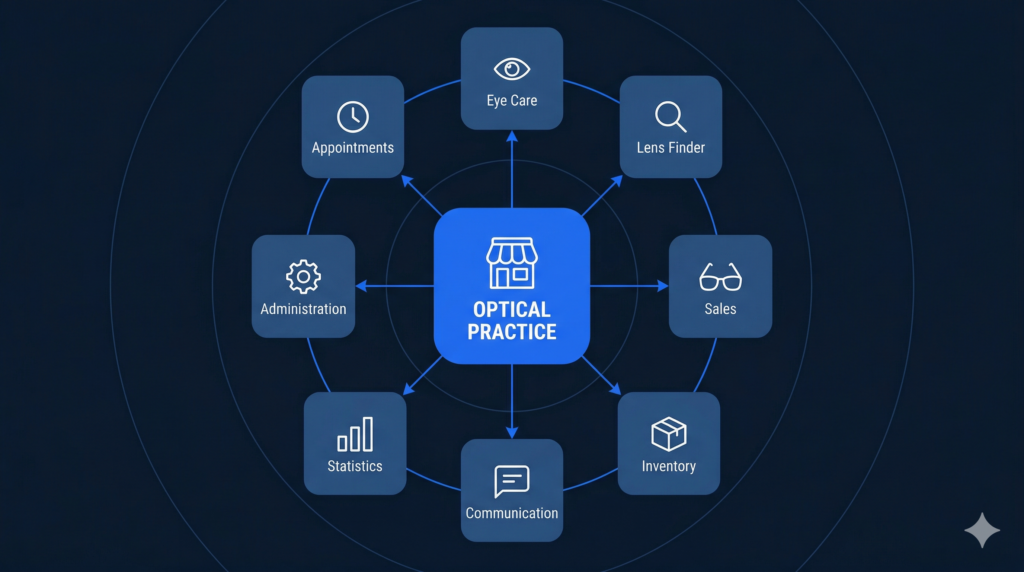
What should an optical store management system cover?
Before looking at Glasson specifically, it’s worth being clear about what the job description actually is for this kind of software. Optical store management is broader than most retail management — it covers clinical, retail, and operational functions under one roof.
Here’s a reference view of the core functional areas and what each needs to do:
| Functional area | What it needs to handle | Why it matters |
| Client management / CRM | Prescription records, purchase history, personal details, files, family links | 81% of client decisions are based on service quality — you need the data to deliver it |
| Appointments & scheduling | Online booking, calendar management, automated reminders | No-shows are lost revenue; reminders reduce them without staff time |
| Eye care / examinations | Vision tests, prescription recording, exam history | Prescription data needs to flow directly into lens selection — no transcription |
| Lens search & selection | Instant prescription-to-lens matching across a large database | Manual catalog searches waste 10–15 minutes per patient |
| Sales & POS | Orders, pricing, discounts, taxes, prepayments, refunds | Errors in this step affect revenue and client experience directly |
| Inventory management | Frames, lenses, contacts; real-time stock, FIFO, audits, multi-location | Stockouts and overstock both cost money — visibility prevents both |
| Communication | Automated SMS/email, templates, bulk messaging, order-ready alerts | 75% more client engagement when contacted by SMS |
| Statistics & reporting | Revenue by period, category, pending orders, staff KPIs | You can’t make good reorder or staffing decisions from memory alone |
| Administration & security | Staff permissions, GDPR compliance, multi-branch management | Multiple staff touching sensitive data need controlled access |
That’s a wide scope — and the reason a purpose-built optical platform exists rather than just a retail POS with add-ons. Let’s look at how Glasson covers each of these areas.
7-day free trial Got Any Questions? Let us know in the Contact Us form below.
How does Glasson handle the client and CRM side?
Client data is the foundation of everything else in an optical store. If you don’t know what a client bought last time, what their prescription was two years ago, or whether they prefer lightweight frames, you’re starting every visit from scratch.
Glasson’s client management module keeps prescription records, personal details, purchase history, and files — including photos of glasses clients have bought — all in one profile. Staff can attach files to client records, save notes from visits, and access the full history of any client at any point in the workflow.
The numbers behind this are worth noting: 67% of optical stores currently don’t collect their client sales data at all. That’s not a minor inefficiency — it’s a structural gap that limits every upsell conversation, every recall campaign, and every personalized recommendation.
The Clients module in Glasson integrates directly with sales, inventory, and communication — so when a client visits, their record shows not just who they are, but what they’ve bought, when they last came in, and what their prescription history looks like.
What about follow-up communication?
Keeping clients coming back is easier when you have a system that handles the communication side without requiring staff to manually track who to contact and when. Glasson’s communication module handles automated SMS and email messages, message templates, bulk sending, and order-ready notifications.
The engagement data here is striking: 85% of clients find it helpful to receive a text message reminding them to collect their eyeglasses, and SMS contact produces 75% more client engagement overall. That’s not a small effect — a simple automated message at the right moment is one of the highest-return actions an optical practice can take.
Glasson lets you set up SMS Premium messages with your company name as the sender rather than a phone number, which lands differently with clients than an anonymous number. Templates cover appointment reminders, order-ready notifications, special offers, and any custom occasion you want to acknowledge.
The full breakdown of what’s available is on the Communication feature page.
Want to see Glasson's full potential? Book a presentation
How does the appointment and clinical workflow connect to sales?
This is the integration that matters most in optical retail — and the one that causes the most friction when it’s missing. If your booking system, your exam records, and your sales workflow are in separate tools, someone has to manually bridge the gaps at each handoff.
How does online booking work in Glasson?
Glasson includes an online reservation module that lets clients book appointments directly — without requiring a phone call to the practice. The booking appears in the practice calendar, and automated reminders can be sent before the appointment to reduce no-shows. For clients who check their phone frequently throughout the day, the ability to book at any hour without waiting for office hours to open is a practical convenience that converts into actual bookings.
The appointment workflow feeds directly into the exam record. When the client arrives, their details are already in the system. When the exam is complete, the prescription is recorded in Glasson’s Eye Care module — and that prescription data flows forward into the lens search without any re-entry.
Details on the booking side are on the Online Reservation page.
What happens between the exam and the sale?
This is where Glasson’s Lens Finder earns its keep. Once the prescription is in the system, the optician can use the Lens Finder to search over 3 million lens combinations in under 0.2 seconds — filtered by optical power, then by physical parameters like index, diameter, material, and coating. The results show available lenses that match the prescription, and one click starts the sale.
That path — from exam record to lens match to completed order — happens entirely within Glasson. No switching systems, no manual transcription, no separate catalog check. The prescription that came out of the exam room is the same data driving the lens selection and the order.
More on how the Lens Finder works is covered on the Lens Finder feature page.
How does Glasson handle inventory across one store or several?
Inventory management in optics is genuinely complex: you’re tracking frames with dozens of color variants, lenses with prescription-specific stock, contact lenses in multiple replacement schedules, and accessories — all with different suppliers, lead times, and reorder thresholds.
Glasson’s inventory module covers the full product range: eyeglass lenses, frames, contact lenses, and accessories, grouped into categories for easier browsing. Stock levels update in real time as sales happen. The system uses FIFO inventory management, supports delivery recording and audits, and provides current stock visibility during the dispensing process — not just in end-of-day reports.
For multi-location practices, the inventory extends across branches. All stores in a Glasson chain share the same product inventory. You can check stock levels per location, initiate transfers between branches, and see the consolidated picture from one account — without calling individual stores or logging into separate systems.
Here’s what that looks like in operational terms:
- Real-time stock levels visible during frame and lens selection — no offering products that aren’t available
- FIFO tracking with delivery records and audit support built in
- Per-branch stock views accessible from one account for chain practices
- Stock transfers between locations handled directly in the system
- Category grouping for faster navigation during sales and stocktaking
The inventory module is described in full on the Inventory feature page.
Expert’s voice
“The question we hear most often from optical store owners isn’t ‘what features do you have’ — it’s ‘will my staff actually use it?’ That’s the right question to ask. A system can have every feature on a checklist, but if it requires three screens and a manual to complete a basic sale, staff will work around it instead of with it. Glasson was designed so that the most common daily tasks — searching for a lens, processing a sale, looking up a client, sending an order-ready message — take the fewest possible steps. The integration isn’t just about data flowing between modules; it’s about removing the moments where staff have to stop, switch context, or re-enter something they’ve already entered once.”
Marcin Debski, Product Manager @ Glasson
What does the reporting and administration side look like?
Running a practice without usable data is like navigating without a map — you can do it, but you’ll take wrong turns you didn’t need to take. Glasson’s statistics module covers the numbers that matter for day-to-day and longer-term decisions.
What data does Glasson give you?
The Statistics section covers revenue by period (with custom date ranges), sales reports, pending orders and their values, cash register records tracking inflows and outflows, Top 10 product and client sales, and financial performance summaries. Data is presented both numerically and as visual charts, so you can pull the format that makes most sense for what you’re analyzing.
That Top 10 view is particularly useful for inventory decisions: knowing which frames and lens categories actually sell guides reordering much better than guesswork or habit.
The full statistics breakdown is on the Statistics feature page.
How does Glasson handle multi-branch administration and security?
For chains, Glasson’s administration module gives you a single account view across all locations. All branches share the same client base and product inventory, with location-specific stock levels and transfer capability. That means a client who visits one branch can be served with complete history at any other — which matters for practices with clients who travel or visit different locations for convenience.
Staff permission levels let you control what each role can see and do. A front-desk staff member can process sales and check stock; a manager can view financial reports; only designated staff can modify inventory records or access sensitive data. The system is compliant with the Data Protection Act and saves all data in real time to the cloud — no local files, no risk of data loss if a device fails.
The administration features are detailed on the Administration page.
Test Glasson for 7 days free of charge Any questions? Leave your contact details and we'll call you back.
How does Glasson map to common optical store management requirements?
If you’re evaluating whether Glasson fits your practice — single location or chain, independent or growing — here’s a direct mapping of common requirements to what the platform actually offers:
| Requirement | Glasson’s approach |
| Central client records with prescription and purchase history | Clients module: prescription records, purchase history, files, personal details, family links — all in one profile |
| Appointment booking with automated reminders | Online Reservation module: client-facing booking, automated SMS/email reminders, reduces no-shows without staff time |
| Exam records flowing into lens selection | Eye Care module feeds prescription data directly into the Lens Finder — no manual re-entry |
| Fast, accurate lens search from prescription | Lens Finder: 3M+ combinations, under 0.2s, 22K+ vision defect types, one-click to sale |
| Integrated sales with pricing, discounts, taxes, prepayments | Inventory + sales workflow: all financial fields in one transaction, stored and integrated with reporting |
| Real-time stock control with FIFO and audits | Inventory module: live stock levels, FIFO, deliveries, audits, low-stock visibility during dispensing |
| Client communication via SMS and email | Communication module: templates, bulk messaging, automated reminders, order-ready alerts, SMS Premium |
| Revenue and stock KPIs | Statistics module: sales reports, Top 10, revenue by category, custom periods, cash register records |
| Multi-branch management from one account | Administration module: shared clients, shared inventory, per-branch stock, transfers, role-based permissions |
| Cloud access on any device | Fully cloud-based: real-time save, access from any internet-connected device, no local installation |
Is switching to Glasson worth it if you’re already managing on existing tools?
If your current setup is a collection of separate tools — a scheduling app, a POS, a stock spreadsheet, paper exam records — the honest answer is that the friction you’re experiencing is structural, not just a matter of which specific tools you use. You’re spending time and accuracy on the joins between systems that an integrated platform handles automatically.
Glasson is built for optical stores specifically, which means the workflow assumptions built into it — prescription to lens, client to communication, exam to order — match how optical practices actually operate rather than how a generic retail tool would expect them to work.
The 7-day free trial is enough time to run the actual workflow end-to-end: book an appointment, complete an exam, search for lenses, process a sale, and check the resulting data in the statistics view. That’s a realistic picture of whether the integration works the way it’s described, in a real practice setting.
Start the trial at glasson.app — no payment details required upfront.
FAQ

What is an optical store management system?
It’s software that covers the end-to-end operations of an optical practice: client records, appointments, eye exams, lens selection, sales, inventory, client communication, and reporting — in a single integrated platform rather than separate disconnected tools.
What makes Glasson different from a generic retail POS?
Glasson is built for optical practices, not retail in general. It includes a Lens Finder that searches 3M+ combinations from prescription data, an Eye Care module for exam records that flows into lens selection, and an inventory system designed for frames, lenses, and contact lenses — all connected in one workflow.
Does Glasson support multi-location optical practices?
Yes. Glasson supports chain store management from a single account. All branches share the same client base and product inventory. You can view per-branch stock levels, initiate stock transfers, and manage staff permissions across locations.
How does Glasson reduce no-show appointments?
Glasson’s Communication module sends automated appointment reminder SMS messages and emails to clients. The data shows 85% of clients find text reminders helpful, and SMS contact produces 75% more client engagement overall.
Can clients book appointments online through Glasson?
Yes. Glasson’s Online Reservation module gives clients a self-service booking option accessible at any time. Bookings appear in the practice calendar and can trigger automated reminders automatically.
How does Glasson handle prescription data from eye exams?
Glasson’s Eye Care module records prescription data from examinations. That data flows directly into the Lens Finder for lens selection — without manual re-entry. The exam record, lens selection, and sale all happen within the same connected system.
What communication tools does Glasson include?
Glasson includes SMS and email messaging with templates, bulk sending capability, automated appointment reminders, and order-ready notifications. SMS Premium messages show your company name as the sender rather than a number.
Is Glasson cloud-based?
Yes. Glasson is fully cloud-based. All data saves in real time and is accessible on any internet-connected device — computer, tablet, or mobile. There’s no local installation, and updates are applied automatically.
What inventory management capabilities does Glasson include?
Glasson tracks lenses, frames, contact lenses, and accessories with real-time stock levels, FIFO management, delivery recording, and audit support. Stock visibility is active during the sales workflow, and multi-location practices can transfer stock between branches directly in the system.
How long is the free trial and what does it include?
Glasson offers a 7-day free trial with access to the full platform — including the Lens Finder, client management, inventory, communication, Eye Care module, statistics, and administration tools. No payment details are required to start.