Optometry Practice Management Solutions: What Works and Why

Key insights
Practice management is one of those topics that sounds straightforward until you’re actually running a practice. This guide cuts through the generic advice and focuses on specific operational problems most optical practices face — and the solutions that actually address them, not just describe them.
- Most practice management problems trace back to the same root cause: fragmented tools that don’t share data, forcing staff to reconcile information manually across systems.
- Effective solutions work at the system level — connecting scheduling, client records, inventory, communication, and reporting into a single workflow rather than treating each area as a separate problem.
- The biggest operational wins tend to come from automation: appointment reminders, order notifications, and recurring reports that run without anyone remembering to trigger them.
- Measuring the right metrics — not just revenue, but no-show rates, frame turnover, and client retention — is what separates practices that manage reactively from those that manage proactively.
- Implementation matters as much as the tool itself: software that’s configured thoughtfully and used consistently delivers results; software that’s half-set-up collects subscription fees without delivering value.
What does “practice management” actually mean for an optical practice?
Ask ten different optometry practice owners to define practice management and you’ll get ten different answers — because the term genuinely covers a lot of ground. For some, it’s primarily about scheduling and reducing no-shows. For others, it’s inventory control and supplier relationships. For others still, it’s staff coordination, client communication, or financial reporting. In practice, good practice management means all of these things working together — not each one handled in isolation by a different tool, a different spreadsheet, or a different person who happens to own that particular process.
What makes optical practices specifically challenging to manage is that they operate at the intersection of healthcare and retail. On any given day, your team is handling clinical appointments, processing frame and lens sales, managing inventory from multiple suppliers, following up with clients about prescription renewals, and tracking financial performance across all of it. The practices that run smoothly are the ones where these workflows connect — where booking an appointment automatically populates the client record, where completing an exam feeds directly into lens search, where processing a sale updates inventory without a separate manual step.
What are the most common practice management problems — and what causes them?
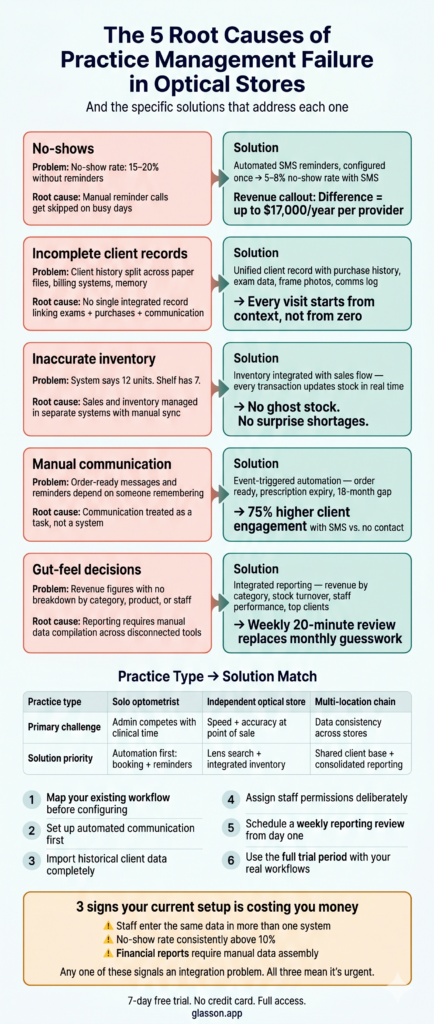
Before looking at solutions, it’s worth naming the problems clearly. Most practice management failures don’t happen because people aren’t trying hard enough — they happen because the systems in place create friction that compounds across hundreds of daily interactions. Here are the five most common problems optical practices report, along with what actually causes each one.
Problem 1: Too many no-shows and last-minute cancellations
No-shows are one of the most straightforward revenue leaks in any practice — and one of the most preventable. The typical cause isn’t client rudeness; it’s that people forget. An appointment booked three weeks ago competes with everything else in a client’s life, and without a reminder, it often loses. Practices relying on manual reminder calls find that on busy days, the calls don’t happen — which is exactly when the no-show problem is worst. The solution isn’t more phone calls — it’s automated SMS reminders that go out on a fixed schedule regardless of how busy the practice is, configured once and running continuously without staff intervention. Glasson Communication handles this automatically, with customizable templates and timing rules set up once per appointment type.
Problem 2: Client records that don’t tell the full story
A client walks in for a new pair of glasses. They’ve been to you twice before. Do you know what they bought last time? What their prescription was a year ago versus today? Whether they mentioned wanting to try contacts? If that information lives in a paper file, a disconnected billing system, or someone’s memory, the answer is probably no. Incomplete client records don’t just make service feel impersonal — they create real clinical and commercial risks: missed prescription changes, repeated recommendations for products already tried, and lost opportunities to suggest relevant upgrades. Glasson Clients keeps complete purchase history, exam records, communication logs, and client files — including frame photos — all linked to a single record accessible in seconds during any visit.
Problem 3: Inventory that doesn’t reflect reality
Walk into most optical practices and ask how many units of a specific frame are in stock. The system says twelve. A quick physical check finds seven. The discrepancy exists because sales were processed in one place, returns in another, and the last stocktake was three months ago. Inaccurate inventory creates a cascade of downstream problems: frames promised to clients that aren’t actually available, purchasing decisions based on ghost stock, and supplier orders that duplicate what’s already sitting in the back. The fix is an inventory system fully integrated with the sales flow — where every transaction updates stock counts automatically, with no separate manual step required. Glasson Inventory connects frames, lenses, contact lenses, and accessories to the sales process in real time.
Problem 4: Client communication that depends on someone remembering to do it
Order-ready notifications, prescription expiry reminders, birthday offers, seasonal promotions — every practice knows these communications drive retention and revenue. The problem is execution. When sending messages requires someone to manually check a list, pull contact details, and write individual messages, it gets deprioritized during busy periods. Busy periods are precisely when you have the most orders to follow up on — and precisely when no one has time to send manual messages. The solution is templated, automated communication that triggers on events. Glasson Communication supports both automated triggers and bulk campaigns, with SMS and email templates that take minutes to configure and then operate without ongoing effort.
Problem 5: Decisions made on gut feel instead of data
Which frame lines are actually profitable versus just popular? Are new clients from a specific referral source worth investing in? Is one staff member closing significantly more second-pair sales than others? These are answerable questions — if you have the data. Most practices that rely on manual reporting end up with a general revenue figure and not much else, which means strategic decisions default to intuition. Practices that review structured reports weekly consistently make better purchasing, staffing, and marketing decisions than those that rely on “how it feels.” Glasson Statistics surfaces all of this in a readable format without requiring any manual data compilation.
7-day free trial
Got Any Questions? Let us know in the Contact Us form below.
What does an integrated practice management solution actually look like?
The word “integrated” gets used a lot in software marketing and usually means very little. In the context of optometry practice management, it has a specific and important meaning: data created in one part of the system is immediately available in every other part, without export, import, copy-paste, or manual entry. Here’s what that looks like across a real patient journey — from first contact to follow-up after pickup.
Step 1: Appointment booked online, calendar updated automatically
A prospective client finds your practice through Google, sees the booking link, and schedules an appointment for next Thursday at 10am — at 9pm on a Tuesday, without calling anyone. Glasson Online Reservation adds the appointment to the calendar, sends an SMS confirmation to the client, and logs it against their record if they’re an existing patient or creates a new record if they’re not. Nobody on your team did anything — and the appointment is already confirmed and will trigger an automated reminder 24 hours before. The client is less likely to forget; your front desk handled zero calls for this booking.
Step 2: Exam conducted with structured digital records
The client arrives. Their previous prescription, purchase history, and any notes from prior visits are visible immediately from their record. The examination runs through the Glasson Eye Care Module, which covers the full diagnostic workflow: patient interview, refraction, optometry assessment, anterior and posterior segment examination, and recommendations on vision correction. Every field completed during the exam goes directly into the client’s record — no transcription, no re-entry, no paper form to scan later. Smart suggestions at each stage of the exam speed up data entry without reducing accuracy.
Step 3: Lens search starts from the exam result
The exam is complete. The prescription is already in the system. One click opens Glasson Lens Finder, and the prescription parameters populate automatically — no re-typing, no risk of transcription error. The search returns results from over 3.5 million lens variants, filtered by the client’s prescription, preferred coating, and price range. The time between completing an exam and presenting lens options drops from several minutes of catalog browsing to seconds of filtered results — a difference the client feels during the appointment, even if they can’t articulate why it felt efficient.
Step 4: Sale processed, inventory updated, order logged
The client chooses lenses and a frame. The sale is processed through the system — pricing applied, discount added if applicable, VAT calculated, invoice generated. The frame is pulled from Glasson Inventory and stock levels update in real time. The lens order is logged with a status the whole team can track. When the order is ready for pickup, the system flags it automatically — no sticky note on the front desk, no list to check manually.
Step 5: Client notified, follow-up scheduled without manual effort
The glasses are ready. Glasson Communication sends the client an SMS notification automatically — without anyone initiating it. In approximately 18 months, when the prescription is approaching expiry, another automated message reminds the client to book a new exam. None of these touchpoints required human initiation — they were configured once and now run as part of the practice’s standard operating procedure, whether it’s a quiet Thursday or the busiest day of the year.
How do you evaluate a practice management solution before committing?
The evaluation process is where most buying mistakes happen. Practices spend hours comparing feature matrices and watching demos designed to look good — then discover after signing that the daily-use experience is completely different. There’s a better way: run your own workflow through the system during a free trial, using real scenarios, before any financial commitment.
| Test | What to do | What you’re looking for | Red flag |
|---|---|---|---|
| End-to-end workflow | Book an appointment, run a mock exam, search for a lens, process a sale | Each step flows naturally into the next without re-entering data | Any point where you leave one module and start fresh in another |
| Lens search speed | Enter 5 recent prescriptions and time the results | Results in under 10 seconds, covering multiple manufacturers | Slow returns or results requiring supplier confirmation |
| Client record depth | Pull up a test client and check what history is accessible | Purchase history, exam records, communication log — all in one view | History split across multiple screens or separate lookups |
| Reporting usability | Generate a weekly sales report and a stock balance report | Clear, readable output with no manual export required | Reports that require spreadsheet manipulation before they’re useful |
If a system passes all four tests during a trial, it will almost certainly fit your practice in daily use. Glasson offers a 7-day free trial with full access and no credit card required — enough time to run every test above with real data. Full plan details are on the Glasson Price List page.
What metrics should a practice management solution help you track?
A practice management solution isn’t just an operational tool — it’s a measurement system. The data it generates, reviewed consistently, is what lets you move from reactive management (“something seems off this month”) to proactive management (“here’s what the numbers say, here’s what we’re doing about it”). But not all metrics are equally useful, and tracking too many creates noise instead of clarity. The table below maps the metrics worth monitoring regularly, what each one reveals, and how frequently to look.
| Metric | What it reveals | Review frequency | In Glasson |
|---|---|---|---|
| No-show rate | Revenue lost to missed appointments; reminder system effectiveness | Weekly | Statistics → appointment history |
| Revenue by category | Whether lenses, frames, or services are driving growth | Weekly | Statistics → detailed sales report |
| Average transaction value | Whether upselling (second pair, premium lenses) is working | Monthly | Statistics → general report per period |
| Frame stock turnover | Which lines earn their shelf space; what’s tying up capital | Monthly | Inventory → stock balance report |
| Top 10 products & clients | Where your highest-value revenue actually comes from | Monthly | Statistics → top 10 sales |
| Staff performance | Individual contribution to sales and service volume | Monthly | Statistics → staff report |
| Pending orders | Outstanding client commitments; delivery bottlenecks | Daily | Statistics → pending orders summary |
| New vs. returning clients | Whether retention or acquisition deserves more attention | Monthly | Clients → filtered client list |
The point isn’t to track all eight of these every day. A daily check of pending orders and a weekly review of no-show rate and revenue by category gives most practices 80% of the decision-making information they actually need — in about 20 minutes per week.
Want to see Glasson's full potential?
Book a presentation
How does practice management differ between practice types?
Not every practice has the same management priorities. A solo optometrist doing exams all day has different operational challenges from a multi-staff optical store with a busy dispensing floor. And a two-location chain has a different set of problems again — shared client data, cross-location inventory, consolidated reporting. The right practice management solution should fit the specific practice type, not force a generic workflow onto a genuinely different operation.
Solo optometrist or single-chair practice
For a solo practitioner, the management burden falls almost entirely on one person — which means anything requiring manual attention competes directly with clinical time. The highest-value solutions here are the ones that run automatically: online booking that doesn’t require front desk management, automated reminders that send without human initiation, and reporting that compiles itself. Glasson’s Optometrist package at $99/month is designed for exactly this scenario — a single-user system covering scheduling, exam records, sales, invoicing, statistics, and SMS communication without requiring a team to operate it.
Independent optical store with dispensing focus
For an independent optical store, the dispensing workflow is central — lens search, frame inventory, client records, and sales processing need to work together seamlessly. The management challenge is usually about speed and accuracy at the point of sale: finding the right lens quickly, confirming stock availability, processing the order without errors, following up without manual effort. This is the practice type Glasson is most comprehensively built for — the Optician plan at $149/month includes Glasson Lens Finder, Glasson Inventory, Glasson Clients, the full communication suite, Eye Care Module, and unlimited staff, all integrated in one platform.
Multi-location optical chain
Multi-location practices have a management layer that single-store practices don’t: the need for consistent data and operations across locations without losing local flexibility. Can a client who usually visits Location A be served efficiently at Location B? Can a manager see consolidated performance across all stores without manually combining reports? Can stock be transferred between locations and tracked accurately? Glasson’s Optical Network plan addresses all of these with a shared client database, cross-location inventory visibility, and consolidated reporting through Glasson Statistics — plus role-based staff permissions managed centrally through Glasson Administration.
“The practices we see getting the most out of practice management solutions are the ones that approach it as a system, not a shopping list. They’re not asking ‘what features do we get?’ — they’re asking ‘how does data flow between our scheduling, our records, our inventory, and our communication?’ When you answer that question well, the whole practice runs on fewer resources and with fewer dropped balls.”
— Marcin Debski, Product Manager @ Glasson
What does implementation actually look like?
Buying practice management software and actually using it are two different things. Many practices sign up for a platform, use 30% of its features, and wonder why the problems haven’t gone away. Implementation — how thoughtfully you set up and configure the system — matters as much as which system you choose. The following steps apply regardless of which platform you select.
- Map your existing workflow before you configure anything. Know how a new client moves through your practice from first contact to post-purchase follow-up. Every step that currently happens manually is a candidate for automation or integration.
- Set up automated communication early. Appointment reminders and order notifications deliver immediate value and require minimal ongoing effort. These should be among the first things configured in Glasson Communication, not left for later.
- Import historical client data completely. A client database is only useful if it contains the history that makes service feel personal. Incomplete imports — missing purchase history or prescription records — undermine the value of client records from day one.
- Assign staff permissions deliberately. Glasson Administration lets you control who sees what. Take the time to set this up properly rather than granting full access by default — it protects sensitive data and clarifies accountability.
- Schedule a weekly reporting review from the start. The habit of reviewing Glasson Statistics weekly is more valuable than any individual report. Build it into the routine before the novelty of the system wears off.
- Use the trial period seriously. Run your actual workflows through the system — not a guided demo. The 7-day free trial with Glasson is enough time to identify any gaps before any financial commitment is made.
Glasson’s technical support team is available via phone and screen sharing during onboarding. Most practices are fully operational in Glasson within their first day of use — which means the 7-day trial is genuinely enough time to make a confident, informed decision.
Test Glasson for 7 days free of charge
Any questions? Leave your contact details and we'll call you back.
Frequently asked questions

What is an optometry practice management solution?
An optometry practice management solution is a platform — or set of integrated tools — that covers the operational workflows of running an eye care practice: scheduling, client records, inventory, sales processing, communication, and financial reporting. The defining characteristic of a genuine solution is that data flows automatically between these areas without manual reconciliation.
What is the difference between a practice management solution and an EHR?
EHR systems focus on clinical documentation — exam records, diagnosis codes, and insurance billing. Practice management solutions handle the operational and commercial side: scheduling, inventory, sales, client communication, and reporting. Glasson integrates an Eye Care Module for clinical records alongside full optical practice management, so both sides share the same client data.
How long does it take to implement practice management software?
For a well-designed system, core setup takes days, not months. Most Glasson users are fully operational within their first day — the system is designed to be learnable without mandatory paid training, with technical support available by phone and screen sharing during onboarding.
Can practice management software reduce no-shows?
Yes — automated appointment reminders are one of the most consistently effective interventions for reducing no-shows. Practices without automated reminders typically see no-show rates of 15–20%; practices with well-configured SMS reminders typically see rates drop to 5–8%. For a practice running 20 appointments per day, that difference represents significant recovered revenue across a year.
Does practice management software work for multi-location optical practices?
Yes, if the platform is designed for it. Glasson’s Optical Network plan supports chain operations with a shared client database, cross-location inventory visibility, centralized reporting through Glasson Statistics, and staff permission management through Glasson Administration.
How does integrated practice management reduce errors?
Most errors in optical practices happen at handoff points — when information is transferred manually from one system to another. When an exam result flows automatically into lens search, and a sale automatically updates inventory, and an order completion automatically triggers a client notification, the manual steps where errors occur are eliminated.
What reports should an optometry practice management solution generate?
At minimum: daily revenue summary, revenue by product category, pending orders, stock balance, and staff performance. More detailed analysis — frame turnover rates, top-spending clients, most popular products — should be available on demand without manual data compilation. Glasson Statistics covers all of these in a readable format accessible to any team member with the appropriate permission level.
Is cloud-based practice management software better than on-premise?
For most independent and small-chain practices, cloud-based is the better choice. Automatic updates mean you’re always on the latest version without any action required; remote access means you can check the system from any device; and no local server means no IT maintenance costs. Glasson is fully cloud-based.
How much does optometry practice management software cost?
Glasson’s Optometrist package starts at $99/month (net) for single-user practices; the Optician plan starts at $149/month with unlimited staff and clients, including Lens Finder, inventory, Eye Care Module, and the full communication suite. All core features are included in the plan price — no per-module add-ons. See the full breakdown on the Glasson Price List page.
What should I look for in an online booking solution for an optical practice?
Look for: 24/7 availability without phone calls, SMS verification to prevent fake bookings, staff availability management built into the system, customizable time intervals between appointments, and a shareable public link. Glasson Online Reservation covers all of these, integrated directly with the practice calendar and client records — so a booking automatically creates or updates a client record and triggers the appropriate reminder sequence.
How do I know if my current practice management setup is underperforming?
Three clear signals: your staff regularly completes tasks in one system and then re-enters the same information in another; your no-show rate is consistently above 10%; or your financial reporting requires someone to manually pull data from multiple places before it’s usable. Any one of these signals indicates that your current setup is creating overhead that an integrated solution would eliminate — and all three together suggest that switching systems would deliver a return quickly enough to justify the transition cost.