12 Optometry Practice Management Tips That Actually Move the Needle

Key insights
Running an optometry practice is equal parts clinical work and business management. Most optometrists and opticians are trained for the first part — and largely left to figure out the second on their own. Here’s what this article covers:
- The biggest operational drains in most optical practices — and which ones are easiest to fix first.
- 12 concrete, actionable tips organized by area: scheduling, client management, inventory, communication, reporting, and team operations.
- Which improvements require process changes, and which ones software can handle for you automatically.
- Honest benchmarks — no-show rates, inventory turn targets, SMS engagement figures — so you know what “good” actually looks like.
- How Glasson’s modules connect across these areas so improvements don’t stay siloed.
Why do so many well-run practices still feel chaotic?
Ask any optical practice owner what their biggest daily frustration is, and the answer is rarely about clinical care. It’s almost always operational: the front desk is overwhelmed, the schedule has gaps nobody planned for, a frame order got lost between the supplier email and the paper log, a client shows up for glasses that weren’t ordered yet. None of these problems require a consultant to diagnose — they’re all symptoms of the same root cause: too many separate systems, too many manual handoffs, and not enough visibility into what’s actually happening in the business.
The good news is that most of these problems have practical solutions that don’t require hiring more staff or spending months on process redesign. This article goes through 12 specific tips — organized by area — that optical practice managers and owners can start applying immediately. Some are mindset shifts. Most are operational changes. And several are things that well-designed software simply handles for you once you set it up.
Scheduling and appointment management
Scheduling is where practices lose time they never get back. A 15-minute gap between appointments doesn’t sound like much — until you multiply it by five providers and two hundred working days a year. Smarter scheduling isn’t just about filling the calendar; it’s about making sure the right appointments land at the right times, with enough preparation built in, and far fewer no-shows eating into revenue.
Tip 1: Let clients book online — then stop thinking about it
How many phone calls does your front desk handle each day just to book appointments? If the answer is “a lot,” that’s time better spent on clients who are already in the room. Glasson Online Reservation gives your practice a public booking link clients can use 24/7 — from your website, Google listing, or Facebook page — without any phone call required. Clients who book themselves are more committed to showing up, which alone tends to reduce no-show rates meaningfully. The system handles SMS verification to filter out fake bookings, manages staff availability automatically, and lets you control how far in advance appointments can be made.
Tip 2: Set up automated appointment reminders before your no-show rate becomes a problem
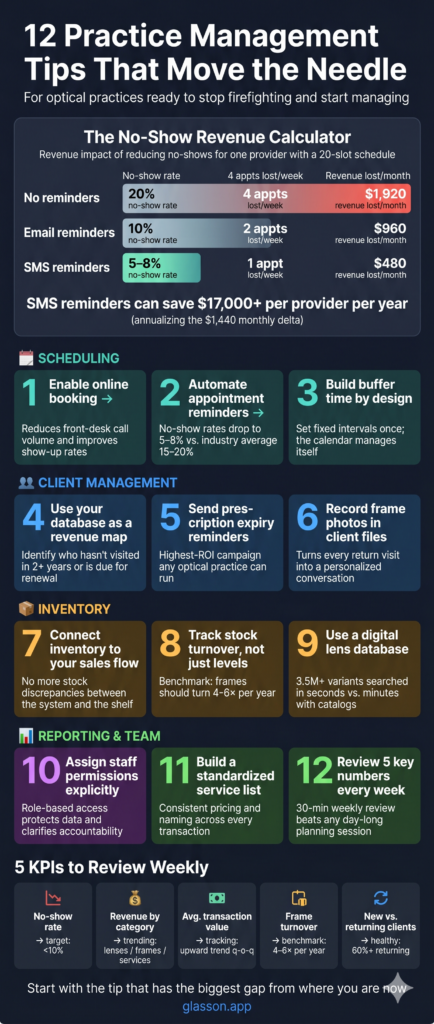
The average no-show rate in optical practices runs between 10% and 20%. On a full schedule, that’s one or two appointments per provider per day — gone, unrecoverable, and often not filled at the last minute. Automated SMS reminders are the most effective countermeasure, and they cost almost nothing to run. Glasson Communication sends appointment reminders automatically once they’re configured — no one on your team needs to remember to send them. Practices that run automated reminders consistently report no-show rates dropping to the 5–8% range, which across a year can represent thousands of dollars in recovered appointments.
The table below shows what a modest reduction in no-shows can mean in practice revenue, based on a single-provider schedule. For a two-provider practice, double these figures.
| No-show rate | Appointments lost/week (20-slot schedule) | Est. revenue lost/month (avg. $120/visit) | Est. annual revenue impact |
|---|---|---|---|
| 20% (no reminders) | 4 | $1,920 | $23,040 |
| 10% (email reminders) | 2 | $960 | $11,520 |
| 5–8% (SMS reminders) | 1 | $480 | $5,760 |
Tip 3: Build buffer time into your schedule by design, not by accident
Most scheduling problems don’t start with no-shows — they start with a calendar that was built too optimistically. Eye exams run long. Dispensing appointments take more time when a client has questions. If your schedule has zero slack built in, one overrun appointment cascades into a stressed afternoon. Glasson’s scheduling system lets you set fixed time intervals between appointments — every 15, 30, or 60 minutes — so buffer time is baked in structurally, not squeezed in reactively. Set the intervals once based on how your practice actually runs, and the calendar handles the rest.
7-day free trial
Got Any Questions? Let us know in the Contact Us form below.
Client records and retention
Returning clients are the backbone of any optical practice. Acquiring a new client costs significantly more than retaining an existing one — estimates typically put the ratio at five to one — yet most practices invest far more energy in attracting new patients than in systematically keeping the ones they already have. The tips below focus on what actually drives retention: remembering details, staying in touch at the right moments, and making every visit feel like a continuation rather than a fresh start.
Tip 4: Treat your client database as an asset, not a filing system
Do you know which clients haven’t been in for more than two years? Which ones bought single-vision lenses last time but might be candidates for progressives now? Which ones mentioned they were interested in contact lenses but never followed through? A client database that stores purchase history, exam records, and communication logs isn’t just a record-keeping tool — it’s a map of your revenue opportunities. Glasson Clients keeps complete purchase history, prescription data, files (including photos of frames clients have bought), and communication logs for every patient — searchable and filterable, so finding a specific group of clients for a targeted campaign takes minutes, not hours.
Tip 5: Send prescription expiry reminders before clients go elsewhere
Here’s a scenario that plays out in optical practices every day: a client’s prescription expires, they don’t hear from you, they book an exam at a chain store down the street because it came up first in a Google search, and they buy their new glasses there too. That’s a lost client you already had. Prescription expiry reminders — sent automatically via SMS or email at the right interval before expiry — are one of the highest-ROI communication campaigns any optical practice can run. They’re not marketing; they’re a service reminder that clients genuinely appreciate. Set them up once in Glasson Communication, and they run without further attention.
Tip 6: Record frame photos in client files — it pays off on the next visit
When a client comes back and says “I want something similar to what I had before,” how do you handle that? If the answer is “we try to remember” or “we check the paper receipt,” there’s a better way. Glasson Clients lets you attach photos directly to a client’s record — frames they’ve bought, styles they liked, anything that helps the next dispensing conversation start with context. Small details like this are exactly how independent practices compete against chains: the chain doesn’t remember what you wore last time, but your local optician does.
Inventory and orders
Inventory is where optical practices silently bleed money. Frames that don’t move tie up capital. Missing stock delays orders and frustrates clients. A lens that was ordered but doesn’t match the prescription because of a data entry error means a remake — and remakes are expensive, both in cost and in client trust. Getting inventory management right isn’t glamorous, but it has a direct and measurable impact on the practice’s bottom line.
Tip 7: Connect your inventory directly to your sales process
If your inventory system and your sales process are separate — even if both are digital — you have a gap where errors happen. A frame gets sold but inventory isn’t updated. Stock levels show ten units but three are already committed to pending orders. When inventory and sales are fully integrated in a single system, these discrepancies disappear because every transaction updates the stock count automatically. Glasson Inventory keeps frames, lenses, contact lenses, and accessories in one place, fully connected to the sales flow — so what you see in the system reflects what’s actually on the shelf.
Tip 8: Track stock turnover, not just stock levels
Knowing how many frames you have is useful. Knowing how fast they’re selling is more useful. Frame inventory in optical stores should ideally turn over four to six times per year — anything sitting longer than that is capital that isn’t working. Reviewing your slowest-moving stock monthly and making active decisions about it — markdowns, returns to the supplier, replacing the display slot with a faster-moving line — is one of the highest-leverage inventory habits a practice can build. Glasson Statistics includes detailed sales reports broken down by product category, which makes identifying dead stock a quick task rather than a manual audit.
Tip 9: Use a digital lens database instead of paper catalogs
Still finding lenses by flipping through manufacturer catalogs or calling supplier reps? That process works, but it’s slow — and slow lens selection during a dispensing appointment is a friction point that clients feel even if they don’t mention it. Glasson Lens Finder searches a database of over 3.5 million lens variants, filtering by prescription parameters, coating, material, design, and price range in seconds. The time saved per appointment adds up across a full day, and accurate digital search also reduces the risk of ordering the wrong lens — which means fewer remakes and fewer unhappy clients.
Want to see Glasson's full potential?
Book a presentation
Team management and daily operations
The operational side of a practice — who has access to what, who handles which tasks, how work gets handed off between team members — is the kind of thing that feels fine until it isn’t. Staff turnover, a busy week, or one person calling in sick can expose how much of your practice runs on institutional knowledge rather than documented systems. The tips below address the organizational infrastructure that keeps things running smoothly regardless of who’s in the building on a given day.
Tip 10: Set staff permission levels explicitly — and keep them updated
Who in your practice can process a refund? Who can edit a client’s prescription record? Who has access to financial reports? If the answer to all of these is “anyone with a login,” you have a data governance problem waiting to happen. Explicit staff permission levels — where each role has access only to what it needs — reduce errors, protect sensitive data, and make it clear who is responsible for which parts of the system. Glasson Administration lets you assign granular permission levels per staff member, so a front desk coordinator sees scheduling and client records, while a practice manager sees everything including financial data. When someone joins or leaves, updating permissions takes minutes.
Tip 11: Build a standardized service list — and stick to it
Does your practice have a documented list of every service you offer, with consistent names, prices, tax rates, and assigned staff? Or do different team members name and price services slightly differently depending on who processed the order? Inconsistency in service labeling creates reporting headaches, makes it harder to analyze what’s actually selling, and occasionally leads to clients being charged differently for the same service. Glasson Administration includes a digital service list where you set names, prices, tax rates, and duration once — and every team member works from the same master list, integrated directly with the sales and invoicing flow.
“The practices that get the most out of Glasson are the ones that treat it as an operating system for the whole business, not just a lens search tool. When scheduling, client records, inventory, communication, and reporting all talk to each other, the whole team works from the same picture — and that’s when things stop falling through the cracks.”
— Marcin Debski, Product Manager @ Glasson
Reporting and data-driven decisions
Ever made a business decision based on gut feel and regretted it later? Every optical practice owner has. The antidote isn’t more meetings or more opinions — it’s better data, reviewed consistently. The practices that grow steadily are the ones that check their numbers regularly and make decisions based on what reports actually say — not on what the team thinks is happening.
Tip 12: Review five key numbers every week — and act on what they tell you
You don’t need to become a data analyst to run a better practice. You need five numbers, reviewed weekly, with a clear sense of what each one should be. The practices that improve fastest are usually the ones that look at their data most consistently — not the ones with the most sophisticated reports. Here’s a starting set of metrics worth tracking:
| Metric | What it tells you | Where to find it in Glasson | Benchmark to aim for |
|---|---|---|---|
| No-show rate | How much scheduled revenue is walking out the door | Glasson Statistics → appointment history | <10% |
| Revenue by category (lenses / frames / services) | Where growth is coming from — and where it isn’t | Statistics → detailed sales report | Varies by practice mix |
| Average transaction value | Whether upselling and second-pair sales are working | Statistics → general report per period | Trending up quarter on quarter |
| Frame stock turnover | Which lines are earning their shelf space | Glasson Inventory → stock balance report | 4–6x per year |
| New vs. returning clients | Whether retention or acquisition needs more attention | Glasson Clients → client filtering | 60%+ returning is a healthy sign |
These five metrics won’t give you the full picture of your practice — but they’ll tell you where to look next. A 30-minute weekly review of these numbers is worth more than a day-long planning session based on memory and impressions.
Test Glasson for 7 days free of charge
Any questions? Leave your contact details and we'll call you back.
How do these tips connect in practice?
Reading twelve tips in a list is easy. Implementing one or two at a time — consistently, over months — is what actually changes how a practice runs. The question worth asking isn’t “which of these is most important?” but “which one has the biggest gap between where we are now and where we should be?” That’s where to start.
What makes integrated practice management software useful here is that many of these tips reinforce each other. When online booking feeds into a calendar that triggers automatic reminders, which link to client records that store purchase history, which connect to inventory and reporting — improvements in one area compound into improvements in others. That’s why fragmented systems — one tool for scheduling, another for inventory, a spreadsheet for reporting — tend to stay fragmented: the data never flows between them the way it needs to.
Glasson is built as an integrated platform — Online Reservation, Clients, Inventory, Communication, Statistics, Eye Care Module, and Administration all share the same data — so each module you use makes the others more useful. You can test it free for 7 days without a credit card required. You can test it free for 7 days; see the Glasson Price List for plan details.
Frequently asked questions

What is optometry practice management?
Optometry practice management covers all the non-clinical operations of running an eye care practice: scheduling, client records, inventory, billing, staff management, communication, and financial reporting. Good practice management keeps clinical care running smoothly by reducing administrative friction and operational surprises.
What is the most common management problem in optical practices?
Fragmentation — using too many disconnected tools that don’t share data. When scheduling, client records, inventory, and communication all live in separate systems, information falls through the gaps and staff spend time on manual reconciliation instead of client service. Consolidating into an integrated platform is usually the highest-leverage change a practice can make.
How much can automated reminders reduce no-show rates?
Practices without automated reminders typically see no-show rates of 15–20%. Well-configured SMS reminders generally bring that rate down to the 5–8% range — a meaningful recovery of scheduled revenue, especially for practices running tight schedules.
How often should optical practice owners review their financial reports?
At minimum, weekly for key metrics like daily revenue and pending orders; monthly for deeper analysis of sales by category, stock turnover, and staff performance. The practices that improve fastest are the ones that review data on a fixed schedule — not just when something feels off.
What is a good frame inventory turnover rate for an optical store?
Four to six times per year is the generally accepted benchmark for frame inventory turnover in optical retail. Stock that turns fewer than four times is tying up capital that could be deployed elsewhere — and is likely occupying display space that a faster-selling line could fill.
How do you reduce lens remake rates in an optical practice?
Most remakes stem from data entry errors or mismatches between the prescription and the ordered lens. Using a digital lens search system that takes prescription data directly from the exam record — rather than transcribing it manually — significantly reduces transcription errors. Structured exam forms with limited free-text fields also help.
Is online booking worth it for a small optical practice?
Yes, for two reasons. First, clients increasingly expect to book online — a practice without online booking is invisible to anyone who searches for an optician after hours. Second, online booking reduces the volume of scheduling calls your front desk handles, freeing that time for clients who are already in the practice. The setup is minimal and the ongoing management is nearly zero once it’s configured.
How should staff permissions be structured in an optical practice?
Role-based access is the standard approach: front desk staff can see scheduling and basic client data, dispensing opticians can access full client records and inventory, and managers have visibility into financial reports and staff activity. The key principle is least-privilege access — each role sees what it needs to do its job, and nothing more. This protects client data and reduces the chance of accidental changes to sensitive records.
What’s the difference between a client management system and a full practice management platform?
A client management system handles contact records and basic history. A full practice management platform also covers scheduling, inventory, sales processing, clinical records, reporting, and communication — all in one integrated system. The practical difference is whether data flows automatically between these areas or requires manual entry at each step.
How long does it take to see results from practice management improvements?
It depends on the change. Automated reminders reduce no-shows within the first week they’re running. Inventory improvements typically show up in monthly reports over one to three months. Client retention improvements compound over six to twelve months. The common pattern is that operational changes produce quick wins, while retention and revenue changes take longer — but both are worth pursuing simultaneously.