Optician Software: What to Look For and Why It Matters for Your Practice

Key insights
Before we get into the details, here’s what this article covers — and why it’s worth your time if you run or manage an optical store. Every section below maps to a decision you’ll face when choosing or switching optician software.
- Most optician software on the market was built for large clinical practices — not for independent optical stores that need fast lens search, frame inventory, and client communication all in one place.
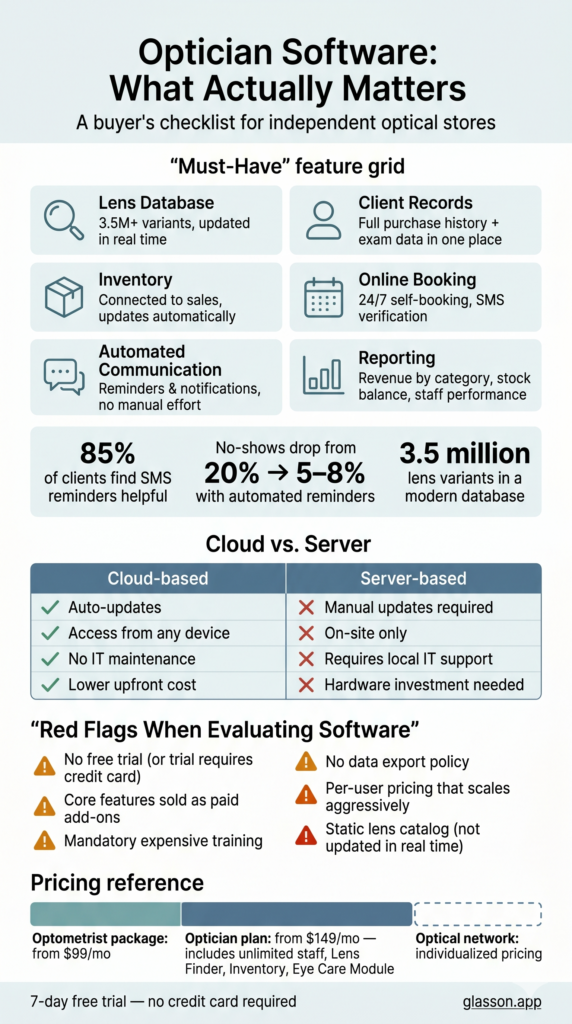
- The right software should cover at minimum: lens search, client records, inventory management, appointment scheduling, and automated communication.
- Cloud-based software beats server-based for most independent opticians — lower upfront cost, automatic updates, and access from any device.
- Pricing models vary significantly. Some platforms charge per feature, per user, or per location — understand the full cost before committing.
- A 7-day free trial (like the one Glasson offers) is the best way to evaluate whether a system actually fits your workflow before paying anything.
- Switching software is disruptive — choosing the right one the first time saves months of frustration and lost productivity.
Why does choosing optician software feel so complicated?
Because most of it wasn’t built for you. Walk into the average optical software demo and you’ll quickly notice the system is packed with features you’ll never use — insurance billing modules, complex clinical coding, multi-physician scheduling — while the things you actually need every day, like a decent lens search or a way to text clients when their order is ready, are either missing or buried under ten menus. The software market for optical practices has long been dominated by tools designed for large ophthalmology clinics, not for the independent optician running one or two locations. That mismatch is expensive, both in time and money.
This guide is for opticians and optical store owners who want to cut through the noise. We’ll walk through what features actually matter, how to compare platforms without getting lost in feature lists, and what separates genuinely useful optician software from expensive shelfware. We’ll also be upfront about where Glasson fits — and where it doesn’t.
What does optician software actually need to do?
Good optician software should mirror how your day actually runs — not force you to adapt your workflow to a developer’s idea of how an optical store works. Think about what happens between the moment a client walks through your door and when they pick up their new glasses. You need to find a lens that matches their prescription, check your inventory, process the order, keep a record of the purchase, and follow up when it’s ready. That’s four or five separate tasks, and in many practices, they’re still handled across four or five separate systems — or worse, on paper.
The core modules any serious optician software should include are not a mystery. What separates good software from mediocre software is how well these modules are integrated with each other — whether searching for a lens automatically pulls from your live inventory, whether client records link to purchase history, whether appointment reminders go out without anyone remembering to send them.
Lens search and database access
This is the feature most opticians care about first, and for good reason. How fast can you find a lens that matches a specific prescription? How many manufacturers are covered? Can you filter by coating, material, index, or design? Glasson Lens Finder gives access to a database of over 3.5 million lens variants, with intelligent filtering that narrows results in seconds based on the client’s exact parameters. The difference between flipping through a paper catalog and running a digital search is measured in minutes per client — and those minutes add up across a full day.
Client records and purchase history
A client comes in for a new pair of glasses. Do you know what they bought last time? What their preferred frame style was? Whether they had any fitting issues? Glasson Clients stores complete purchase history, prescription data, and client files — including photos of frames — so every visit feels informed rather than starting from scratch. Clients notice when you remember their preferences; it’s one of the simplest ways independent opticians compete against retail chains. A robust client database is not a luxury feature — it’s the foundation of repeat business.
Inventory management
Frame and lens inventory is where a lot of optical stores quietly bleed money. Overstocked frames that don’t sell, missing SKUs that delay orders, no clear picture of what’s actually on the shelf versus what the system says — these are everyday problems. Glasson Inventory keeps frames, lenses, contact lenses, and accessories in one place, integrated directly with the sales process. When inventory is connected to sales in real time, you stop discovering stock problems at the worst possible moment — when a client is waiting.
7-day free trial
Got Any Questions? Let us know in the Contact Us form below.
Appointment scheduling and online booking
How many calls does your front desk handle each day just to book or confirm appointments? Glasson Online Reservation lets clients book their own appointments 24/7 through a public link you can share on your website, Facebook, or Google listing — without any phone call required. The system handles SMS verification to prevent fake bookings, lets you set time intervals between appointments, and manages staff availability automatically. Practices that enable online booking typically see a measurable drop in no-shows, because clients who book themselves are more committed to showing up.
Automated client communication
85% of clients say they find it helpful to receive a text message reminding them to collect their eyeglasses. 75% show higher engagement when contacted by SMS. These aren’t marketing statistics invented to sell software — they reflect a simple reality: people forget things, and a well-timed message from your store keeps you top of mind. Glasson Communication handles appointment reminders, order-ready notifications, and marketing campaigns through both SMS and email, using customizable templates that take minutes to set up. Once automated communication is running, it works in the background without anyone on your team lifting a finger.
What features are nice to have – but shouldn’t drive your decision?
Software vendors love to compete on feature counts. The more items on the list, the more impressive the demo. But for most independent opticians, a long feature list is as much a warning sign as it is a selling point — because every feature you don’t use is complexity you still have to navigate around. There are a few categories worth examining critically before they influence your purchase.
The eye care and clinical examination module is one example. If you perform refraction exams in your practice, having a structured exam record directly in your software makes sense. Glasson Eye Care Module covers exactly this — patient interviews, refraction data, optometry records, and recommendations on vision correction, all linked to the client file. But if you don’t perform exams and work exclusively on the dispensing side, paying for a full clinical module is money wasted. Know what your practice actually does before evaluating software.
Advanced reporting and analytics is another area where practices differ widely. Some owners want detailed daily breakdowns of revenue by product category, top-selling frames, staff performance, and stock turnover. Others just need to know how much came in today and whether anything’s running low. Glasson Statistics covers everything from cash register summaries to detailed lens sales reports, staff reports, and general period reports. The question isn’t whether reporting matters — it does — but whether the depth of reporting justifies added complexity for your specific operation.
How do optician software pricing models actually compare?
Pricing in the optical software market is less transparent than it should be. Many vendors quote a base subscription price and then add per-user fees, per-location fees, training costs, data migration fees, and support tiers on top. Before you compare two systems on price, you need to know the full number — what you’ll actually pay after 12 months, not what the website shows as the starting figure.
Here’s a simplified comparison of what different practice types typically need to budget for, based on what Glasson’s plans cover. Note that all standard plans include a 7-day free trial and unlimited clients — those aren’t premium add-ons.
| Plan type | Best for | Starting price (net/mo.) | Key inclusions |
|---|---|---|---|
| Optometrist package | Single-user practices focused on eye exams | $99 | Eye Care Module, sales, statistics, SMS & email, unlimited clients |
| Optician package | Independent optical stores with dispensing focus | $149 | Lens Finder, inventory, unlimited staff, Eye Care Module, full communication suite |
| Optical network | Multi-location chains | Individualized | Chain store support, shared client base, all Optician features |
Both standard plans include a 7-day free trial, which is genuinely the most honest way to evaluate whether any software fits your workflow. No demo, no sales call, and no feature comparison sheet tells you as much as two days of actually using the system with your own data. See the full breakdown on the Glasson Price List page.
Want to see Glasson's full potential?
Book a presentation
Cloud-based vs. server-based: which is right for an independent optician?
This question comes up in almost every software evaluation, and the answer for most independent optical practices is the same: cloud-based wins. Not because server-based software is inherently bad, but because the practical advantages of cloud for a one- or two-location practice are hard to argue with. Updates happen automatically — you never fall behind on a critical feature or security patch because someone forgot to run the update. You can access your system from any device with an internet connection, which matters if you ever need to check something from outside the store. And you don’t need an IT person on call whenever something breaks.
The most common objection to cloud software is “what happens if the internet goes down?” It’s a fair question, but worth calibrating against reality. Most optical practices in North America have reliable broadband, and a brief connection interruption is manageable with a mobile hotspot. Comparing the risk of occasional connectivity issues against the ongoing cost and complexity of maintaining a local server, the math almost always favors cloud for a small or mid-sized practice. Glasson is fully cloud-based, which means the system is always up-to-date, accessible from any browser, and backed up automatically.
What should your day actually look like with the right software?
Here’s a concrete scenario. It’s 9:15 AM. A client walks in — she was here two years ago for progressives and is back because her prescription changed. Without good software, someone on your team is hunting through paper files or a disconnected spreadsheet to find her last order. With Glasson, her full history is up in seconds: previous prescription, the frames she chose, any notes from the last visit, communication history. The conversation starts from context, not from zero.
She gets a new exam. The results go directly into her record in the Glasson Eye Care Module. You search for lenses matching her updated prescription — within seconds, Glasson Lens Finder returns a filtered list from 3.5 million variants, narrowed by coating, design, and price range. She picks a frame from your display. You check stock in Glasson Inventory, process the sale, and the order goes in. Three business days later, the system automatically sends her an SMS to let her know her glasses are ready — without anyone remembering to do it.
That’s not a feature demonstration. That’s an ordinary Tuesday, done efficiently. The difference between a store that runs this way and one that doesn’t isn’t talent — it’s tools.
“Independent opticians don’t have the luxury of dedicated IT teams or admin departments. The software they use has to work the way they do — fast, integrated, and without requiring hours of training to get value from. That’s what we built Glasson around: a system where every module talks to the others, so nothing falls through the cracks between lens search, inventory, client records, and communication.”
— Marcin Debski, Product Manager @ Glasson
What should you watch out for when evaluating optician software?
A few red flags come up repeatedly when optical store owners describe software regrets. Watch for these during your evaluation process — each one has cost someone real money or months of frustration.
- No free trial or trial requires a credit card: Any credible software vendor will let you test the system without financial commitment. A vendor that won’t is either not confident in the product or is betting on inertia once your card is on file.
- Lens database is static or requires manual updates: Lens catalogs change constantly. A database that isn’t updated in real time means you’re searching through outdated information and potentially ordering lenses your supplier no longer carries.
- Communication and inventory are separate add-ons: When core features are sold separately, the total cost adds up fast — and integration between modules is often poor because they weren’t designed together.
- Training is mandatory and expensive: If a vendor’s onboarding plan includes paid training days as a requirement, that’s a signal the system isn’t intuitive. Good software should be learnable in hours, not weeks.
- No clear data export policy: You need to know that if you ever leave, you can take your client records and purchase history with you. Vendors that make data export difficult are counting on that friction to retain customers.
- Per-user pricing that scales aggressively: A system that costs $149/month with one staff member but jumps to $400 with five isn’t a small-practice solution — it’s designed to grow on your bill as you grow your team.
Test Glasson for 7 days free of charge
Any questions? Leave your contact details and we'll call you back.
How does Glasson handle multi-location optical practices?
Running more than one location adds a layer of complexity that basic software handles badly. Do you have a shared client base across stores, or does each location operate as a silo? Can staff at location B see inventory from location A? Is there consolidated reporting across the whole business, or do you end up manually combining spreadsheets at the end of each month?
Glasson’s Optical Network plan is built specifically for this situation, with chain store support, a shared client database, and centralized reporting through Glasson Statistics. For optical chains, the most important thing software can do is eliminate the information gap between locations — making sure the client’s record follows them across stores, that inventory transfers are tracked, and that the owner has a single view of performance across the whole business. Glasson Administration also handles multi-staff permission levels, so you can control what each team member can see and do without granting everyone full system access.
Frequently asked questions

What is optician software?
Optician software is a management platform designed for optical stores and practices. It typically covers lens search, client records, inventory, appointment scheduling, sales processing, invoicing, and client communication — all in one integrated system instead of separate tools.
Is optician software different from optometry EHR software?
Yes, meaningfully so. EHR (Electronic Health Records) software is primarily built for clinical documentation — exam notes, diagnosis codes, billing. Optician software focuses on the dispensing and retail side: lens selection, frame inventory, client management, and order processing. Some platforms, like Glasson, combine both with an integrated Eye Care Module alongside full optical practice management.
How much does optician software cost?
Pricing varies widely. Glasson’s Optician plan starts at $149/month (net) and includes unlimited staff, clients, lens search, inventory, communication, and the Eye Care Module. Some competing platforms charge separately for each module, leading to higher total costs. Always calculate the full 12-month cost including add-ons before comparing.
Do I need internet access to use cloud-based optician software?
Yes, cloud-based software requires an internet connection to function. For most optical practices, this is not a practical limitation — connectivity is reliable, and mobile hotspots can serve as backup. The trade-off is automatic updates, remote access, and no server maintenance costs.
Can optician software handle multiple store locations?
Yes, if it’s designed for it. Glasson’s Optical Network plan supports chain store operations with a shared client base, cross-location inventory visibility, unified reporting, and individualized pricing for the network’s specific size and needs.
How large is Glasson’s lens database?
Glasson’s lens database contains over 3.5 million lens variants, covering a wide range of manufacturers, lens types, coatings, materials, and designs. The database is kept up to date automatically, so searches always reflect current catalog availability.
Does optician software send automatic appointment reminders?
Good optician software does. Glasson’s communication module sends automated SMS and email reminders for appointments, order-ready notifications, and marketing messages using customizable templates — without requiring manual action from your team for each message.
Can clients book appointments online through the software?
Yes. Glasson’s Online Reservation feature gives each practice a unique public booking link that clients can use 24/7 from any device. Clients choose their preferred service, specialist, and time slot; the system handles SMS verification to prevent fake bookings and updates the calendar automatically.
How long does it take to set up optician software?
With a well-designed system, initial setup should take hours, not days. Glasson is built to be intuitive without mandatory paid training — most practices are operational within their first day. The 7-day free trial is enough time to evaluate the system fully before committing to a subscription.
What happens to my data if I stop using the software?
Before signing up for any software, confirm the vendor’s data export policy in writing. You should always be able to export your client records and purchase history in a standard format — if a vendor makes this difficult, that’s a serious red flag. Glasson stores all client data securely and in compliance with GDPR requirements, and clients retain the right to access or request deletion of their personal data.