Best Optometry Software in 2026: A Category-by-Category Breakdown
Best Optometry Software in 2026: A Category-by-Category Breakdown

Key insights
“Best optometry software” is not a single answer. The right software for a solo optometrist doing exams all day looks completely different from the right software for an independent optical store focused on dispensing and frame sales. This article maps the main software categories, what each one is actually good at, and where the gaps tend to show up — so you can match the tool to what your practice actually does, rather than buying something impressive that you use at 20% of its capacity.
- Optometry software falls into distinct categories — EHR, practice management, optical POS, and integrated platforms — and they solve different problems.
- Most practices end up using more software than they need to because they buy category by category instead of evaluating their actual workflow first.
- The optical dispensing side of the practice — lens search, frame inventory, client communication — is consistently underserved by clinical-first EHR platforms.
- Cloud-based systems have become the default for independent and small-chain practices; server-based is largely a legacy choice at this point.
- Free trials are non-negotiable before committing — no feature list or demo tells you as much as two days of actual use with your own data.
Why is finding the best optometry software so confusing?
Because the category is genuinely fragmented. Search for “best optometry software” and you’ll find EHR platforms competing in the same list as practice management tools, scheduling apps, and optical-specific POS systems — all solving different problems, marketed with the same broad language. A practice owner trying to make a decision in good faith ends up comparing apples to filing cabinets, wondering why the pricing varies by a factor of ten and why two “complete solutions” have almost no feature overlap.
The confusion has a structural cause: the optometry industry sits at the intersection of healthcare and retail. On one side, you have clinical software built for billing, diagnosis coding, and electronic health records — designed for systems that process insurance claims. On the other, you have optical retail software built for dispensing, frame inventory, lens search, and client communication. Most practices need elements of both, but very few platforms genuinely cover the full picture without asking you to compromise somewhere.
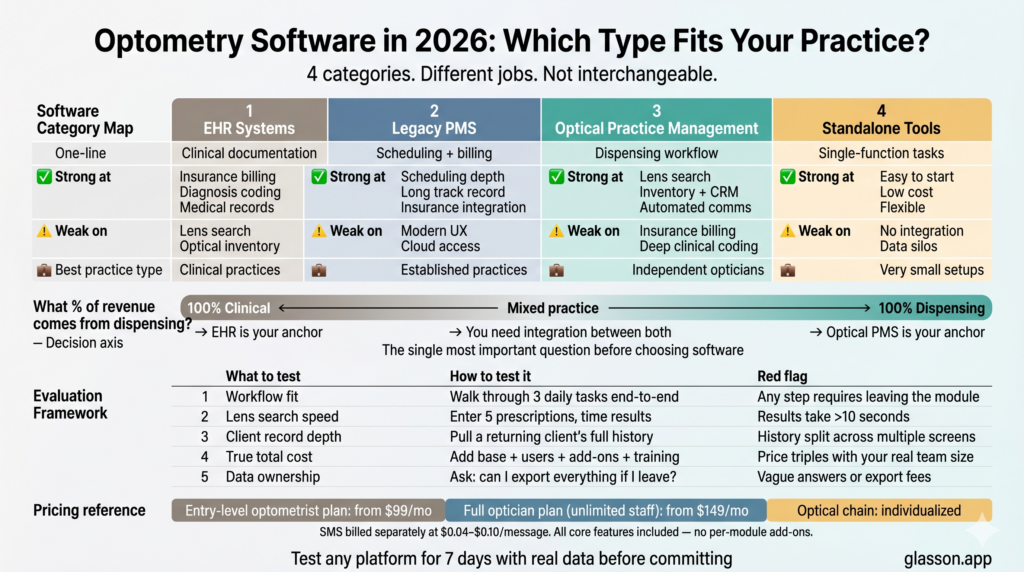
What are the main categories of optometry software?
Before evaluating any specific platform, it helps to understand what job each category of software is actually designed to do. Buying a clinical EHR when what you need is optical practice management is like hiring an accountant when what you need is a bookkeeper — adjacent skills, wrong fit, expensive mistake. Here’s how the categories break down.
EHR (Electronic Health Record) systems
EHR platforms are built around the clinical record: documenting exams, storing diagnosis codes, managing medical history, and integrating with insurance billing workflows. They’re designed for practices where the primary revenue comes from clinical services — eye exams, medical ophthalmology, co-management of post-surgical patients. The biggest names in optometry EHR (RevolutionEHR, Compulink, ModMed EMA) are excellent at clinical documentation and insurance integration, but consistently weak on the optical dispensing side — lens search, frame inventory, and the kind of client communication a retail-facing practice actually needs. If your practice bills primarily through insurance and performs complex clinical work, an EHR is the right anchor. If you’re an independent optician focused on dispensing, it’s the wrong starting point.
Practice management software (PMS)
Practice management software handles the operational layer of a practice — scheduling, billing, staff management, reporting — often alongside or integrated with an EHR. Optometry-specific PMS tools like Eyefinity and Crystal PM have been around for decades and cover the standard operational workflows well. The common complaint about legacy PMS platforms is that they were built for a world of server installations and insurance-heavy workflows, and they haven’t fully kept pace with cloud-first expectations, mobile access, or the kind of automated client communication modern practices want. They work, but they often feel dated — and the pricing models can be opaque.
Optical practice management platforms
This is the category that independent opticians and optician-led practices actually need most — and the one that gets the least attention in broad “best optometry software” roundups. Optical practice management platforms are built around the dispensing workflow: finding lenses, managing frame and lens inventory, processing sales, maintaining client records with purchase history, and keeping clients engaged through automated communication. Glasson sits in this category — designed specifically for optical stores and practices where the dispensing floor is the core of the business, not an afterthought to the clinical suite. The defining advantage of a purpose-built optical platform is that every module — lens search, client records, inventory, communication, reporting — is designed to work together from the start, not bolted together from separate acquisitions.
Standalone scheduling and communication tools
Some practices piece together their workflow using generic scheduling tools (like Calendly or Acuity) and separate SMS platforms for client communication. This can work at very small scale, but it creates data silos quickly — your booking system doesn’t know about your client’s purchase history, your SMS tool doesn’t connect to your inventory, and nothing talks to anything else. The hidden cost of this approach isn’t the tool fees — it’s the staff time spent manually reconciling data across systems and the errors that happen at every handoff. As a practice grows, these fragmented stacks become increasingly painful to manage.
7-day free trial
Got Any Questions? Let us know in the Contact Us form below.
How do you evaluate optometry software before buying?
Feature lists are close to useless as evaluation tools. Every vendor checks every box in the right column of their own comparison table. The things that actually separate good software from expensive shelfware show up during use — how fast is the lens search, does the client record surface relevant information during a visit, how many clicks does it take to process a standard order. You can’t find any of that in a PDF datasheet.
A more reliable evaluation framework looks at five dimensions that feature lists don’t capture. Run every platform you’re seriously considering through each of these during the trial — not just the features that look good in a screenshot.
| Dimension | What to actually test | Red flag to watch for |
|---|---|---|
| Workflow fit | Walk through your three most common daily tasks end-to-end in the trial | Any task that takes more than 3–4 clicks more than it should |
| Integration depth | Does data flow automatically between scheduling, records, inventory, and communication? | Modules that feel like separate apps pasted together |
| Lens database quality | Search for 5 recent prescriptions — how fast, how complete are results? | Results requiring you to call a supplier to confirm availability |
| True total cost | Add up base price + per-user fees + add-ons + training + support tier | Base price that multiplies by 3x once you add your actual team |
| Data ownership | Ask specifically: can I export all client records if I leave? | Vague answers, export fees, or formats that require their own tools to read |
Run every platform you’re seriously considering through this framework during a trial period. Glasson offers a 7-day free trial with no credit card required — enough time to run through your actual workflow and get a realistic sense of whether the system fits before any financial commitment. See the Glasson Price List for what’s included in each plan.
What features should the best optometry software actually have?
Regardless of which category of software you’re evaluating, there’s a baseline set of capabilities that any serious platform should cover. Think of these as table stakes — the minimum you should expect before you even start comparing platforms on their differentiating features. If something on this list is missing or is sold as a paid add-on, that tells you something important about how the vendor thinks about optical practice workflows.
Lens search with a live, comprehensive database
This is the single most operationally important feature for any practice that dispenses lenses — which is most of them. How fast can you find a lens matching a specific prescription? How many manufacturers are covered? Are the catalogs updated in real time, or do you occasionally order something that’s discontinued? Glasson Lens Finder searches across more than 3.5 million lens variants, filtering by prescription parameters, coating, material, design, and index. The practical difference between a good lens database and a mediocre one isn’t visible in a demo — it shows up during the dispensing appointment when you’re in front of a client and need a result in seconds, not minutes.
Client records with full purchase and exam history
A client record that shows only contact information is barely more useful than a paper index card. What you actually need is a complete history: every purchase, every exam result, every communication, what frames they’ve worn, any fitting notes, prescription changes over time. Glasson Clients stores unlimited purchase history per client, links to exam records from the Eye Care Module, supports file attachments including frame photos, and logs every communication automatically. When a client comes in for their third pair of glasses, the conversation should start from shared history — not from “so, what were you wearing before?”
Inventory management connected to the sales flow
Inventory that lives in a separate system from your sales process is inventory you can’t fully trust. Every sale processed outside the inventory system creates a potential discrepancy — stock levels that don’t reflect reality, frame orders placed for items already sold, missing SKUs discovered when a client is waiting. Glasson Inventory covers frames, lenses, contact lenses, and accessories in one place, with every sale updating stock counts in real time. Accurate inventory isn’t just an operational convenience — it’s the foundation of every purchasing decision, supplier negotiation, and frame floor refresh you’ll make.
Automated client communication
Appointment reminders, order-ready notifications, prescription expiry alerts, birthday offers — these are all proven drivers of client retention and practice revenue. But they only work consistently if they’re automated. A reminder that depends on someone remembering to send it gets skipped on busy days, which are exactly the days when it would be most valuable. Glasson Communication handles SMS and email campaigns, appointment reminders, and templated messages automatically — 85% of clients say they find SMS reminders helpful, and practices with automated communication in place report measurably higher engagement. Set it up once, and it runs without any ongoing effort from your team.
Online appointment booking
Clients who want to book an appointment at 8pm on a Tuesday shouldn’t have to call you and leave a voicemail. Glasson Online Reservation gives your practice a public booking link — shareable on your website, Google Business Profile, and social media — that clients can use 24/7. Practices that add online booking typically see two effects simultaneously: fewer scheduling calls hitting the front desk, and a meaningful drop in no-show rates because clients who book themselves are more committed to showing up. SMS verification prevents fake bookings, and the system manages availability automatically.
Reporting that tells you something actionable
Revenue by day is not a report — it’s a number. Useful reporting for an optical practice includes: revenue broken down by product category (lenses, frames, services), most popular products and top-spending clients, staff performance, pending orders, stock balance, and inflow/outflow summaries. Glasson Statistics covers all of these, presented in a format that doesn’t require an accountant to interpret. The point of practice reporting isn’t to create work — it’s to surface the decisions you’d otherwise make by gut feel and replace them with something more reliable.
Want to see Glasson's full potential?
Book a presentation
How does Glasson compare to other optometry software options?
Honest comparisons require honest framing. Glasson is not the right choice for every practice — and pretending otherwise would be a waste of your time. The table below positions Glasson against the main categories of competing software, based on what each type of platform is actually designed to do well.
| Software type | Best for | Strong on | Weak on | Glasson vs. |
|---|---|---|---|---|
| Clinical EHR (RevolutionEHR, Compulink, ModMed EMA) | Practices with heavy clinical billing & insurance | Diagnosis coding, insurance integration, clinical documentation | Lens search, optical inventory, dispensing workflow | Glasson wins on dispensing; EHR wins on clinical billing |
| Legacy PMS (Eyefinity, Crystal PM) | Established practices already on these platforms | Scheduling, billing integration, long track record | Cloud access, modern UX, automated communication | Glasson wins on usability & cloud; legacy PMS on insurance depth |
| Generic scheduling tools (Calendly, Acuity) | Very small practices needing only appointment booking | Simple calendar management, low cost | Everything optical-specific: inventory, lens search, records | Not comparable — different scope entirely |
| Glasson | Independent optical stores & optician-led practices | Lens Finder (3.5M+ variants), integrated optical workflow, cloud-native, clean UX | Complex insurance billing, deep clinical coding | Best fit for dispensing-focused practices that want one integrated system |
The core question when evaluating optometry software is: what percentage of your revenue comes from clinical services versus optical dispensing? If dispensing — selling frames, lenses, and contact lenses — is your primary business, you need software built around that workflow, not a clinical EHR with an optical module stapled on the side.
“The practices that struggle most with software are usually the ones that bought a system built for a different kind of practice. A clinical EHR is a great tool — for a clinical practice. For an independent optician who dispenses lenses all day, it’s the wrong tool, and no amount of configuration changes that. Glasson was built specifically for the dispensing side of optical care, and that focus is what makes the difference in daily use.”
— Marcin Debski, Product Manager @ Glasson
What does optometry software typically cost in 2026?
Pricing in this market is genuinely hard to compare because vendors structure their fees so differently. Some charge per provider, some per user, some per location, some by feature tier — and the published price rarely reflects what you’ll actually pay once you add the modules you need and the users your team requires. The most important number isn’t the starting price — it’s the total 12-month cost for your actual practice configuration.
| Plan | Starting price (net/mo.) | Users | Clients | Key inclusions |
|---|---|---|---|---|
| Glasson — Optometrist package | $99 | Single user | Unlimited | Eye Care Module, sales, statistics, SMS & email, invoices |
| Glasson — Optician plan | $149 | Unlimited | Unlimited | Lens Finder, inventory, Eye Care Module, full communication suite, unlimited staff |
| Glasson — Optical network | Individualized | Unlimited | Unlimited (shared) | Chain store support, all Optician features, shared client base |
SMS messages in Glasson are priced separately at $0.04–$0.10 per message depending on volume and type. All other core features — inventory, lens search, client records, scheduling, reporting — are included in the plan price with no per-module add-ons. For most independent practices, the Optician plan at $149/month represents a significantly lower total cost than assembling comparable functionality from separate tools. Full details are on the Glasson Price List page.
Test Glasson for 7 days free of charge
Any questions? Leave your contact details and we'll call you back.
Which optometry software is right for your practice type?
Rather than a single “best” answer, here’s a practical decision guide based on what different types of practices actually need. Your practice type determines the software category that fits — and getting that match right matters far more than any individual feature comparison.
- Independent optician, primarily dispensing: You need optical practice management software — lens search, inventory, client records, communication, and scheduling all in one place. Glasson’s Optician plan is built exactly for this. Glasson Lens Finder and Glasson Inventory are the core daily-use features.
- Solo optometrist, primarily exams and clinical care: A clinical EHR is the right anchor. Glasson’s Optometrist package covers the dispensing and communication side if you also sell frames and lenses; for complex insurance billing, you may want a dedicated EHR alongside it.
- Mixed practice (exams + dispensing): This is where integrated platforms earn their value. Glasson Eye Care Module covers exams, refraction, and recommendations; the rest of the platform handles dispensing. One login, one client record, exam data flowing directly into lens search.
- Multi-location optical chain: Glasson’s Optical Network plan covers shared client databases, cross-location inventory, and consolidated reporting through Glasson Statistics. Glasson Administration handles staff permissions across locations.
- Practice evaluating software for the first time: Start with a 7-day free trial before any financial commitment. Run your three most common daily workflows end-to-end. If the system slows you down or requires workarounds, it’s not the right fit regardless of the feature list.
No software is universally “best” — but the right software for your specific practice type, workflow, and scale will feel obvious within a few days of actual use. The goal is a system that makes your busiest days easier, not one that adds administrative overhead in exchange for a longer capabilities list.
Frequently asked questions

What is the best optometry software overall?
There’s no single best answer because practices have different needs. For independent optical stores and dispensing-focused practices, Glasson is purpose-built for that workflow — lens search, inventory, client management, and communication in one integrated platform. For heavy clinical billing and insurance-driven practices, a dedicated EHR like RevolutionEHR or Compulink is more appropriate.
Is there free optometry software available?
Some tools offer free tiers with limited functionality, but no serious full-practice platform is genuinely free — the costs show up somewhere, whether in per-transaction fees, feature limits, or paid support. A 7-day free trial (like Glasson’s) with full access is the most useful evaluation format: you get to test the real product, not a stripped-down demo version.
What is the difference between optometry EHR and optometry practice management software?
EHR software focuses on clinical documentation — exam records, diagnosis codes, and insurance billing. Practice management software handles operations — scheduling, inventory, client records, sales, and communication. Most practices need elements of both; the question is whether you buy them as separate tools or find a platform that genuinely integrates both sides.
How much does optometry software cost per month?
Costs range from roughly $99/month for single-user platforms to several hundred dollars per month for multi-provider, multi-location systems. Glasson’s Optician plan starts at $149/month (net) and includes unlimited staff and clients, Lens Finder, inventory, Eye Care Module, and communication — with no per-module add-ons. Always calculate the full 12-month cost including users, add-ons, and training before comparing headline prices.
Can optometry software handle both exams and dispensing?
Yes — if it’s designed for it. Glasson’s Eye Care Module covers patient interviews, refraction, optometry assessment, and recommendations on vision correction. After an exam, you move directly into lens search in Glasson Lens Finder — no re-entering prescription data, no switching between systems. That seamless handoff between exam and dispensing is what most clinical EHRs struggle to replicate.
What is RevolutionEHR and how does it compare to Glasson?
RevolutionEHR is a cloud-based EHR platform widely used by optometrists, strong on clinical documentation and insurance billing. Where RevolutionEHR excels in clinical workflows, Glasson focuses on the optical dispensing side — lens search across 3.5 million variants, frame inventory, client communication, and online booking. Practices with significant dispensing revenue often find they need additional optical-specific tools alongside a clinical EHR; Glasson is built to fill exactly that gap.
Is cloud-based optometry software better than server-based?
For most independent and small-chain practices, yes. Cloud-based software updates automatically, is accessible from any device, and requires no local IT infrastructure to maintain. The main argument against cloud — internet dependency — is manageable with a mobile hotspot backup, and the practical benefits of cloud outweigh this risk for the vast majority of practices. Glasson is fully cloud-based.
How long does it take to switch optometry software?
The technical setup for a well-designed system should take days, not months. The bigger transition cost is team retraining and the period of running two systems in parallel during the cutover. Glasson is designed to be learnable without mandatory paid training — most practices are operational within their first day — and the 7-day free trial lets you identify any gaps before the full switch.
Does optometry software work for multi-location practices?
It depends on the platform. Glasson’s Optical Network plan is specifically designed for chains, with a shared client database across locations, centralized reporting through Glasson Statistics, cross-location inventory visibility, and staff permission management through Glasson Administration. The defining requirement for multi-location software is that data flows between stores automatically — not that each location runs a separate instance of the same system.
What should I test during an optometry software trial?
Run your three most common daily tasks end-to-end: booking an appointment, processing a lens sale, and looking up a returning client’s history. Then test the edge cases: a prescription that needs a rare lens parameter, a frame return, a bulk SMS reminder to a client segment. If the system handles your everyday workflows smoothly and your edge cases without workarounds, it’s probably a good fit — the feature list is secondary to how the tool actually performs under real conditions.