Optical POS Software: What an Optical Store Checkout Actually Needs

You ring up a customer, and it’s never just one thing. There’s a pair of frames, two lenses with a specific index and coating, an anti-reflective add-on, a discount because they’re a returning client, and a prepayment because the lenses take a week to arrive. A checkout built for a coffee shop or a clothing rack simply can’t hold all of that in one transaction. That’s the gap optical POS software is meant to close.
Key insights
Before we get into the detail, here’s the short version of what an optical checkout has to do that a standard till never will. An optical sale is a bundle of related items, not a single scanned barcode.
- One sale, many parts: lenses, frames, and services need to sit in a single transaction that you can still edit line by line.
- Prescriptions belong at the till: the checkout should connect the lens being sold to the client’s prescription and purchase history.
- Money is rarely simple: discounts, prepayments, refunds, and tax changes all happen mid-sale and need to be recorded, not scribbled on paper.
- The data has to go somewhere useful: a good optical checkout feeds your reports, your inventory, and your client records automatically.
Why won’t a regular retail POS work in an optical store?
A regular retail POS won’t work because it treats every sale as a list of independent products, and an optical sale isn’t built that way. Think about the difference between buying three t-shirts and buying a pair of glasses. The t-shirts have nothing to do with each other; the glasses are one product assembled from a frame, two lenses, a coating, and maybe a fitting service, all priced together and all tied to a person’s eyes. Selling glasses on a t-shirt till means forcing a connected product into a system that only understands loose items.
Here’s a scenario you’ll recognise. A client comes in for progressive lenses, picks a frame, asks for a thinner index because they don’t want “bottle glasses,” and then mentions their sister gets a family discount. On a generic till you’re now juggling four separate line items, a manual discount, and a sticky note reminding you which lens actually goes with which frame. The moment one of those details slips, you’ve either lost margin or handed the lab the wrong order.
It’s a bit like buying bench seats for a pickup truck. They’re seats, sure, but they don’t bolt into the cab, so you spend all your effort making something fit that was never shaped for the job. That’s a generic POS in an optical store: technically it processes payments, but everything specific to eyewear becomes your problem to work around.
7-day free trial
Got Any Questions? Let us know in the Contact Us form below.
What does an optical checkout actually need to handle?
An optical checkout needs to handle a bundled sale that stays editable from the first lens to the final payment. In Glasson, the sale process is built around exactly that flow: you search for the lenses, add the frames, and then select any additional services, all within one transaction. Rather than three disconnected receipts, you get a single order that reflects what the client is actually buying.
The flexibility matters just as much as the structure. Throughout the sale you can edit prices, add a discount, or change the tax rate without starting over or breaking the transaction. That means the returning-client discount and the last-minute coating upgrade both get captured cleanly, right where they happen. Below is a quick comparison of how the same everyday moments play out on each type of system.
| At the checkout | Generic retail POS | Optical POS (Glasson) |
|---|---|---|
| Selling frame + 2 lenses + coating | 4 loose line items | One bundled sale |
| Applying a returning-client discount | Manual override | Built into the sale |
| Taking a prepayment for lab lenses | Not supported | Recorded & stored |
| Linking the sale to a prescription | No connection | Tied to client record |
| Changing tax rate mid-sale | Often locked | Editable in the flow |
Notice that none of these are exotic requests. They’re the ordinary shape of an optical sale, and the checkout either supports that shape or it fights you every day.
How should the checkout connect to lenses and inventory?
The checkout should connect to your lenses and stock so tightly that selling and finding a product become the same motion. This is where optical software earns its place, because the hardest part of an eyewear sale often happens before you ever touch the payment screen: identifying the right lens.
Glasson’s Glasson Lens Finder works directly with the sale. You enter the lens details on a form that looks like the prescription you already know, and the search mechanism analyses over 3 million lens combinations, returning matches in under 0.2 seconds. Once you’ve found the right lens, you’re one click from the details and starting the sale. No flipping through supplier catalogues while a customer waits at the counter.
That search is wired into your stock through Glasson Inventory, which keeps eyeglass lenses, frames, contact lenses, and accessories in one place. Because inventory and search are integrated, sales move faster and you’re not selling something you’d have to apologise for later.
- Search first, sell straight after: the lens you find is the lens you add to the order.
- Everything in one catalogue: lenses, frames, contacts, and accessories grouped for easy browsing.
- Fewer surprises: because stock and sales share the same data, the till reflects what you can actually deliver.
Want to see Glasson's full potential?
Book a presentation
Can the checkout deal with prepayments, refunds, and discounts?
Yes, and an optical checkout has to, because money in eyewear rarely arrives in one clean payment. Lenses often need to be ordered, so the client leaves a deposit and settles the rest on collection. Somewhere in there a discount gets applied, and occasionally a refund is due. If your till can’t record those moments, they end up on paper, and paper gets lost.
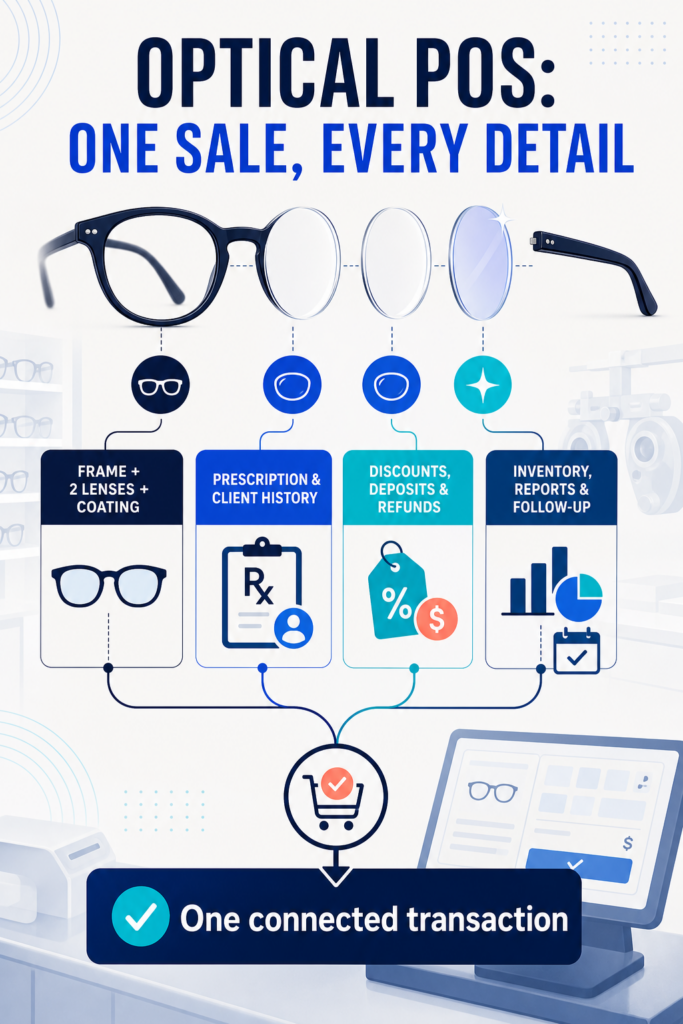
In Glasson’s sale process, you can add information about discounts, refunds, and prepayments, and all of that data is then stored and integrated into other parts of the app. So the deposit a client left on Monday is still attached to their order on Friday when they come to collect. Ever taken a deposit, written it on a Post-it, and then spent ten minutes hunting for that note two days later? This is the fix for exactly that.
There’s a small but real time-saver here too. When the lenses arrive, Glasson can print addressed envelopes directly from the app using ready templates, with the client details already filled in and a receipt to attach to the package. It’s the kind of everyday chore that quietly eats your afternoon, handled from the same place you made the sale.
“An optical checkout isn’t a payment terminal with a logo on it. The sale has to carry the prescription, the deposit, the discount, and the exact lens the client chose, and it all has to stay connected afterwards. When we built the sale flow in Glasson, that was the whole point: one transaction that behaves the way an optical sale actually behaves.”
— Marcin Debski, Product Manager @ Glasson
What happens to the sale after the customer leaves?
After the customer leaves, the sale should keep working for you as data rather than sitting inert in a receipt drawer. This is the part a generic till almost always misses, because it was never designed to tell you anything about your business the next morning.
Every completed sale in Glasson feeds Glasson Statistics, where you can check revenue, monitor sales, and review staff performance over the period you choose. There’s also a cash registers feature that records cash inflows and outflows through the day, so you’re monitoring cash flow instead of counting a drawer and hoping. Ever made a business decision based on “what feels right” and regretted it later? This is how you swap the gut feeling for an actual number.
The sale also lands on the client’s record in Glasson Clients, alongside their personal details, prescriptions, and purchase history. That record is what lets you greet a returning customer with real context, and it connects to Glasson Communication when it’s time to text them that their glasses are ready to collect.
Test Glasson for 7 days free of charge
Any questions? Leave your contact details and we'll call you back.
How much does optical POS software cost?
Optical POS software is usually sold as a monthly subscription rather than a one-off box, and Glasson follows that model with plans matched to the size of your business. Because the checkout is part of a wider platform, you’re not buying a till in isolation; you’re buying the sale flow, the lens search, the inventory, and the reporting together.
| Plan | Best for | Price (net/month) |
|---|---|---|
| Optometrist | Single-user exam-led practice | from $99 |
| Optician | Optical stores (most popular) | from $149 |
| Optical network | Chains & multi-store businesses | Custom |
The Optician plan is the one most stores land on, and it bundles the Lens Finder, unlimited clients, inventory, unlimited staff, SMS and email communication, orders and sales, and the Eye Care Module. You can see the full breakdown and start a 7-day free trial on the Glasson Price List. If you run several locations, the Glasson Administration tools handle chain stores from one account with a shared client base and inventory.
Frequently asked questions

What is optical POS software?
It’s checkout software built specifically for eyewear retail. Unlike a generic till, it handles lens-plus-frame-plus-service sales as one bundled transaction tied to the client’s prescription and history.
Can’t I just use a standard retail POS?
You can process payments on one, but you’ll be working around it constantly. Generic tills treat lenses and frames as unrelated items and can’t record prepayments or connect a sale to a prescription.
Does Glasson’s checkout connect to lens search?
Yes. The Lens Finder is integrated with the sale, so once you find the right lens you can add it straight to the order. The search analyses over 3 million lens combinations and returns results in under 0.2 seconds.
Can I take a deposit for lenses that need ordering?
Yes. You can add prepayments, discounts, and refunds within the sale. All of that information is stored and stays attached to the order until the client collects.
Can I change prices or tax during a sale?
Yes. Throughout the sale process you can edit prices, apply a discount, or change the tax rate. You don’t have to cancel and restart the transaction to make an adjustment.
Is the checkout linked to my inventory?
Yes. The sale draws on Glasson Inventory, which holds lenses, frames, contact lenses, and accessories. Because stock and sales share the same data, the checkout reflects what you can actually supply.
Where do sales figures show up?
Completed sales feed Glasson Statistics. You can check revenue, monitor sales, review staff performance, and use the cash registers feature to track daily cash flow.
Does it work across multiple stores?
Yes. Glasson can manage a chain of stores from one account. All stores share the same client base and product inventory, and you can transfer products between locations.
Is it cloud-based or installed on one machine?
It’s cloud-based. You can access the app from any device with an internet connection, and updates happen automatically.
How do I try it before committing?
Glasson offers a 7-day free trial with no upfront payment. You can register directly and test the sale flow with your own products before choosing a plan.